
I'm writing this mainly for Rich Vazquez (who's working with channelAustin to add the functionality to Synergy) and Aaron Todd (a developer at Leightronix working to add this functionality to their NEXUS line), but the information should be useful to everyone.
In my first post on this topic, I describe how we are getting data out of the playback servers into Drupal in a standard format. Once we know what's already been scheduled through the playback servers interface or some other automated process, we can start moving content from Drupal to the server. On the Princeton's we are using SOAP to insert the initial metadata.
Looking at the WSDL on the Princeton makes this seem pretty complicated...
<?xml version="1.0" encoding="UTF-8"?>
<definitions name="" xmlns:typens="urn:ActionWebService" xmlns:wsdl="http://schemas.xmlsoap.org/wsdl/" xmlns:xsd="http://www.w3.org/2001/XMLSchema" xmlns:soap="http://schemas.xmlsoap.org/wsdl/soap/" targetNamespace="urn:ActionWebService" xmlns:soapenc="http://schemas.xmlsoap.org/soap/encoding/" xmlns="http://schemas.xmlsoap.org/wsdl/">
  <types>
    <xsd:schema xmlns="http://www.w3.org/2001/XMLSchema" targetNamespace="urn:ActionWebService">
      <xsd:complexType name="StringArray">
        <xsd:complexContent>
          <xsd:restriction base="soapenc:Array">
            <xsd:attribute wsdl:arrayType="xsd:string[]" ref="soapenc:arrayType"/>
          </xsd:restriction>
        </xsd:complexContent>

      </xsd:complexType>
    </xsd:schema>
  </types>
  <message name="AddProgram">
    <part name="program_code" type="xsd:string"/>
    <part name="program" type="xsd:string"/>
    <part name="episode" type="xsd:string"/>
    <part name="episode_code" type="xsd:string"/>
    <part name="description" type="xsd:string"/>

    <part name="delete_datetime" type="xsd:dateTime"/>
    <part name="ingest_datetime" type="xsd:dateTime"/>
    <part name="expected_duration" type="xsd:int"/>
    <part name="expected_filename" type="xsd:string"/>
    <part name="contributor" type="xsd:string"/>
    <part name="location" type="xsd:string"/>
    <part name="username" type="xsd:string"/>
  </message>
  <message name="AddProgramResponse">

    <part name="return" type="typens:StringArray"/>
  </message>
  <message name="DeleteProgram">
    <part name="program_id" type="xsd:int"/>
    <part name="username" type="xsd:string"/>
  </message>
  <message name="DeleteProgramResponse">
    <part name="return" type="typens:StringArray"/>
  </message>

  <portType name="ProgramServicePort">
    <operation name="AddProgram">
      <input message="typens:AddProgram"/>
      <output message="typens:AddProgramResponse"/>
    </operation>
    <operation name="DeleteProgram">
      <input message="typens:DeleteProgram"/>
      <output message="typens:DeleteProgramResponse"/>
    </operation>

  </portType>
  <binding name="ProgramServiceBinding" type="typens:ProgramServicePort">
    <soap:binding transport="http://schemas.xmlsoap.org/soap/http" style="rpc"/>
    <operation name="AddProgram">
      <soap:operation soapAction="/program_service/api/AddProgram"/>
      <input>
        <soap:body encodingStyle="http://schemas.xmlsoap.org/soap/encoding/" namespace="urn:ActionWebService" use="encoded"/>
      </input>
      <output>

        <soap:body encodingStyle="http://schemas.xmlsoap.org/soap/encoding/" namespace="urn:ActionWebService" use="encoded"/>
      </output>
    </operation>
    <operation name="DeleteProgram">
      <soap:operation soapAction="/program_service/api/DeleteProgram"/>
      <input>
        <soap:body encodingStyle="http://schemas.xmlsoap.org/soap/encoding/" namespace="urn:ActionWebService" use="encoded"/>
      </input>
      <output>

        <soap:body encodingStyle="http://schemas.xmlsoap.org/soap/encoding/" namespace="urn:ActionWebService" use="encoded"/>
      </output>
    </operation>
  </binding>
  <service name="Service">
    <port name="ProgramServicePort" binding="typens:ProgramServiceBinding">
      <soap:address location="http://[SERVER-ADDRESS]:3000/program_service/api"/>
    </port>
  </service>

</definitions>

But the code that does the insert is relatively simple...
$client = new SoapClient('http://[SERVER-ADDRESS]:3000/program_service/wsdl');
print_r($client->__soapCall("AddProgram", array($program_code, $program, $episode, $episode_code, $description, $delete_datetime, $ingest_datetime, $expected_duration, $expected_filename, $contributor, $location, $username)));Those of you familiar with the Open Media System Show content type (om_show), know that all of these variables are fields that we either require the user to complete or that the system enters automatically. Once the show is registered on the playback server, the server is just waiting for the video to finish encoding and scheduling information to be inserted.
The video encoding process is being handled by FFMPEG (either in the background of the webserver or on a dedicated encoding box). We've discussed FFMPEG before and I'm sure we'll be discussing it again, but let's just assuming the video is going to make it's was to the playback server without issue and move on to scheduling.
One of the options of the Timeslot Scheduler is Allow User Scheduling. If you allow user scheduling, as soon as a Show is submitted the system is going to look for a place to schedule that. It does that by first pulling all the Timeslot Events in the future that match the criteria of the Show (theme, project, location, licensing, etc.). In Denver all shows are given an initial airing based on their Timeslot Theme, but it is possible to configure scheduling based on any criteria in the Project or Show. I really want to see a remix hour at DOM where only show that are licensed for remixing are aired.
To keep it simple, let's assume we are scheduling based on theme. The first query run pulls all of the Timeslot Events that match the Timeslot Theme of the Show we are trying to work with. Then we pull all of the existing Airings with a start or end time between the start and end time of the Timeslot Events. Finally we look for the any opening that is greater than the duration of the Show we are trying to schedule. In this diagram that doesn't happen until the 7th "day".
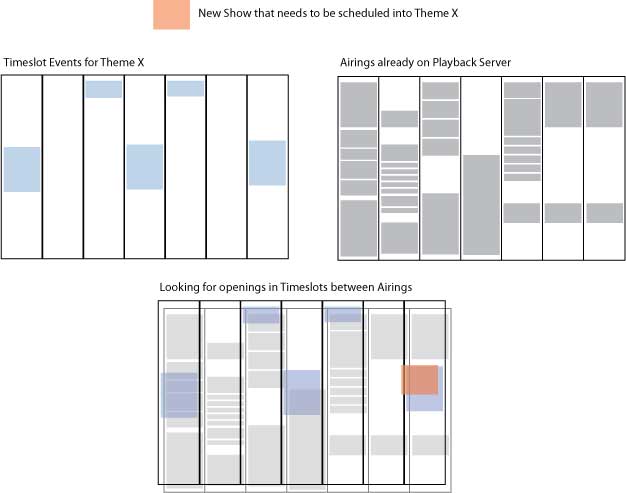
In Denver, users are presented with 3 potential times for their show to air. Once they select one, the scheduling information is sent to the appropriate Princeton through a less sophisticated process than SOAP. It's just an old school .csv. The Princeton's supports 3 different formats for those imports.
- Native – TelVue's format that covers all event types on single-channel and multi-channel systems and can be used for internal manipulations. Native can carry metadata associated with the content, and you can edit the CSV
file to change the metadata before importing. Native format is recommended for batch copying, batch imports, and backups. - Annenberg – specific format requested by Annenberg Media. It supports only Channel 1 and uses the format filename, start time. Annenberg files cannot have a header row.
- Protrack – a third-party format used for integrating with third-party broadcast traffic systems. This format supports the Protrack raw log document format for scheduling playouts and switch events.
Facil – a third-party format used by many access centers to manage assets, schedules, and facilities. Facil supports only playout and switch events. It uses a Facil-specific CSV format.
Currently I'm just kicking the scheduling info out as a file in Princeton native format because that's what we used in the Drupal 5 based system, but the plan is to add a configuration option to Timeslot scheduler defining which format to use for each playback server. That way if you have 2 Princeton's and 1 NEXUS, you can use the TelVue format on the 2 Princeton's and Protrack on the NEXUS (or whatever format the NEXUS supports).
If there was a SOAP interface for inserting the scheduling information on the Princeton, I'd be using it. It isn't as much of problem for us because we already have each Princeton's import directories mounted on the webserver to move video between the archive and playback server, but if your playback server supported more sophisticated file transfers from a centralizing archive unit like Synergy does (and Princeton might after the June? upgrade), there's no reason the web server would need to know anything about the playback server other than the path to the SOAP interface.
It's also worth noting that Denver currently synchronizes their Airings every 15 minutes based on cron. This means that it's possible to schedule a Show between syncs. When this happens, the Timeslot may appear open. When we attempt to schedule it the playback server will log an error. Unfortunately, unlike the SOAP inserts, that error only appears on the playback server so Drupal never knows about it and assumes that everything is scheduled. Because we always assume that the scheduling info in the playback servers is what the station really wants to error, we don't store what we trying to schedule. That show isn't going to air. This is definitely something we could improve, but I think moving to interfaces that allow immediate feedback like SOAP makes more sense than building an entire sub system for error checking and data integrity.
Hopefully this is enough of a description of what we need from the playback servers to be fully supported by the Open Media System.
| Attachment | Size |
|---|---|
| airings_timeslot_event_scre.jpg | 22.15 KB |
