Here's a wiki page to track the stuff to cover during the CVS/Project class. I'd like to cover the use of Project module on Drupal.org from a consumer perspective.
Audience
Anyone who is familiar with Drupal and writing php code. The course is useful to those interested in creating or testing out patches and also those who would like to contribute a module or theme.
Skills gained
Able to commit/maintain a module/theme and/or test/contribute patches.
General Agenda:
- Basics of CVS and Revision control
- Branches, Tags
- Creating a patch
- Applying a patch
- Different clients (cvs command line, SmartCVS, Eclipse)
- Projects on Drupal.org in general
- Creating a project
- Creating a dev release and an official release
The tentative date/time is January 28th at 11AM PST, AKA "The Josh Time".
I'd like to keep the conversation focused in on CVS/Project module as they relate to Modules/Themes/Core in Drupal - I'm also concerned about running over an hour and my goal is to stay right at an hour.
Ideas/Suggestions/Requests for this lesson:
- Edit and add yours here (several incorporated into the rest of the plan)
A very brief overview of Version Control alternatives (suggested by victorkane)(I don't plan to cover these because they aren't really relevant to Drupal even though they are good/interesting and I use SVN personally...)SVN (Subversion)Git and Cogito, the new kids on the block that's gaining by leaps and bounds, written by Linus Torvalds)
- Use of web browsers for CVS repositories, like viewcvs, trac, gforge
- How to connect to the Drupal Contrib CVS to just get modules (or themes) tagged as 5.0
Useful Links
- Angie answered some beginners questions here (well, in 2005...some info may be outdated? :)
http://lists.drupal.org/archives/development/2005-09/msg01256.html - Create patches using TortoiseCVS:
http://drupal.org/node/113172 - Quikstart guide for adding to Drupal CVS using a windows client (TortoiseCVS)
http://drupal.org/node/112902
GUI Clients
Smart CVS is cross platform and free (though not Free). It is simple compared to Eclipse and works well enough for most purposes.It turns out that SmartCVS doesn't output to a patchfile when doing a diff in the free version. This makes it a poorer choice for this type of development as you would also then need a program to make diff's.- Eclipse.org / Easy Eclipse for PHP (cross-platform): integrated into a development environment; overkill if you are already happy with the editor you are using to code with
- TortoiseCVS is windows only so I don't plan to cover it. The concepts are basically the same, though, so it will be easy for anyone to apply the knowlege to using Tortoise.
- CvsGui is actually a group of gui's, apart from which this page has references to practically all there are (including java varieties. The main project shares code among different platforms (windows/mac/linux). Before tortoise came along (everyone's current favorite by far), wincvs was my favorite for years. Now in linux, I have installed gcvs (ubuntu with synaptic straight up) and it looks great. Has a macro for patches. And you can see every command you make in its command-line form (great learning tool) in all its varieties, providing you have tcl installed (optional). Although I am proficient at the command line, I understand that a good gui can make one more productive (easy switch between working copies, graphic log and history, patch and diff macros..., branching and merging made somewhat easier...). Will report on this tool.
- Cervisa is the KDE front-end to CVS (follow the link to relevant Drupal handbook entry), and it rocks. It rocks alone, and it rocks integrated into Konqueror. It rocks as a poor man's eclipse! See http://drupal.org/node/93950#comment-193698 (screenshots there). (we won't be covering this since it's so platform specific (and a minority platform at that) but it's interesting nonetheless).
Command Line
This is the original form and is the way that most of the documentation is written. It can be a little confusing for new users so we will touch on it somewhat briefly.
- cvs command line mode - available on Mac and Linux natively
- Need to install the Xcode tools or the DeveloperTools package for Mac
- I use it on Windows via Cygwin.
- When installing Cygwin, make sure you install the following:
- patchutils
- cvs
- cvsps
- cvsutils
- Also useful:
- vim
- please add -- notes on good/bad as well, please...
Useful Commands
- CVS command reference: knowing the command line basics is good, since this is what the GUI clients are also based on
- There is an enormous amount of useful information in the Drupal handbooks so please read those. Really. They are long, but very important. I'd like to keep the documentation of specific commands in that documentation and not balkanized in various locations.
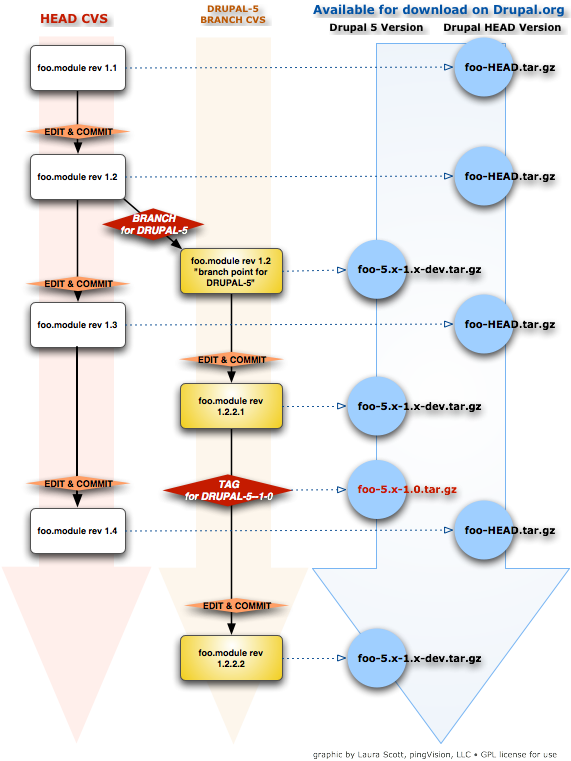
CVS/Project Downloads integration flow
Here is a photo created by Laura Scott showing the flow of a simple module file in CVS.
| Attachment | Size |
|---|---|
| cvs_logic_flow.png | 142.46 KB |
