
The goal is to have Drupal become putty in our hands and to be able to do with it as we will. I thought I'd make this first post in the Lab a pretty basic one. I wanted to cover some basics of the Form API. It's very useful and extremly powerful.
Many tasks can be achieved in the Drupal interface alone, but I like to see how the code works whenever I can and I thought this might be a good chance to dip into it. For a while I was unsure as to how you should go about moving form elements about, altering their titles and changing their graphics. I looked into the Form API and found the answer. Here is my example for using the form API.
I started out creating some taxonomy terms inside a vocabulary named 'Genres'. These genres will be assigned to a content type called 'Music review' (it's 'type' URL is 'review') and selectable using a drop down bar.
e.g. Album Title:Acidy Death Spike, Assigned genre using drop down: Metal.
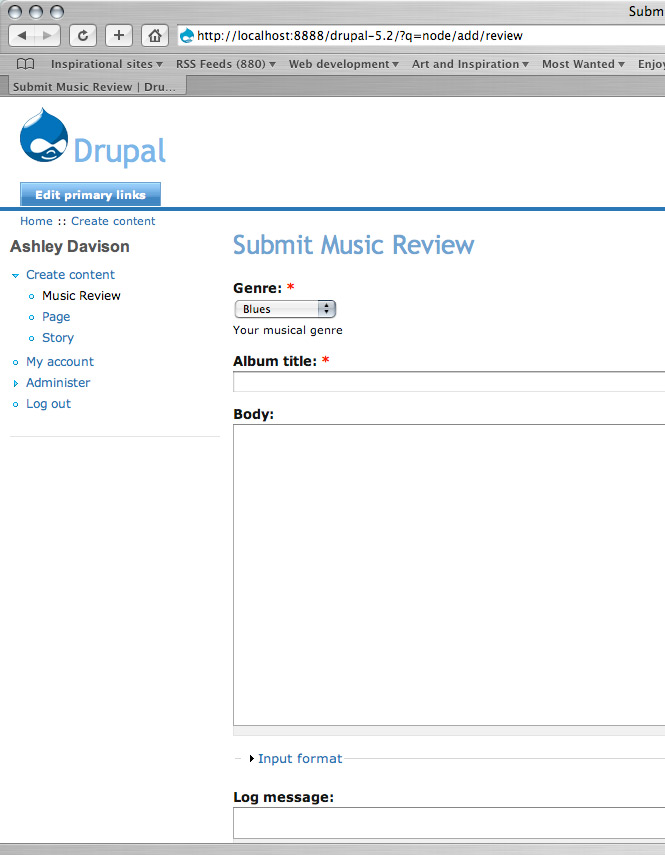
I wrote a little module to alter the 'Music review's' content form to enable the taxonomy drop down selector appear as the first item.
Note: To findout all you need to know on module creation and the proper code standards, I recomend this: http://drupal.org/node/82926
You basically need two files. A ".info" file and a ".module" file. These need to be placed in the following directory of your site:
sites/all/modules/review
"review.info"
; $Id: $
name = review
description = Module Example
package = review
version = VERSION
"review.module"
<?php
/**
* Changes the title of the Text Box which accepts the wiki titles
* Make the title optional by disabling the red asterix
*/
function review_form_alter($form_id, &$form)  {
  if($form_id == "review_node_form") {
        $form['title']['#title']="Album title";
        $form['taxonomy']['#weight']=-10;
     }
}
?>
My short module example takes advantage of Drupal's form API and it's 'hook_form_alter' function. Once I enabe the module for my site the form for the specific content type 'review' will now altered accordingly.
Explanation of the code:
<?php
//Long hand PHP declaration
function review_form_alter($form_id, &$form)  {
//Sets the name of the function and the variables it utilises.
     if($form_id == "review_node_form") {
//An if statement which looks for the review forms 'id'. You can find the id for any form by viewing the rendered HTML code in your browser. I found the form id for this content type was "review_node_form".
          $form['title']['#title']="Album title";
          $form['taxonomy']['#weight']=-10;
     }
}
//Now that the certain form has been located; this happens. The form's taxonomy drop down selector is given a weight of -10 and sent to the top. Plus the title element's name is altered to "Album title".
//Note that you don't need to close the PHP off at the end of this code, I've found it best not to.
?>
Using this method you can override elements, style and edit forms in every which way you like.
Screenshot: End example of 'Music review' content type with the altered elements.
Comments welcome,
BeechyBoy
| Attachment | Size |
|---|---|
| screenGrab.jpg | 80.58 KB |
