We're exploring user interface design solutions for these two site builder workflows:
Todo: review itangalo's sketches
1. If we have a path of node/$nid, a node type of Student, a Language of German, a browser type of Safari Mobile, and it's Thursday, use response controller X and layout Y.
2. We have this thing here called layout Y. I want to put blocks in it that will render stuff based on context and configuration.
& As merlinofchaos outlines it:
By visualize hierarchy, I mean that from the perspective of someone coming into a site, we need to be able to show, in the UI, how the content is organized. In Drupal, this usually manifests through the breadcrumb and/or active trail. Typically it's how sites are broken up into sections or buckets. Typically right now it's done via book.module and/or menu.module.
Drupal currently does a very poor job at this, partly because it's very difficult to affect the active trail using anything other than the URL. Things like book.module and menu.module let you manually move things around in the hierarchy, but they're both flawed mostly because they both address only a small portion of what needs to be done. Plus, the UI for them is not really easy to use. IN part this is because you have to be able to organize very very large amounts of information. It's hard.
| Attachment | Size |
|---|---|
| panels-map.jpg | 506.52 KB |
| panels-flow.png | 595.97 KB |
| panels0.png | 683.99 KB |
| panels-4-use-cases.png | 1.43 MB |


Comments
Block system
Butler will eventually replace the block system with something more panels-like. Not to much thinking has been done about this so far as I can tell, but I think it has to do with http://groups.drupal.org/node/67598
I would love if someone can
I would love if someone can give a more detailed explanation, than something panels a-like. Are we dealing with a system that has a per-page block system, per-section, per-[something]? Do they have more settings (e.g panels-a-like context configuration)? Is this improvement something for site-builders, developers, content creators?
TBD and all of the above
For phase 4, the intent is to improve the situation for designers (because the layout system is closer to how the think than to a blog), for site builders (because less hacking is required to implement things designers come up with) and developers (because baking the new functionality in at a lower level means less hacking around core and a more streamlined, faster, flexible system than Panels could hope to do in contrib).
Ideally the layout could vary based on a variety of criteria: node type, section, one-off page, etc.
We don't have all the details of that worked out yet. It would probably be beneficial, actually, to have the UX folks try to draw up some UX thoughts about what a "panels in core" concept could/should look like from a designer and site builder perspective. Then we can compare that with the needs of developers and see where we can meet in the middle. We're a long way off from implementing that part, but that means this is a good time to be playing with those concepts.
Volunteers welcome. :-)
Alright, seems like a
Alright, seems like a reasonable approach. Nothing is more informing than discussing actual sketches.
Yep
Please start sketching and keep us posted! :-) I'd rather have lots of buffer time to get the UI worked out so that we know how/if that will impact the architecture.
I actually suspect that once we start toying with the UI it will either answer some architecture questions for us or else open up a whole new batch we didn't think of but really need to solve. Or probably both.
Hey, I have gone ahead and
Hey,
I have gone ahead and scribbled an idea on paper. To me the main part of this iniative is allowing blocks to have context, and that context is often derrived from the url. As shown in my proposal, I have added url as "base" of where it will be and possibly which arguments it can hold.
So we replace the shortcut bar, with a blue colored action bar. You get to this bar through normal administrative navigation, but it is an action bar where you are not in some preview mode but in your actual front-end. Similair to panels-in-page editor.

As shown below, you are able to put in a url (or any token). And using the dropdown menu on the right you can select the appropiate block, these are categorised and searchable. This is just an idea of the placement and possible interaction, the actual interaction should be diffrent to accomodate loads of blocks.
So the URL can hold tokens, for example content/[article-content-type]/%node or [all].

The interaction for moving blocks around on the page should be simple and leaning towards contextual links.

Subtle distinction
Hm. I think there's a subtle question here that one of us isn't quite getting, or probably both. :-) Let me try and provide some summary of discussions I've had with Sam Boyer on the subject, from the Panels side, and see if I can work through some of those.
On the one hand, we need to be able to define layouts, and put blocks into them, and specify on what URLs or URL patterns those layouts will be used. On the other, we need to define the blocks that get put into those layouts. Those in practice need to be separate, which introduces a number of UX challenges.
The reason those need to be separate is reuse. Say you have a block that shows the latest 5 comments in a particular forum topic (which is a taxonomy term). That's a View, most likely, that requires configuration (number of comments, which forum tid, etc.) On the home page, you want that block to show up front-and-center. On most other pages (different layout), it should be in the right sidebar, 3rd position down. When looking at a forum post, however, it should be in the right sidebar, top position.
It's easy conceptually to just say that a user should configure each instance separately, but that's a lot of unnecessary work. And if you want to change to, say, the most recent 3 comments instead, that's 3 places you have to go make that change.
The only solution I've been able to come up with is defining block instances (block + configuration) as a separate thing, independent of a given layout, and then multiple layouts can use the same block. It's similar in concept to Fields being able to be shared between entities with the same configuration.
How we would make a good UI for that division, I don't know. There may be a better approach as well; I've not thought of one but that doesn't mean it doesn't exist. :-)
So given that, I'm not quite sure how to grok the pictures above. It seems they assume that blocks are not shared, which I believe would be a serious UX problem. Or am I misunderstanding them (which is always possible)?
Thanks. From what I
Thanks. From what I understood in talking shortly with bojhan, is that the problem you mention simply isn't solved yet in these sketches.
...
I like the way Panels works now - first define a layout for a context (path, node type, term or what have you) and being able to load that up and see what blocks/panes etc are in that layout.
I'm not sure why want to reinvent the wheel here when we have a pretty good UI to build on (Panels). Its complex for sure and be improved (modals for example have serious accessibility issues) but lets please not throw the baby out with the bath water - work with Panels rather than attempt to reinvent something we don't really need to.
Is it possible we could use some of the next round of usability testing for Panels?
Edit: ops I replied to crells post, this was meant to be a general comment.
Panels
The problem is that Panels has a very high learning curve, and because it's so powerful it's also very complex. I still get lost in it, especially when we get into variants (i.e., selecting the layout to use based on more than just the URL). Panels is often derided as needlessly complex even more so than Views.
I'm not against using the Panels UI as a starting point (although I also dislike modals and really dislike their inclusion in the new Views UI), but it doesn't solve the reuse issue that I note above either. (At least not when I last talked to Sam about it.) If we can take this opportunity to revise the UI as well as the architecture, we should do so while we can.
Agree, I don't really like
Agree, I don't really like Panels because of its complexity, the Panels UX complexity highlight its long history and high complexity for a need that should remain basic. Panels variants and such doesn't seem to fit the actual Butler problem, but I might be wrong here.
Pierre.
Variants are relevant
If you want to have two node types that use different layouts, then in the Panels model you have to use variants. Any core layout system needs to be able to give different node types different layouts. Whether that's done using the concept of variants a la Panels, the same thing relabeled and restructured, or a totally different UI model is one of the questions we're discussing in this thread. It is in scope for phase 4, however.
Complexity is probably necessary
I disagree to Panels/Page manager being overly complex. I think Page manager has the complexity necessary to set up dynamic contexts, in the way required for a future Drupal.
That being said, I also think that the user experience in Page manager could be drastically improved. I haven't really thought about it, but reading this thread I already got some ideas. I hope to get back soon with some sketches.
Great post.
I disagree strongly with the
I disagree strongly with the notion, we got something - lets continue iterating on it. Exploring design alternatives, is about trying all sorts of things - one of them could be putting panels as the basis. But saying, we need 1 thing to denote our explorations - is a bad idea, because it restricts where you look for solutions. I know its a common approach for websites and most stuff that goes into core, but it rarely is beneficiary for core UX - because contrib holds different standards and is quite often more technically aimed.
We can't test panels in this round.
...
Sure, I definitely agree its important to explore design alternatives and trying new things, problem with that is we tend to lack the resources to actually test these alternatives - for example no actual testing of the existing Panels UI has ever taken place.
I'm not saying we should wholesale copy or port in Panels UI, just that we should consider some parts of Panels, for example the notion of selecting a layout for a context then placing blocks into that layout, and being able to drag and drop them into position. How this actually works in Panels is madness (variants, modals and a bunch of other quite difficult to grok concepts and terminology etc etc).
Panels does support reusing blocks, i.e. using the same block more than once in a different position, even, for certain blocks, control the settings and output of each instance separately, or take a default (such as with Views blocks and panes).
Clearly Panels/Views Panes etc is way to complex for core, but I think we should at least pick to pieces and see whats useful.
It's because Views and Panels
It's because Views and Panels (and some other modules) are too complex that core needs to clarify things they do. Rewriting clear and well-design stuff to core is the right and only time to factorise complex concepts into smaller one without copy/pasting old and non well-designed code.
What I mean here is that if Panels UI is good enough for this, it should be fully rewrote here based on the clean brand new API redesign.
Some stuff, for example (but is not the only one) such as selector dialog should factorize and share the same basis for WYSIWYG media inclusion, and block selection, node reference like selector, user search, etc.. the only difference between all of these is the object nature you select, with a good design based on interfaces you won't have to worry about Panels dialog if you have nice a common code in core for all of these.
I thinks this UI redesign, if it uses dialogs for example, should then share the thought and ideas with all other core initiatives in order to reach a common API agreement then implement it at only one place, if you get some Panels pieces right now, it ensures that you won't be able to double back later because too many API's will then use it, and you will annihilate all of this clean designed refactor benefits.
Panels is not the model here, its UX might be (and probably is a good place to start), but not its code or even its concepts because here, we are manipulating totally new ones, which are born from the necessity to have clean and central one from all of these modules that are origin of this initiative.
Pierre.
UI/UX
We're discussing the UI and UX of "in core layouts" as part of phase 4. We're not discussing the code implementation yet. I don't think anyone is proposing that we copy-paste the Panels UI code into core; even if they were, it's not like we ever do that when moving something from contrib into core. Deriding the Panels UI code base itself is not useful here. Please stay focused on the UI and UX aspects, not the code implementation.
Block Placement OK but confused
From the above I believe that
I am confused by two issues,
Quote me: "In my ideal world,
Quote me: "In my ideal world, if Butler is done properly, variants are unnecessary. They exist to work around core's naive routing."
For the purposes of Butler, let's assume we've done a good enough job that Variants go away. It will make this easier because then we can stop discussing them. People trip over it because they don't get it. Let me illustrate why variants are what they do:
[incoming request] -> [menu router] -> [page manager router] -> [page]Variants are a secondary router.
Now, in our world:
[incoming request] -> [butler router] -> [page]No more variants, at least not as we know them. That said, here are some complexities we have to deal with:
I have a theoretically overworked website with the following content types: Article, Story, Product, Teacher, Student, Class and Cow.
I want articles and stories to use this template. I want teachers, students, classes and cows to use this template. I want products to use one of these seventy templates depending on if it's a t-shirt or a spaceship or a bottle of wine or a pass to Disneyland or 74 other different things I sell.
In today's Drupal, routing to a page is handled purely by the URL, and when you have placeholders in the URL, that is immaterial. It still ends up on the same page.
In Butler, routing will start with the URL, but we have to have a system that can route based upon the content. It has to be able to let the UI visualize hierarchy (something the current system really really wishes it could do, and it theoretically could if I get around to testing out some ideas I have there). Sometimes the URL basically is the content: i.e, when visiting the 'about' page, that is the content, there is one major piece of content there. But sometimes the URL is some aggregated content. For example, news sites will have news categories and will assemble a lot of different content into that page. We have to be prepared to let users think of pages as distinct entities and also think of pages as templates that contain a piece or multiple pieces of content.
Finally, something I think Page Manager does moderately well but has HUGE room for improvement is the idea that you break content down into components. Please do not be afraid of the 'views panes' idea. One thing that would vastly improve our world is if Views didn't create pages and blocks and attachment displays. Instead, if Views just created, say, components, that you then added to your pages somewhere else, that would greatly simplify some of the massive problems I have.
What problem is that? Views handles page creation. Page Manager handles page creation. Page Manager really likes Views. Views doesn't really care that page manager exists. We have duplicate UIs and duplicate functionalities because the whole concept of page creation has to be recreated in Views. If you look carefully, they do fundamentally the same task; they create a URL and a menu entry and other navigation foo. When using the two systems together, it's really really really really hard to tell which one you should be using.
But if a View just created a component, and put it into a library, and then over here where you're generating a page layout, you can add that view to your page as a component? If everything worked this way, the perceived complexity would diminish. Instead, our complexity would be about finding and identifying the components you want to use on that particular page. But that's a fixable problem. We can write awesome search widgets and stuff.
It has to be able to let the
I'm not sure what your getting at here. The hierarchy of distinct pages (about page) vs aggregate pages (taxonomy page)? I don't understand why they need to be grouped hierarchically.
I was very impressed when I discovered this methodology in Page Manager. I think it is a very powerful idea.
By visualize hierarchy, I
By visualize hierarchy, I mean that from the perspective of someone coming into a site, we need to be able to show, in the UI, how the content is organized. In Drupal, this usually manifests through the breadcrumb and/or active trail. Typically it's how sites are broken up into sections or buckets. Typically right now it's done via book.module and/or menu.module.
Drupal currently does a very poor job at this, partly because it's very difficult to affect the active trail using anything other than the URL. Things like book.module and menu.module let you manually move things around in the hierarchy, but they're both flawed mostly because they both address only a small portion of what needs to be done. Plus, the UI for them is not really easy to use. IN part this is because you have to be able to organize very very large amounts of information. It's hard.
Two separate questions
What Earl said. :-)
For phase 3/4, I think there's actually two key parts that should be considered separately.
1) If we have a path of node/$nid, a node type of Student, a Language of German, a browser type of Safari Mobile, and it's Thursday, use response controller X and layout Y.
2) We have this thing here called layout Y. I want to put blocks in it that will render stuff based on context and configuration.
Both of those are important. Both of those need to have a really solid API (possibly declarative, I hope?). Both of those need to have a really solid UI built atop it.
Arguably those are two separate questions, although from a UI/UX perspective I don't know the degree to which they should be separated or integrated. Bojan, yoroy?
The problem I think is that
The problem I think is that Layout Y will be so tightly coupled to the context it will be difficult to break them up. I think it is desirable to sperate them. I also see it as a hard problem to solve ( even to think about :) ).
I think the problem is that we need two sort of things Sections and Pages. By this I mean,
In this example the distinction is not totally clear because the the conditions are so particular (I know you did not mean it to be canonical). The section and the page are pretty much the same thing. It gets a bit more confusing when you try and group things like say a the node type Student view & a page showing all students. Here we have a more general set of conditions. It makes sense that since we have grouped these together we want them to be similar in someway (i.e. we want them both to display a certain block in the sidebar).
One of the few good things about the current system is that it allows us to create an arbitrary section (say two paths: /blog & /blog/$nid) and dump content into a region given this section. One rule applying to two pages. We need some way to keep this. The need away to be general in our response controller & layout. We don't want to have the page equivalent of going and styling all our h1 tags with inline styles.
At the moment I am thinking something like Views uses with Default Views (now called Master Views). You define a set of rules which are both inherited and override-able.
Anyway off to a Drupal meetup. Sounds like it's time to get some pen & paper out :)
Just trying to wrap my head
Just trying to wrap my head around this. As I understand, the thing is to match services orientation with site building. Is the context of 1 above entirely expressed via the URI? So blocks and any other components (including lists) are URI's. As is a page, the difference being that a page is an aggregate of components plus layout. Could a page editing UI therefore be thought of as a layout designer that contains URI's (with overrideable inheritance of context), possibly along with optional static content? ...And can this itself be a component (eg are 'pages' nestable components, or can be treated more as widgets with a single nesting level)? I imagine a URI-based layout editor would also let us use external components...
Butler Routing for Mobile Devices??
I am not sure if this is the right place to raise an issue I see coming from the popularity of mobile devices. If I am wrong to post here, please redirect my comment to the right place.
Mobile devices have more limited display space than more traditional laptops or desktops/terminals. As a result for the HTML theming layer, it would be very helpful to have the concept of display context that might turn off side-bar-1/2 for instance if an iPhone display context was detected. However, it might make more sense to have the display context as part of the [butler router] logic so that the resulting [page] is one format for general HTML and another format for the mobile HTML display (forgoing even retrieving and rendering the blocks/panels/sections that hopefully could be turned off at the theme layer if necessary). This thought would in essence allow for multiple HTML display possibilities to route along with JSON, XML, Atom, and RSS.
For this to work in core, I believe we need to add the following type of functionality:
Let me know if you would like me to expand the thoughts here or if I have posted in the wrong place. Thanks.
To an extent
At the level we're working at now, that's "something we should enable but not decide on yet". See my comment above in reply to merlinofchaos. If you can figure out the browser from the HTTP headers, it should be possible to vary the response controller and layout if you want to. Whether or not that's a wise thing to do is a separate question. ;-)
For the most part in this thread we're talking about the admin UI for setting all of that up, rather than when to send what type of response. That should be configurable, so we punt on that question for now.
A simple question?
There are really two ways I currently work with blocks in D6 (and one of them I have deprecated):
Go to admin/build/blocks. Find the block I want. Figure out where I want to put the block.
(We never use this one any more, but for the sake of the example..., in fact I haven't look at admin/build/blocks in a long time :)
Install context module. Create a context (URL x/y/z, or zombie nodes, or group pages, etc...). Put blocks into regions in this context.
(This is how we place blocks now)
I see these examples as sorta opposites.
1 is saying "I have my content, where do I put it?".
2 is saying "I have this context (a page), what do I put in it?"
I am assuming the Butler would more closely follow philosophy #2. We are building up 'pages' and 'sections' and 'contexts' first, and then figuring out what to put in it.
And a good question, too!
Yep, and the latter follows the mental model of our site builder Jeremy much better. He starts from the page (say a listing or single content item) and wants to arrange "other stuff" around it. Keep in mind that 'the page' is not necessarily seen as an abstract, empty container, but that a single node equals a single page. So there's always one main thing and the other things that go with it.
Almost
While in many cases the "I have a node page, now I want to decorate it" mental model works, there are many many many cases where it doesn't. Home pages, landing pages, section pages, any page that consists of 2 or more Views, etc. That also doesn't work if you want to do wild and crazy things with the node layout itself without hacking away at $content in the template. The bloggy "primary content and context-free secondary content" model is too limited; that's what we're trying to get away from.
So while a quick and easy way to leverage that degenerate case for building a layout is a good thing, it cannot be the only solution. That leaves is pretty much right back where we are now, which we all know is inadequate.
Perhaps if you are in that case (node with decoration) there are quick links to take you into the appropriate layout editor page, which exists as part of a more robust setup?
(Incidentally, where the line is/should be between layout-by-button-pushing and layout-by-template-editing is still one that I really don't have a handle on. That's probably a separate conversation, though.)
May be the mental model
May be the mental model should dispose a new concept which is like "site sections". This where I like the context way of presenting things.
It's not about "a node page" but more about "a set of pages that goes with a node", or like "the contact section where there are many pages about how to contact us". Sections can be totally abitrary data from site admin, or can be pre given by modules.
In Plone, they have an hierarchical object storage, each page is an object display. When you display an object C which is under respectively A then B, you inherit from the A block configuration, and the B block configuration. If the B configuration removes a A block, then C doesn't have it, etc etc.
The mental way may work quite easily on a "per section" basis, and contextes (as in butler contextes not the context module) may fit with it too.
Pierre.
Plone
One of the problems with the Plone model is it can get really confusing for end users, and the UI is tough to get right in a way that is understandable. With our OO background it is pretty easy for people like us to latch onto that conceptually, but for normal people it is not a very natural way of working at all.
Page, components, context?
Some initial feedback, I really like the discussion so far. It's important to remember that we are trying to build an understanding of the UX, before jumping to solutions. The wireframes I posted above, where merely to kick-start the discussion - which worked :)
So from my understanding we have two concepts :
This is the simplistic use case, which I sketched. You build a page which has a URL and perhaps menu link, which has a layout where you can drag in components. This page has no context, other than the URL.
The more complex use case, you are going to add components to a dynamic page (e.g home pages, landing pages, section pages etc.). So once you are past selecting which dynamic page it is you want, you are going to add components. These components will show up or not, depending on the context.
I might be oversimplifying this, but it'd be good to have a understand what it is one needs to do - what does the system model need to know?
The explanation of Earl is very insightful, which puts the concept of "page" at the basis of all interactions.
I agree this is a very powerful concept and should be at base of what we are trying to do, everything to do with contexts is even past this. Its about explaining that the page is structured in distinct components.
To respond to Crells question in http://groups.drupal.org/node/137469#comment-479879 . I believe the two are connected, in both cases you are building a page and Step 1 is merely, the first step in this process and quite often you will move to step 2. I do wonder where we draw the line (especially regarding Step 1), what should be a possibility in code and what should be handled by default in the UI.
@Crell Could you describe a few simple and more complex use cases of context?
Looking forward to learning more about this, it's incredible to think how connected it is with other problem area's such as showing the hierarchy within Drupal and browsing components.
Competing Contexts
Don't forget that a physical (well, virtual really) web page might be composed of many contexts. So node/1337 might be a 'product', be owned by 'santa', and be tagged with 'super saver deal'.
All of these contexts may contribute to the overall layout/content of the actual page. This is one thing where I don't think even context.module has a true solution. How I solve this in the real world is to make sure each region is only controlled by a single context (although multiple contexts may be responsible for the overall layout).
That's something that Page
That's something that Page Manager + Panels Everywhere can actually do reasonably well.
Some interface ideas (and sketches)
I did some thinking and testing and some more thinking, and made myself a paper version of a very rudimentary interface for managing Core Contexts. They are heavily influenced by Page manager (and somewhat by Panels), but there are other sources of inspiration as well.
As the images show, this is clearly just a sketch. Hopefully they can help me or others to have better ideas further down the track. Also, pardon for the less-than-perfect image quality. (Click on images for full size!)
What the sketch inteface describes
The sketches describe an interface for managing "pages" -- responses that Drupal give on requests. They don't necessarily have to be pages, but could be JSON objects, RSS feeds or what not. I call these pages components, but should probably have called them sections instead.
1: Component/section contexts
Each component/section have contextual variables. New contextual variables can be added with relationships to existing ones ("the term from a node") or without any relationships ("user 21" or "current date"). A palette shows new contextual variables that could be added, and possibly you could also see which kind of variables you can't add (and why you can't add them).
Some comments:
(Sorry about request type being called "response type". That is, to put it bluntly, wrong.)
2: Component/section definition
The available contetxual variables are used to define when the component/section should be used. In this example, there are limitations saying that this section serves standard www browsers on the path node/%nid, for nodes that are articles or blog posts and only for anonymous users.
Some comments:
3: Content
The content part is very similar to how Panels work -- you place content pieces in a layout, and probably set some properties on them while doing so. Again there is the palette with available content pieces. These, again, are limited by the available contextual variables. (If you don't have a taxonomy term variable available, you can't use the "term list" content piece.)
Some comments:
4: Component/section presentation
Finally, there are some settings for the presentation of the content stacked up in the component/section. I kind of suck when it comes to know presentation of information, but I added some settings here anyway.
Some comments:
0: Components/sections overview
All the components/sections are listed at some administration page. Since I would really hate to set the standard theme on every single component/section, I really want the ability to inherit/cascade settings. I have no idea of how that could be implemented, and haven't given enough thoughts to how it would work to inherit settings like "content in a region", but it is currently on my wish list.
Some comments:
That's it. I hope it can inspire someone to something.
//Johan Falk
Nice serendipity
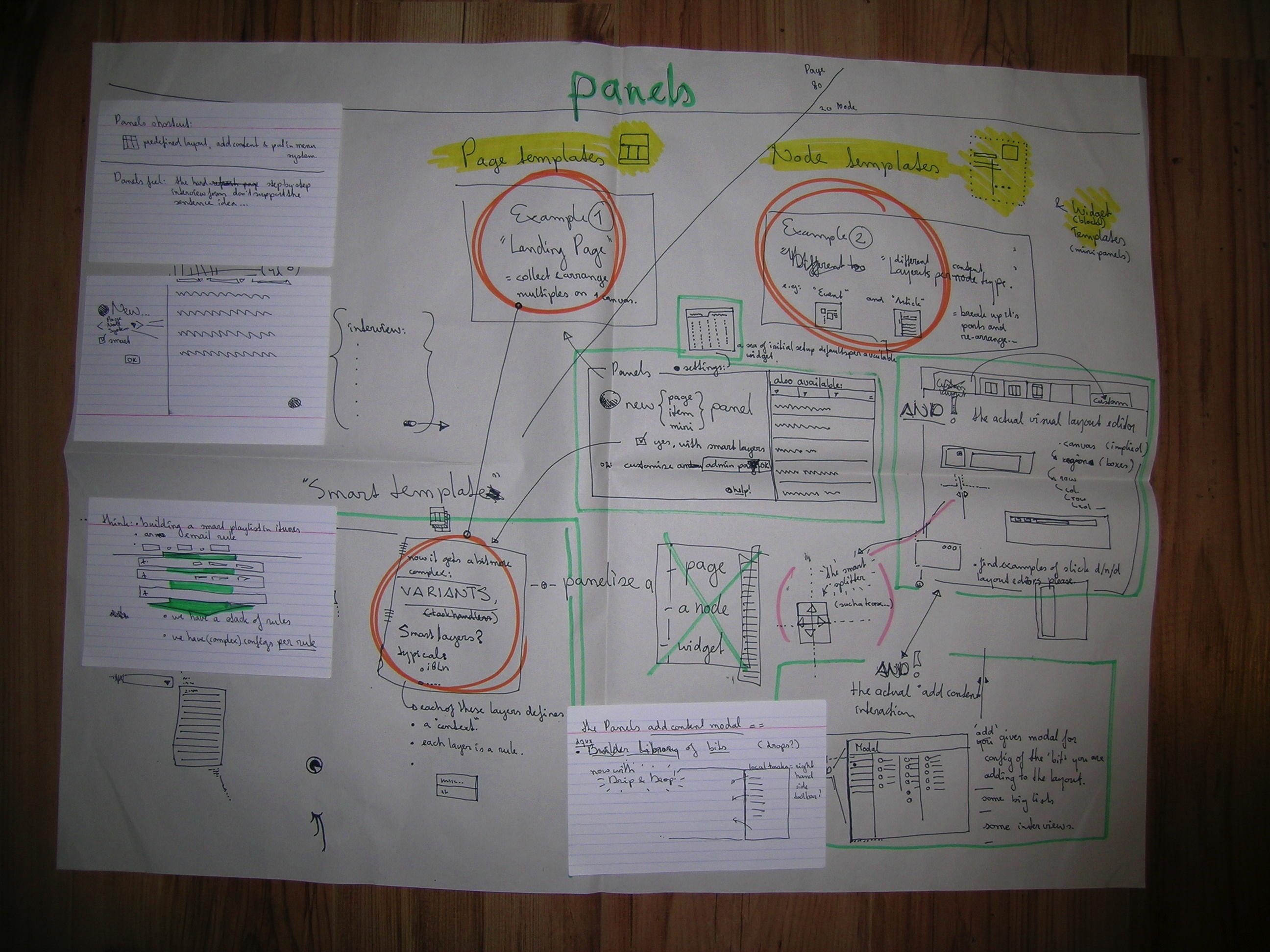
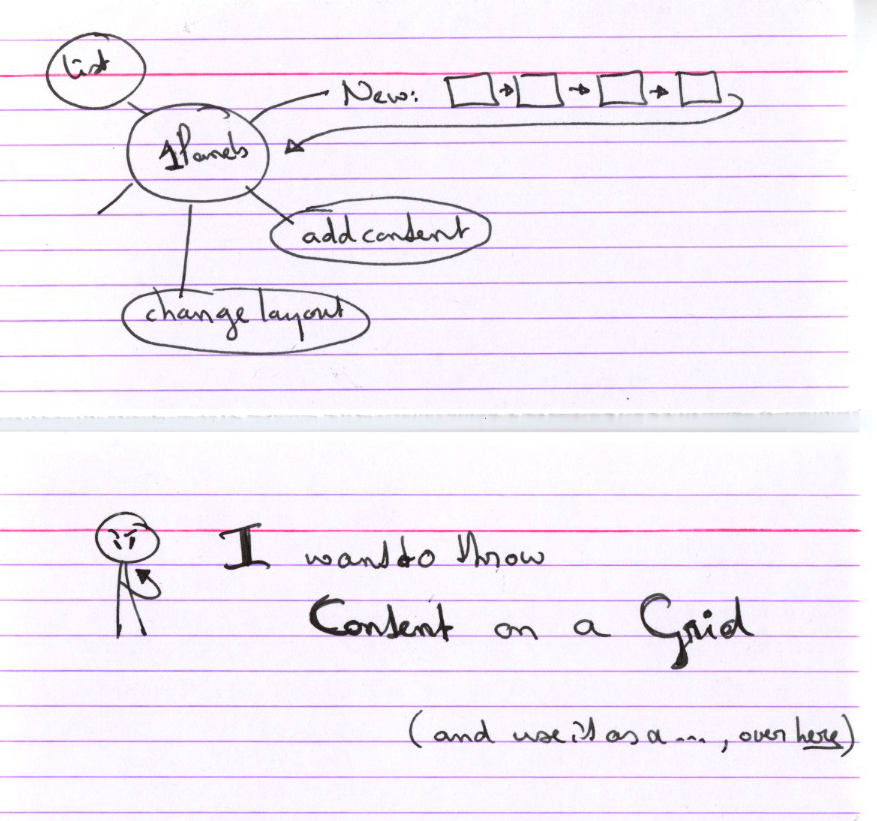
I dug up early Panels 3 concept sketches and attached them to the wiki above. They look like this:
Bigger versions:
Glad I was so quick!
I'm glad I was a few minutes quicker than you to post ideas and images – your photos make mine look too crappy. :-)
I am not sure, since I haven't managed to interpret all parts of your uploads, but it seems the underlying concepts in both our sketches are pretty similar. (Perhaps not very surprising, since I base much of my ideas on Page manager / Panels 3.)
2 cents
Bellow are some wireframes which are my 2 cents on the above. I have centered my thinking round the idea that we are trying to create and edit three things: Sections, Pages, Components.
Sections, Pages, Components
I have tried to deal with three concepts
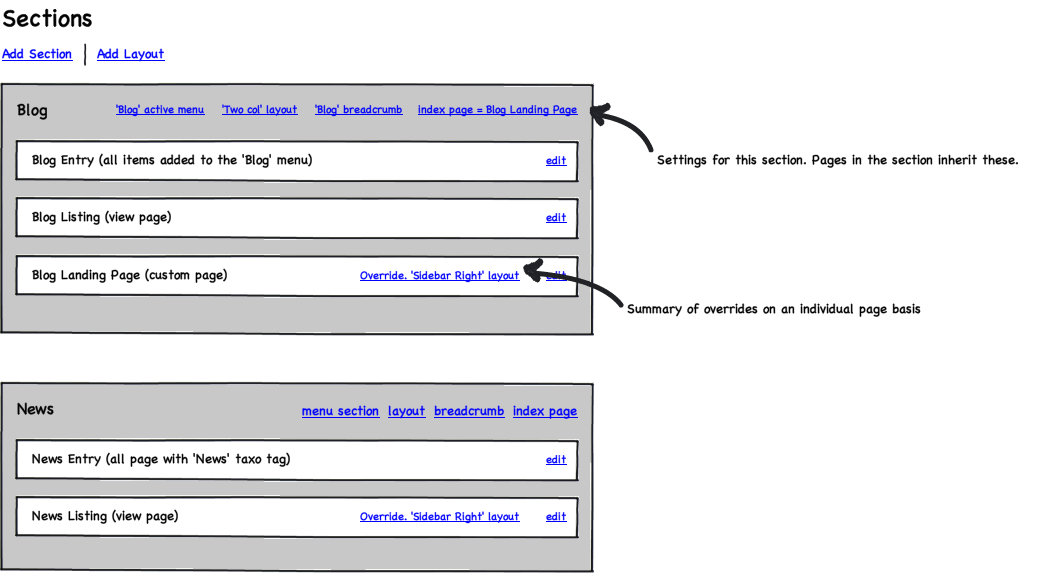
Section Listing
Bellow is the section listing. This lists the various sections and shows the pages contained in them.
It lists the various sections of the site and shows the pages contained within them. It also shows the various configurations associated with them.
Page Edit
I attach two page edit screens. Page edit screens show the configuration (both that inherited from the section & also custom configuration of the page). There is some way to move easily to the other pages in the section.
Node Grouping Page
Page edit for the 'Blog Entry' Page (page being edited is indicated by an *). This a page which is a grouping of nodes. This is a useful idea as it allows us to use existing configuration to do the work of organize the site. It is a convenient way of allowing a bunch of nodes which it makes sense to group together to be together. We don't have to do the work all over again.
There are other types of pages as well. These might be view pages, an arbitrary node (we might want to add node/16 to a section), a custom page which we are creating as an aggregate of components.

Custom Page
Page edit for the 'Blog Landing Page'. This is a custom page we are creating which will aggregate components on the site. This is something like a Panel page we are creating as a landing page or the frontpage.
Summary
I have tried to bring as much of the above as I could into these wireframes. They are offered in the spirt of iterate early, iterate often. I hope merely to keep the kickstarted discussion motoring :)
My main concern about the above is that I am taking the term 'Page' which is already overloaded in Drupal (Page node type, Page Manager, the common understanding of a webpage) and truly drowning the word. I do think the three concept idea makes sense though even if the terminology might not be the best.
Page builder, context settings?
eoriordan, thanks for those thoughts, very good. I'm only just now seeing this. Still haven't digested itangalo's ideas either and yet toss in another sketch. 1min50sec videoclip on the youtubes: http://www.youtube.com/watch?v=7VOkLzD3yDs
Main question in it is to try and make the list of things core could offer for context to a page. I imagine to maybe check the 'Role' box and then go configure which components get added to the page for the higher-up roles. Or choose which tag to filter this listing of radio show teasers on. Can we make that list? Point out the ones core would want to provide UI for? Thanks!