
Posted by joshmiller on March 12, 2009 at 5:14pm
I have been dealing with clients from multiple Drupal websites today and found myself wishing for the following interface for my clients. Maybe this is something worth pursuing. At least we have a visual to get the discussion started. I've attached the .PSD file and used the icons from the free library found here.
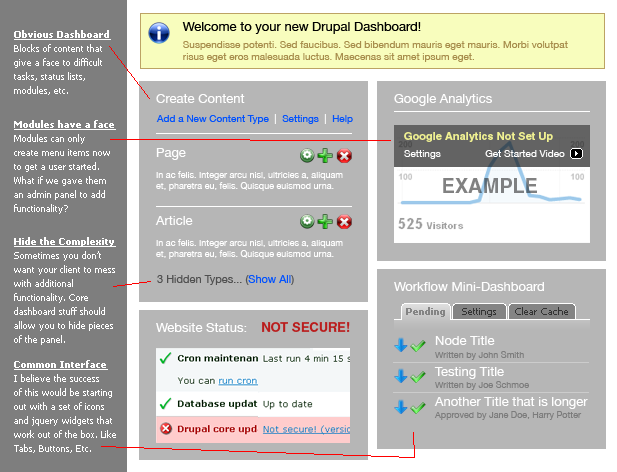
(I hope the img tag works. If not, click on the attached png.)
| Attachment | Size |
|---|---|
| drupal-dashboard-interface.psd | 954.04 KB |
| drupal-dashboard-interface.png | 57.13 KB |
Comments
I like the concept. My
I like the concept. My worry, however is that it will create the need for a bunch of features:
1. Who decides what blocks appear here?
2. Do content types now need a weight? Or a checkbox that says "show in dashboard"?
Some notes:
1. I prefer using text links most of the time to icons. ('e.g. "settings" instead of making a user interpret what a picture of a gear means)
2. I'd rather see a log of latest activity, like "comment added to blah blah bla" instead of "Not secure". Alerting users about security should probably be somewhere else, and simply say "there's a security matter that requires your attention". Often, "insecure" code is secure in a user's circumstance. For example, vulnerabilities on a Windowz servers, but not on Linux servers.
"We are all worms. But I believe that I am a glow-worm." - Winston Churchill
work: http://www.entermedianow.com
blog: http://www.nicklewis.org
"We are all worms. But I believe that I am a glow-worm." - Winston Churchill
work: http://www.chapterthree.com
blog: http://www.nicklewis.org
User?
Then is it a dashboard for clients (admins, moderators) and not users (simple registered users)?
Yeah, about that...
Greatest usability problem of Drupal: We have so many use cases.
Yes, this would be targeted towards that person who is adding content and configuring their website on a daily basis. But, I don't see why we couldn't enable a dashboard view on each user's page. It wouldn't probably have google analytics, but it might have a lot of OG dashboard widgets...
Josh
Visibility Settings & Dries' Activity Log Vision
Excellent thoughts Nick!
I especially like your idea of "latest activity" and that mashes up well with Dries' vision of an activity log.
The great thing about an icon is that it can be small and have a title. Yeah, this mockup might be a little too icon heavy.
As for your biggest question: who decides what blocks appear here? Well, I would like to see a dashboard control that has visibility settings based on role and even down to "only show this block to my user id."
In the short term, I wonder
In the short term, I wonder if the way to go would be to create a hook called "hook_dashboard", that can be altered through another hook.
e.g.
<?php
function hook_dashboard() {
  return array('my_wombat_control' => array('content' => theme('hook_dashboard_block'), 'weight' => -1, 'access' => array('Create comments'), 'region' => 'left')))
}

function hook_dashboard_alter($id, &$block) {
 if ($id == 'my_wombat_control') {
   // remove it;
   unset($block);
 }
}
?>
"We are all worms. But I believe that I am a glow-worm." - Winston Churchill
work: http://www.entermedianow.com
blog: http://www.nicklewis.org
"We are all worms. But I believe that I am a glow-worm." - Winston Churchill
work: http://www.chapterthree.com
blog: http://www.nicklewis.org
Version 2
Everybody's comments have been integrated:
Dashboard
Love the dashboard approach. I suggest that the "activity" stuff be folded up by default, with just a status to indicate whether there's anything that requires attention (e.g. security vulnerability).
The reason for this suggestion is that the list of items is potentially confusing and somewhat off-putting for inexperienced users. For example, I personally would not have understood "pathauto" or "cron" or Drupal's use of "node" when I started using it about a month ago.
I would also avoid "Workflow mini-dashboard". It seems unnecessary to name this item, and if we can avoid introducing a new term, then let's do so.
dashboard for anything
gerrygaffney,
Thanks for the positive comments.
The "workflow" block and "google analytics" block are meant to show examples of "module blocks" -- that is, once you install a module, it has something user-facing on the dashboard.
Josh
Great!
Why not add a drag and drop functionality to arrange the panels right on the dashboard just like in
admin/blockor a collapse and expand feature just like in form fieldsets?I like the idea, Josh! Won't the users be confused when they read terms such as "node"? Someone from the Lullabot said from one of their videos that it is an SOP for developers not use that term on UIs, just on APIs.
+1 for the icons with titles.
I posted this similar
I posted this similar Dashboard once long time ago. Unfortunately, it wasn't chosen for GSOC last year. Hope it might help. I'm interested in making it definitely.
http://groups.drupal.org/node/9570
This looks promising
Josh, This looks very promising. I've been playing with a dashboard implementation for about a month now that has a similar feel as yours, but isn't as polished in the UI at the moment.
http://www.screencast.com/users/fillerwriter/folders/Jing/media/4659afc3...
Each Role have its own dedicated dashboard
How about a different dashboard link location for each role?
Eg. content editors would have access to example.com/content-editor
forum moderators would have their own dashboard at example.com/forum-moderator
User 1 would automatically have access to /admin
Right now, I modify user profile pages to display pseudo-widgets that can only be seen by specific roles for easier content writing or content moderation. If re-writing /admin is tedious, I'd like to see an easier way to 'widgetize' the user profile page as that is the best place to implement a dashboard.
An alternative way to use a dashboard to administer the site
-Rather than have user 1 always access /admin for administration takes, user 1 should also be able to administer the site through their account page with a separate tab for regular profile information edits.
-- /admin as it is or a future admin dashboard can appear by default on user 1's account page when logged in with a separate tab for their regular profile information.
-Roles without administration or their own dashboard would not see tabs and would directly edit their profile information.
-Roles with dashboards set for them would have their role's dashboard appear by default on their account page with a separate tab leading to regular profile information.
Would it be possible to
Would it be possible to consolidate this discussion and http://groups.drupal.org/node/19258 into a single thread? Also cross-posting there.
Chris Shattuck
Learn Drupal with over 1700 Drupal video tutorials
Discussion moved to:
Discussion moved to: http://www.d7ux.org/dashboard/
Tag: #d7ux_2_0
Inspired in part by this
Inspired in part by this issue, I created a small module to cover the 4 most usual administration tasks by a non-administrator:
The module is a first dev version I'm gonna start working on new features and making it easier, some cool things about the module are (I think they're cool :)
This is my first module and I did it on a weekend, I'm expecting to change some things and to add some functionality, I just wanted to share the module with the community to get some feedback and because I'm using it on several production sites and it's making my clients happier and my life easier.
The project it's at http://drupal.org/project/udashboard.
Luis