
Posted by jayjax@gmail.com on April 2, 2012 at 4:47pm
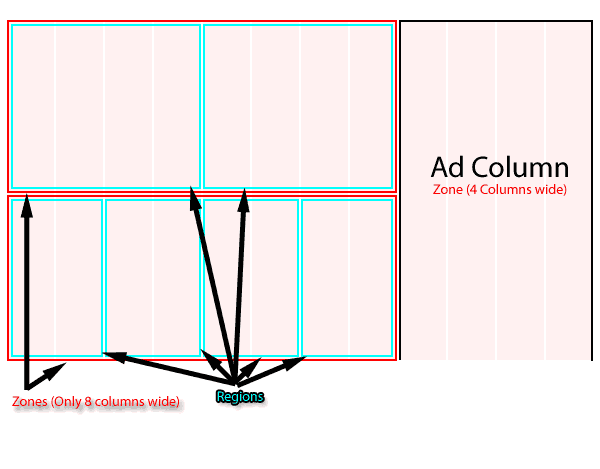
How can I change the length of a zone? I want to be able to split them up, instead of them being 12,16,24, or 32 columns wide. For example, I want something like a zone that is 8 columns wide and another one right next to it that is 4 columns wide.
I understand the concept of regions but the site we are creating would benefit from multiple zone lengths.
If there is another way to fix my problem, I would love to hear it! Basically, we will have 8 columns for content and 4 columns for the advertising. The content is constantly pushed down to the bottoms of my ads and I can't get them to line up next to each other.
Any help would be greatly appreciated!
Thanks
| Attachment | Size |
|---|---|
| linedemo.png | 5.83 KB |
Comments
Omega "Sub-Regions"
Your image displays what many have asked for in Omega (because they are used to Page Manager/Panels), but cannot achieve without some coding. I understand the Omega crew is working on "Sub-regions" that will make this possible.
For know, unless you want to do some coding, you should look to css to theme your content to fit within the selected region. There is some none-programming help, though. Look at http://drupal.org/project/views_column_class
James Sinkiewicz
Drupal Site Builder and Generalist
http://MyDrupalJourney.com