
I've been wrestling with theming the pop-up for a Gmap view. There are some tutorials, but they seem like total overkill for my problem.
I want to get some people's feedback on the ways they've gone about making small changes to their map. I think there are quite a few people out there who want to make small changes to their map.
Here are some links I've found:
This person shares my question: http://groups.drupal.org/node/20773
This seems like total overkill: http://drupal.org/node/130671
and there are no solid conclusions here: http://drupal.org/node/185617
Here is my specific problem:
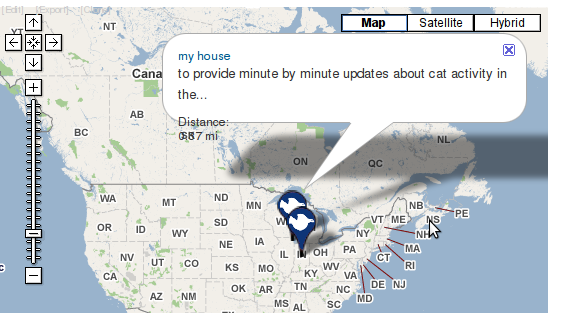
You can see that the text runs off the popup bubble. I can theme the internals of the bubble, the text and the fields and all, but the bubble itself is a composite image and the height doesn't seem to grow with additional content.
| Attachment | Size |
|---|---|
| pop-up-problem.png | 101.87 KB |
Comments
I can't see exactly what the
I can't see exactly what the issue is here without a link to the web page that is displaying your map, but my best guess is this:
The google maps api does some dynamic calculations to set the height of the info window (popup bubble). However it often gets this calculation wrong - I've run into this when putting images in the info window. I think this relates to css elements being floated left or right. So try inspecting the css of your info window with firebug and seeing if this is the case. Try assigning fixed heights or clearing the floats of various elements of the infowindow and then reloading the page.
Also, I'd recommend posting this as an issue in the gmap issue queue - that's the best place to get bugs looked at and ideally to find a permanent solution for this.
http://www.thomasturnbull.com
http://twitter.com/thomasturnbull
I had a very similar problem
I had a very similar problem - your screenshot looks all too familiar! I looked at the same posts you found, and got nowhere.
Eventually, I found that simply enclosing all of the content in the infowindow in a div with a max-width did the trick. Once the content had a clear, explicit width, google maps api seemed to be able to calculate the size of the infowindow and 'bubble' properly.
Details at http://drupal.org/node/63085#comment-2684248
similar problem with the height
But my case is having inconsistent extra space at the bottom. Fixed by specify the font-size to Gmap popup using css
div.gmap-popup {
font-size: 12px;
}
Previous font-size "em" seems to confuse popup window to calculate the height. I tested by increasing/decreasing the font size and the popup window wraps around all text nicely. However, still having problem when adding images and float by css just like tom_o_t said. I could not have a fixed height (using clusterer to display multiple records), so anyone has a solution?
Thank you in advance.
Finally fixed
I think not every case has the same solution, it depends on what elements we have inside the popup window. Mine is...
<div class="gmap-popup"><div class="thumbnail"></div>
<div class="title"></div>
<div class="city"></div>
<div class="province"></div>
</div>
My accomplishment is to have a thumbnail with another div wrapped around and the most important is (of course) "the correct calculation from gmap popup window". So once the div.thumbnail floats, the container (div.gmap-popup) and what inside(div.city and div.province) has to float too. However, could not explain well why I have to omit the floating rule for div.title, that is easy enough to concatenate everything else in one css rule though.
Once again, My approach is not to have any fixed dimension because of multiple records. And you may need to poke around, if there are span tags or another separations(,) inside the div.gmap-popup. That is a fun part of css:)
I struggled with this for a couple days, hope this may help the others. Still open up for cleaner solutions though,
iparsin
a bit cleaner