
I'm worried our strategy is lacking to solve Drag and Drop for table rows not accessible to screen-reader users. This issue is flagged as critical for Drupal 7 and it's very important for accessibility of many admin screens in Drupal core and contrib.
Not accessible or usable
So far the patches in the issue queue allow users to choose to disable the javascript drag-n-drop and instead keep the weight and parent fields available.
That is a good start, but I believe the resulting interface is still bad for accessibility and usability.
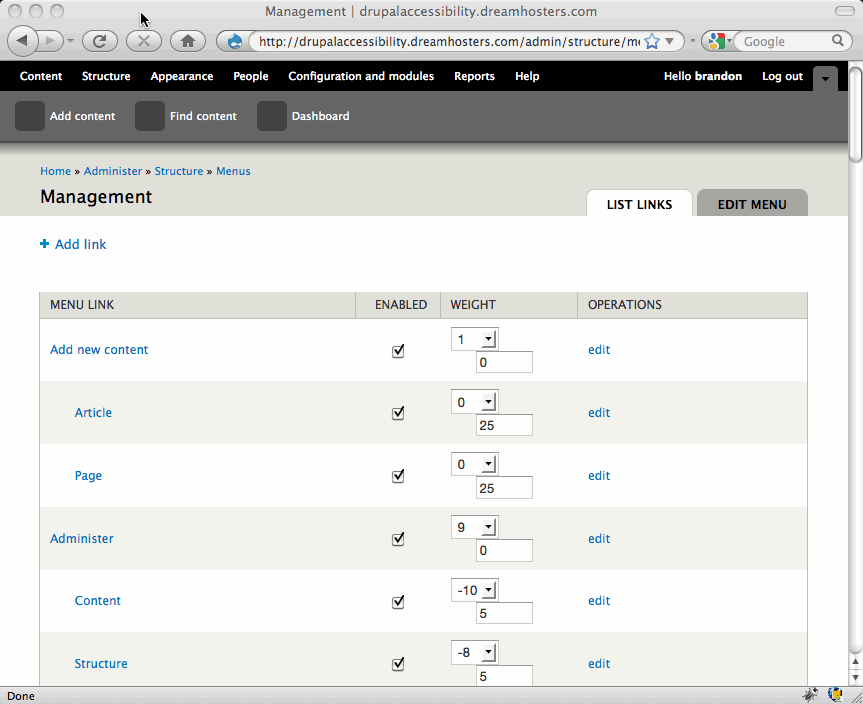
I've attached a screenshot of a typical drag-n-drop interface (/admin/structure/menu/manage/management). The screenshot shows the form without javascript drag-n-drop. The draggable handles are not added in, and the weight and parent fields are visible because they haven't been removed.
But this interface is a challenge for accessibility and usability:
- Weight and parent fields do not have labels
- Parent field is not even named anywhere (at least Weight is the name of the table column header)
- Rows do not have a table header (so when a screenreader is reading a cell in the middle of the table somewhere, it cannot use row and column headers to put the cell in context)
- Weight is just a meaningless number, and you have to jump all over the page to compare to the weight of siblings (while ignoring all the weight numbers for non-siblings)
- Parent is more meaningless because you cannot find the ID number of an item anywhere on the page, so you truly have no idea what to enter in the parent field
New Strategies
So how can we solve this? Here are a few proposals:
Meaningful weight options
Display the weight values with meaningful names. Instead of "-9" the option in the weight dropdown would be "-9: Roles". So as you choose weight from the list, instead of just numbers you would be choosing names of where you want to put your item next to. If there are multiple items at that weight already it can say "0: File system and 2 others" or "0: File system ... Image toolkit".
Choose a parent by name
The parent field should be a dropdown select field with options for every other item. In the case of menus, the dropdown would list all menu items by their name, not ID. It would be an optional field that defaults to the item's current parent or 'Top-level item'. Leaving an item as 'Top-level item' would keep its parent ID as 0.
Labels and column headers
- Weight and Parent fields get a label
- Parent field gets its own column with a column header
- The name of each row should be tagged as the row header (thead span="row")
Feedback?
Do these suggestions make sense?
Do they begin to solve the challenges of accessibility and usability, both for people using assistive technology and also making these screens work for users without javascript?
| Attachment | Size |
|---|---|
| drupal7-menu-reordering.gif | 45.27 KB |
Comments
Looks like a good approach
Thanks Brandon. Disabling Javascript does add accessibility, but doesn't ad much meaning.
I do like your approach here of adding more names to indicate what changing this number would do.
--
OpenConcept | Twitter @mgifford | Drupal Security Guide
Solving drag&drop
Hello,
for years I've been using d5, mainly for it's uncluttered accessible admin interface. I recently set up a D6 test site, only to discover that what atracted me in D5 was gone in D6. I am very hhappy with the initiatives to get accessibility in D7, not olyn the client side, but on the admin site too.
I am now installing D7, to test the changes, and will report back as soon as possible.
When using D5, I either used lynx on linux, or Firefox on a windows machine, using Jaws as my screenreader. On linux my screenreader is brltty.
The proposals as outlined above sound good to me. I can't read the screenshot, as I am completely blind.
Kind regards,
Henk.
the cha
Improvements in Drupal 7
Hey, thanks for commenting on this thread.
We can give you a demo of what Drupal 7 will be like with the Drag/Drop patch on my sandbox. We definitely would appreciate more feedback on ways to make it better.
Looking forward to talking with you more about this.
--
OpenConcept | Twitter @mgifford | Drupal Security Guide
Accessible D7
Hello,
my installation of d7 failed with a çall to undefined function var_filter in the final stages, so it didn't setup my admin account, so if I can check it elsewhere, that'd be nice.
Kind regards, Henk.
Sandbox
Not sure what that issue with var_filter might be. You can create an account here though and I can give you admin access:
http://drupal7.dev.openconcept.ca
I've just applied this patch to the latest CVS version of D7 - http://drupal.org/node/448292#comment-2328588
Mike
--
OpenConcept | Twitter @mgifford | Drupal Security Guide
d7 install
Hello Mike,
This was caused by a missing php extension, so it's solved (I hope). I'll create an account on the sandbox in the coming minutes.
Regards,
,
Henk,
Creating account on sandbox
Hello Mike,
Creating an account resulted in the following message being displayed:
• Notice: Undefined index: module in _field_info_prepare_instance_display() (line 323 of /home/dm7/modules/field/field.info.inc).
• Notice: Undefined index: module in _field_info_prepare_instance_display() (line 323 of /home/dm7/modules/field/field.info.inc).
• Notice: Undefined index: module in _field_info_prepare_instance_display() (line 323 of /home/dm7/modules/field/field.info.inc).
• Notice: Undefined index: module in _field_info_prepare_instance_display() (line 323 of /home/dm7/modules/field/field.info.inc).
• Notice: Undefined variable: elements in field_default_view() (line 195 of /home/dm7/modules/field/field.default.inc).
• Notice: Undefined index: und in node_build_content() (line 1255 of /home/dm7/modules/node/node.module).
Regards,
Henk
PHP Notices
Thanks for the information about the notices. I think those are bundled with the latest CVS or possibly with an older version of my DB. I haven't had time to track them down yet and check for or submit bugs yet. Hopefully soon though.
All seems to be working at the moment though other than the errors.
Mike
--
OpenConcept | Twitter @mgifford | Drupal Security Guide
First look
Hellllo Mike,
I now have my unpatched D7 to compare to your patched one.
First thing I noticed, is that I see no D&D in menus or blocks on your site, can it be disabled per user, or has it been turned off completely?
For blocks the current implementation (as on your site) is perfectly usable for me, since it looks like D5 to me. Same for menus. It took a little while to figure out that the 'weight' column are actually two fields (a combo and an edit field), however after discovering this, menus were easy to edit. My screenreader does not name the table fields, but I've gotten used to that. Every time I hear a menu option, I know I'm in a new row, besides counting to 6 isn't that hard....
Such tables are harder to read if columns can be blank, for example in a feature list, where 4 versions of a product are compared. If the availability of a feature is marked by Ý', and the absence marked with whitespace, it's hard for me to decipher such tables, however with drupal menus and blocks, all fields have a value.
Kind regards,
Henk.
Second look
Hi Mike,
I see your site has been updated again. In the menu screen, fields are propperly labeled, which is more of an improvement than I expected. Now I also learned that the third column in the table is the parent menu. I thought it was a second interface to the weight value.....
Entering a menu number isn't useful, because there is no way to find it without looking in the database.
So if this option cannot become a combo with menu names, I'd suggest to remove it from the table and force the user to change it via the 'edit' option of the menu item.
Kind regards,
Henk.
Agreed.
I have to actually hide the 2nd value for the parent id in the form. Not entirely sure how to do that, but I've posted some thoughts.
I had forgotten that we didn't set a way to add the label tag without making it visible. There was a discussion of this here - http://drupal.org/node/451980#comment-1933292 - but it didn't seem to make it into a patch I can find.
I don't know how to make an element invisible (and still functional) using the forms API. We can't actually remove the parent id field as it is used within the drag/drop interface to switch parents.
--
OpenConcept | Twitter @mgifford | Drupal Security Guide
Content types
Hello Mike,
Content types also use drag&drop. At your site, the table with field types and theyr order looks good, however I had some problems with the'"add field" part.
My screenreader assigns the text above each field as the label, E.g. The combox where I can select field type, is called
"field name" by my reader. In D5 I had a simular issue with the permissions screen. I don't know if this is a problem with Jaws, or with drupal, just thought I'd mention it.
tests so far have been performed using Jaws V8 and IE v6.
On my unpatched D7, blocks menus and content types are completely inaccessible, so the patch is a great improvement.
Kind regards,
Henk.
Add thing & screen readers
Hey Henk,
This is a bit of an unusual space. So you're looking at a page like - admin/structure/types/manage/page/fields - right? Down at the bottom of the page there is an option to re-order fields or add new ones through the admin interface.
That row should allow you to re-order it using the drag/drop or weight alternative, add a new Label, Field name (a-z, 0-9, _), Type of data to store & Form element to edit the data. There is a row below this that allows you to select from an already defined field. None of these use labels at the moment which is a bit confusing. Instead using div's:
<input id="edit--add-new-field-label" class="form-text" type="text" value="" size="15" name="_add_new_field[label]" maxlength="128" gtbfieldid="286"/><div class="description">Label</div>
Jaws 8 is a bit old, but not sure if this is the culprit for this or not.
Is the permissions screen still an issue still a concern in D7?
--
OpenConcept | Twitter @mgifford | Drupal Security Guide
Jaws and permission screen
Hello Mike,
I've tested the permission screen in D7 alpha-1 with both Jaws8 and Jaws10. In Jaws8, I get no labels at all (e.g. with every checkbox Jaws8 only says 'checked' or 'unchecked') With Jaws10 I get the wrong labeling as in D5. E.g. the page:
d7/node/1#overlay=admin/config/people/permissions/2
says: 'comment' for the first checkbox, wherre 'administer blocks' should be said.
Kind regards,
Henk.
The need for invisible labels
Hey Henk,
The permissions pages (and others) need to have invisible labels (if labels are going to be presented).
This additional patch is necessary before we can do this:
http://drupal.org/node/558928#comment-2471112
So often there has been a cascading series of things that have needed to change and the forms reorg was a large initiative. Sadly it seems we overlooked some things.
Adding comments of support to the patch above would be great!
Mike
--
OpenConcept | Twitter @mgifford | Drupal Security Guide