
This post describes how to have data entered in the Aegir site be useable in your install profile. The way this works now still feels quite hacky and probably won't stay like this forever. If anyone has better suggestions please post in the comments :).
For anyone with a slightly customized aegir setup, passing data from aegir to your install profile is a must. In Wedful (my own business running on top of Drupal w/ Aegir) our aegir site signup form looks like this:
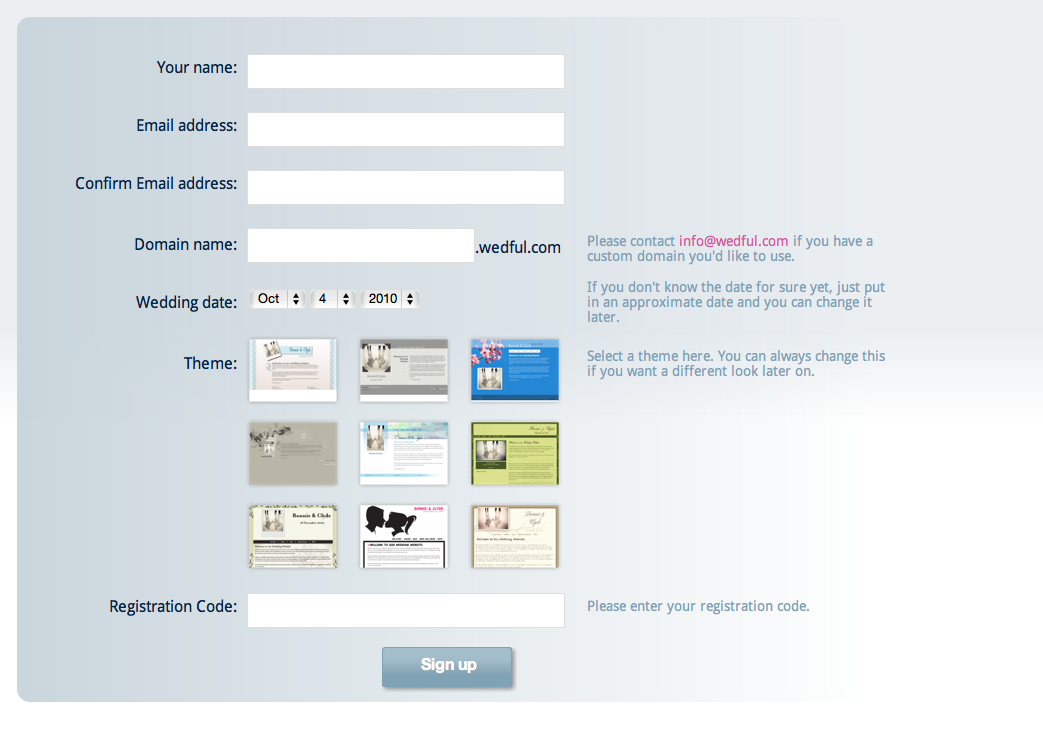
We've added a few custom fields here including wedding date and theme selection. In addition I also want to get the client name back into my install profile so that I can properly set the account profile data for the user on the site.
If you do have any custom data, the first thing you need to do is get it saved into the aegir database. This will totally depend on your own needs and I won't go into details here on that aspect. In this case, I created a new db table that stores the site and client ids with their corresponding selected theme and wedding date.
Adding new form elements to the aegir site or signup forms changed quite drastically between 0.4 alpha8 and alpha9. As of alpha9 there's a new function that can be used to add fields to the site and signup form _hosting_site_field(). It can be used as follows:
<?php
function mymodule_form_alter((&$form, &$form_state, $form_id) {
  if ($form_id == 'site_node_form') {
    $node = $form['#node'];
    _hosting_site_field($form, $node, 'custom_string', array(
      '#type' => 'textfield',
      '#title' => t('Custom string'),
      '#description' => t('Type a custom test string here'),
      '#required' => TRUE,
    ));
  }
}
?>
You'll need to implement your custom nodeapi hooks as well to save/delete the custom_string data
<?php
function mymodule_nodeapi_site_insert($node) {
  db_query("INSERT INTO {mymodule_site} (vid, nid, custom_string) VALUES (%d, %d, '%s')", $node->vid, $node->nid, $node->custom_string);
}
function mymodule_nodeapi_site_update($node) {
  // First make sure this site already exists in the getwedful site table
  $result = db_query("SELECT vid FROM {mymodule_site} WHERE vid = %d", $node->vid);
  if (db_result($result)) {
    db_query("UPDATE {mymodule_site} SET custom_string = '%s' WHERE vid = %d", $node->vid);
  }
  else {
    mymodule_nodeapi_site_insert($node);
  }
}
function mymodule_nodeapi_site_delete($node) {
  db_query("DELETE FROM {getwedful_site} WHERE nid = %d", $node->nid);
}
function mymodule_nodeapi_site_delete_revision($node) {
  db_query("DELETE FROM {getwedful_site} WHERE vid = %d", $node->vid);
}
?>
Ok, so now that the easy part is out of the way, create (or edit if you already have one) your custom drush.inc, in this case, mymodule.drush.inc:
<?php
function drush_mymodule_pre_hosting_task() {
  $task =& drush_get_context('HOSTING_TASK');
  if ($task->ref->type == 'site' && $task->task_type == 'install') {
    $client = node_load($task->ref->client);
    $vid = $task->ref->vid;

    $mymodule = db_fetch_object(db_query("SELECT * FROM {mymodule_site} WHERE vid = %d", $vid));

    $task->options['client_name'] = $client->client_name;
    $task->options['custom_string'] = $mymodule->custom_string;
 }
}
?>
This function hooks into pre_hosting_task and copies the data we want (i.e. client name and the custom string) into $task->options.
Next, we need to create another file, and it needs to sit in your .drush folder (unlike the previous mymodule.drush.inc which sits in your custom module folder). Create a mycommandfile.drush.inc in your ~/.drush folder and add something like the following to it:
<?php
function drush_mycommandfile_pre_provision_install($url = NULL) {
  drush_set_option('client_name', drush_get_option('client_name'), 'site');
  drush_set_option('custom_string', drush_get_option('custom_string'), 'site');
}
?>
This sets the value of the data as drush options into the site context. This is a two step process as the site context doesn't exist pre_hosting_task, and pre_provision_install acts as the bridge between aegir and your actual install profile.
Now that you've set those options in the "site" context you can retrieve them in your install profile like so:
$client_name = drush_get_option('client_name');
$custom_string = drush_get_option('custom_string');
DONE! :)
| Attachment | Size |
|---|---|
| Screen shot 2010-10-04 at 9.55.54 AM.png | 174.13 KB |
Comments
Nice!
I think we could abstract this somehow to enable some other known distros, where custom fields are used during install, so it doesn't work with the standard Aegir site provisioning, because no custom fields are expected (by default).
Awesome
This is great - been wondering about this for a while and is awesome to see it visualised and explained so well.
Cant wait to try it out
Thanks
Gregg
Omg. I Love this post so
Omg.
I Love this post so much. This is exactly what I am invisioning for a site in my head. Thanks for sharing.
I can not pass data.
I create a module auto_manager in /var/aegir/hostmaster-HEAD/sites/mysitename/modules/. than put the auto_manager.drush.inc in /var/aegir/hostmaster-HEAD/sites/mysitename/modules/auto_manager
<?phpfunction drush_auto_manager_pre_hosting_task() {
$task =& drush_get_context('HOSTING_TASK');
$task->options['manager_name'] = 'manager';
$task->options['manager_mail'] = 'manager@manager.com';
}
}
?>
then I create a file test_datapass.drush.inc in the /var/aegir/.drush
<?phpfunction drush_wedful_pre_provision_install($url = NULL) {
drush_set_option('manager_name', drush_get_option('manager_name'), 'site');
drush_set_option('manager_mail', drush_get_option('manager_mail'), 'site');
}
?>
my profile is in /var/aegir/platforms/platform_name/profiles/profilename/profilename.profile
$manager_name = drush_get_option('manager_name');
$manager_mail = drush_get_option('manager_mail');
I used these code, but I can not get the value T_T
You need to name your drush
You need to name your drush hook in test_datapass.drush.inc after the file, you still have the "wedful" name in there. It would need to be drush_test_datapass_pre_provision_install i believe. I'd forgot to replace that one in my example. I'll replace it now.
Thank you hadsie ! very much!
Thank you hadsie ! very much! I'll test it
needing something a little
needing something a little bit more flexible I am building a module that should be able to more generalized for people.
I have a couple of goals for the module:
1. To be able to create and manage Params via the UI
2. To have Granularity for the params, is Aegir Wide -> Server Wide -> Profile Wide -> Platform Wide -> Client Wide, etc. im doing a bit of reading into how Menus and taxonomy handle trees and think that may be a good place to start.
3. Probably a more useful functionality is to have Aegir after or during verification of a new platform, locate and pull in all externally accessible setable params and have them waiting in the UI to be set and managed.
I am getting along with the module and have a good deal of the basic UI stuff done. Im still working out the handling for the actual site creation form, IE something like how when you click a profile, it then removes platforms that are not valid. I think the same should happen with the profiles.
Once the UI stuff is complete and tested alright i will go ahead and build a drush script to interject the values from aegir as well as work on how i can go about grabbing out profile params during the platform verification process.
If anyone else is ambitious enough and think that this could add some value to more people than just myself, let me know and ill be glad to collaborate on it,
Notes to self: for building
Notes to self:
for building the jQuery goodness we need to setup two things
1. We need to track each profile's nid,
2. store their default values in a javascript object that we can pull from when we need to display the params that are enabled for that profile
then all we have to do is a simple .hide(); and show(); depending on what option is selected.
How to create a provision?
I wanna implement like the following:
1. I can create custom task by myself ;
2. the task which I create is to use drush to enable modules of a site or all sites in a same platform.
I am working on this but I searched internet and could not find any useful information, I want to create a custom provision like provision-enablemodule, then use hosting_task to implement it. Is it able to be done? How? Or other method to achieve this?
Thanks a lot.
the easy method would be to
the easy method would be to write a module that would need two parts, the one is the ui. The second would be a drush script. look at some of the existing Drush commands to get an idea on how to go about it. The best one to look at would be the one that handles en / dis commands via cmd line.
thank you cmcintosh
I have finished a UI of this , but about the drush script . I have no idea. 'The best one to look at would be the one that handles en / dis commands via cmd line.' what's that mean?
what that means...
en / dis
is short for enable module
disable module... instantaneous graditude with no page refresh!!!
get it?
you mean use command 'drush
you mean use command 'drush en modulename' directly? use exec('drush en modulename') in .php file?
Well yea that is one way i
Well yea that is one way i had thought of doing it, and you should then be able to run it that way. Then just loop through the modules you select.
drush en modulename
drush en modulename --uri='mysite' --root='myroot' -backend . I tested it in command line. It was ok. But when I used it in drupal like exec("drush en modulename --uri='mysite' --root='myroot' -backend"); I used drupal_set_message to show the output. it was
Fatal error: Unsupported operand types in \/var\/aegir\/drush\/includes\/environment.inc on line 698\n","object":[],"error_status":1,"log":[{"type":"bootstrap","message":"Drush bootstrap phase : _drush_bootstrap_drush()","timestamp":1288315659.3818,"memory":1147848,"error":null}.........
{"type":"bootstrap","message":"Loading drushrc \"\/var\/aegir\/platforms\/myplatform\/drushrc.php\" into \"drupal\" scope.","timestamp":1288315659.4186,"memory":2224556,"error":null},{"type":"warning","message":"Cannot open drushrc \"\/var\/aegir\/platforms\/myplatform\/drushrc.php\", ignoring.","timestamp":1288315659.4187,"memory":2225396,"error":null}.......
{"type":"warning","message":"parse_url(:\/\/:@:\/): Unable to parse URL environment.inc:697"....
It was the error message. T_T
Is this still functional on
Is this still functional on Aegir alpha 14 ?
i've been following this tutorial, but no luck :(
please help !
yes
Yeah, this is still valid for alpha 14. What's the problem you're having?
Problem desciption
I will try to describe my problem in a clear simple way.
I have a Drupal web application with several plans "installation profiles":
- Free
- Basic
I also have a Drupal website to represent the application and allow users to sign up for their desired plan.
Each user will have a corresponding sub domain, that runs the web application with the selected plan.
All sub domains will be hosted and managed on Aegir platform.
I need to pass the registration information from the website to Aegir to created the sub domain based on them. The steps are ordered as follows:
1- User registration on website
2- Pass registration info to aegir: Username, (Password potentially), Email, Company Name, Plan, Sub domain.
3- Create new client on aegir with these info.
4- Create a new site on aegir with these info.
5- Disable webmaster account (not delete), and set it to default values.. default username, email and password provided by us.
6- Create a new user with a designated role "Manager", that is already there.
7- Notify the user with his domain name, username and password.
8- Notify the administrator that a new site and client are created.
My main problem is that i followed the tutorial, but couldn't pass the info the installation profile.
This is it i guess. What is the best practice to accomplish this.
Thanks!
Very Nice
Awesome site @hadsie, I signed up for a test drive and everything looks really well done. Nothing but praise for you! Really good to see a functional example in production of aegir and signup form etc. Nice job!
Creating Multisites using Aegir in Drupal, a good choice?
As we know that Aegir is a web based interface, allowing site administrators or users to manage multiple drupal sites on a single or multiple hosts and platforms.
I'm interested to have something like, a Hosting Site that allows User to make some payment and get a Drupal hosting website. So he fills a form with some information like his name, address, etc, then fills out the payment form, and then his Site is created.
Keeping the above scenario in mind, I have following questions:
1) Can I make up a form on front end site (not the Aegir web interface) with custom fields, domain/subdomain name, and create a Site (without using the web interface of Aegir)?
2) Can I additionally save the information collected with my form, with the Site information that Aegir created?
3) I want to be able to manage the custom information I collected, along with the Web interface of Aegir. For example, I need to see who bought this site, etc. Any ideas how I can incorporate this?
An urgent response would be highly appreciated, as I'm doing this research for a work I've been assigned and I need to make a decision whether we make a custom multi site creation and management module in Drupal or go with Aegir if it is stable enough and can fulfil our needs.
Thanks
Waqar
4 Ace Technologies
http://www.4acetech.com
Passing the ubercart checkout form password
Does anyone know if it is possible to pass the password through to the install profile similar to how hadsie snatch the client_name from the uc checkout form?
<?php$task->options['client_name'] = $client->client_name;
?>
Taine
Pearance.com
very simple, you will need
very simple, you will need two drush scripts one in your module and one in the .drush folder in your root aegir directory. then in your install profile use drush_get_option to get that option. Also, because drush set it at install time its in the drushrc.php file for your site, so you can pull that option back up and look at it later after the installation.