
As promised, a write-up of my presentation at the January Drupalers meeting.
My name is Dale McGladdery, and I'm a Drupala ... sorry, wrong meeting. Here we go.
Northern Voice Scheduling Grid
The Views module via theming allows custom formatting of list views using PHP code. This formatting method, combined with CCK, can be used to provide a data driven schedule grid. This was used to create the Northern Voice scheduling grid: 2007.northernvoice.ca/schedule.

This Views feature was also used to create the Northern Voice FAQ page: 2007.northernvoice.ca/faq
My apologies for people looking for an exact how-to. This will, I'm positive, give you enough information to recreate the grid, but it isn't a complete set of step-by-step instructions.
CCK
A presentation session has some basic fields like its name, a session summary, presenter, time slot, room or track number. The CCK node type is created with these fields. For the Views component to work properly, the timeslot and room must be fixed text using the either 'select list' or 'radio buttons' widget type. The values will be your time slot name and room/ track name, respectively. Optionally, the room can contain the values None and All. For this presentation, the CCK content node is called: session
The View
The following View settings needs to be set as follows:
- Provide Page View: enabled
- View Type: List View
- Nodes per Page: Some number greater than the number of your sessions
- Use Pager: Disabled
- Fields: Select all of the fields that will appear in your schedule grid
- Filters: "Node: type" "Is one of" "session"/Node: Published Equals Yes
The others are settable as you'd like.
Views Custom Formatting Overview
When the Views module is generating the page for a list view it checks template.php for a custom formatting function. If found, this function is used to create the view body content.
header
body -> if it exists call function: phptemplate_views_view_list_myviewname
footer
For the examples the view will be named: sched1
The Views Theme Wizard will give you default content for template.php. The code it provides will use a callback function to format each item using a .tpl.php template file. The .tpl.php template file is also provided by Theme Wizard. We will never use this .tpl.php template file. You can optionally create it to observe how it works.
To observe the template.php function in action create a view and add the function name specified by the Theme Wizard. Instead of using the code provided by the theme wizard, replace it with:
<?php
function phptemplate_views_view_list_sched1($view, $nodes, $type) {
  return "<p>This is the text from my template.php file</p>";
}
?>
This function is passed 3 variables: $views, $nodes and $type. We can look at the content of these three variables using the print_r function:
<?php
function phptemplate_views_view_list_sched1($view, $nodes, $type) {
  $output = '<p>Displaying the variables passed.</p>';
  $output .= '<h2>$view value:</h2>';
  $output .= '<pre>' . print_r($view, TRUE) . '</pre>';
  $output .= '<h2>$nodes value:</h2>';
  $output .= '<pre>' . print_r($nodes, TRUE) . '</pre>';
  $output .= '<h2>$type value:</h2>';
  $output .= '<pre>' . print_r($type, TRUE) . '</pre>';

  return $output;
}
?>
Partial Screenshot of Output: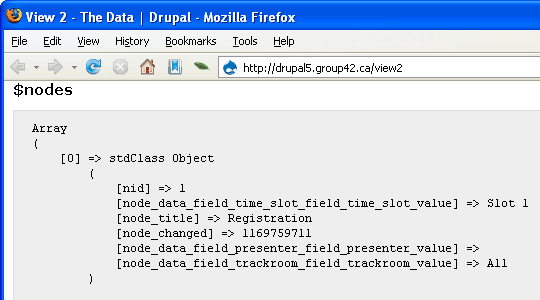
Views, in this context, has become a general purpose database query and page display engine. By selecting the right set of fields we can collect all the data we need for the scheduling grid.
Here is simplified psuedocode for the template.php code provided by the Theme Wizard. It processes this data into a displayable form.
loop over $view field data
  collect fieldnames

get $base_vars[] (1)

loop over $nodes
  $var[] = $base_var[]
  for each field
    add field value to $var[] // e.g. field_time_slot_value
  format field values into text string using theme callback (2)
  add text string to $items[]

convert $items[] (array of text strings) to single text string (3)

return text string

---
1: $base_vars contains Views specific information
2: The theme callback is the second (.tpl.php) file provided by the Theme Wizard
3: Uses standard Drupal theming function: theme_item_list
Custom Formatting the Grid
I insinuated my grid code into the existing Views code and used the same basic pattern of collecting individual values into arrays and then building the output text based on the arrays. The $schedule variable is a multidimensional array in the form:
$schedule[timeslot][room][session_index][session_data]
session_data: An associative array containing information like presenter and session title.
session _index: Although one would not schedule more than one session per room, session_index is required to pick up room conflicts. Otherwise if multiple sessions are scheduled only the last one loaded would be displayed (i.e., would overwrite previous value).
The $roomlist array is a simple array used as a kind of alternate index into $schedule. We need to know all of the rooms used anywhere in the schedule. Since a specific timeslot may not have all of it's room scheduled and we need to know when to create an empty table cell we can't simply loop over every room in a specific timeslot.
The basic pseudo code, minus added extras, looks like this:
loop over $view field data
  collect fieldnames

get $base_vars[]

loop over $nodes
  $var[] = $base_var[]
  for each field
    add field value to $var[]
  add room to $roomlist[]
  add session data to $schedule
  // $schedule[timeslot][room][session_index][session_data]

remove "All" and "None" from $roomlist[]
remove "Unscheduled" from $schedule[timeslot]

//Build the table
for each $room in $roomlist[]
  add a column heading
for each timeslot in $schedule[]  // table row for each timeslot
  add the timeslot label          // leftmost column
  for each $room in $roomlist[]   // column cell for each room
    add room session info to output string

return output string
Over and above basic scheduling there are other features that are desirable. A way of specifying that a session take up the entire row for things like keynotes and breaks. In the case of Northern Voice, the ability for the session title to be a link or plaintext was added. It is also desirable to flag room conflicts. All of these features add complexity to the code.
The Actual Full Code
The ultimate code came out looking like this. The formatting was placed in function to make the loop cleaner and majority of visual formatting left for CSS.
<?php
/**
* Schedule Grid
*
* Theme function that turns a list view into a grid display.
* This code is very customized and is tightly coupled to a
* CCK type named session.
*
* Date: Tue, 2006-12-05 23:38
* View: schedule
*/
function phptemplate_views_view_list_schedule($view, $nodes, $type) {
$fields = _views_get_fields();
$taken = array();
// Set up the fields in nicely named chunks.
foreach ($view->field as $id => $field) {
$field_name = $field['field'];
if (isset($taken[$field_name])) {
$field_name = $field['queryname'];
}
$taken[$field_name] = true;
$field_names[$id] = $field_name;
}
// Set up some variables that won't change.
$base_vars = array(
'view' => $view,
'view_type' => $type,
);
// A reference list of rooms, which will be used to create our table columns
$roomlist = array();
// $schedule is a multidimensional array as follows:
// $schedule[timeslot][room][session-index][session-data]
// timeslot: text value provided by cck
// room: text value provided by cck
// session-index: integer index (0, 1, 2) to allow multiple presentations to exist in a room
// Required to detect room conflicts
// session-data: associative array of session information (e.g., presenter, title)
$schedule = array();
//
// Extract the node data into the room list and schedule
//
foreach ($nodes as $i => $node) {
$vars = $base_vars;
$vars['node'] = $node;
$vars['count'] = $i;
$vars['stripe'] = $i % 2 ? 'even' : 'odd';
// Extract the field data from the node information
foreach ($view->field as $id => $field) {
$name = $field_names[$id];
$vars[$name] = views_theme_field('views_handle_field', $field['queryname'], $fields, $field, $node);
if (isset($field['label'])) {
$vars[$name . '_label'] = $field['label'];
}
}
// Make things a little easier by using our own named variables
$timeslot = $vars['field_time_slot_value'];
$room = $vars['field_room_value'];
$sesstitle = $vars['title'];
$presenters = $vars['field_presenter_value'];
$linktitle = $vars['field_link_title_value'];
// Add the room to the room list if it isn't there already
if (!in_array($room,$roomlist)) $roomlist[] = $room;
// Add the item to the schedule
if (!array_key_exists($timeslot, $schedule)) {
$schedule[$timeslot] = array(); // Initialize timeslot if it doesn't exist
}
if (!array_key_exists($room,$schedule[$timeslot])) {
$schedule[$timeslot][$room] = array(); // Initialize presentation index if it doesn't exist
}
$schedule[$timeslot][$room][] = array('title' => $sesstitle,
'presenters' => $presenters,
'linktitle' => $linktitle
);
}
// All and None are special values and not a room, so remove them from
// the room list if they exist. Remember that there will still be the All and
// None entries in $schedule. $roomlist is just a type of alternate index
if ( in_array('All', $roomlist) ) {
unset($roomlist[array_search('All', $roomlist)]);
}
if ( in_array('None', $roomlist) ) {
unset($roomlist[array_search('None', $roomlist)]);
}
// Unscheduled is a timeslot we don't want appearing in the grid, either
if (array_key_exists('00: Unscheduled',$schedule)) {
unset($schedule['00: Unscheduled']);
}
// Guarantee a specific order
sort($roomlist);
//
// Build the table
//
$output = '<table class="schedulegrid">';
// Build the table header
$output .= '<tr><th>Time</th>';
foreach ($roomlist as $room) {
$output .= '<th>' . $room . '</th>';
}
$output .= '</tr>';
// Build the table rows, aka timeslots
foreach($schedule as $timeslotname => $roomarray) {
$output .= '<tr>';
$output .= '<td class="timeslotlabel">' . $timeslotname . '</td>';
$output .= _format_schedule_cells($roomarray, $roomlist);
$output .= '</tr>';
}
$output .= '</table>';
return $output;
}
function _format_schedule_cells($roomarray, $roomlist) {
$output = '';
// There are two displays modes, one for the 'All' case, which uses colspan to create
// a single table cell; the second mode uses one room per table cell.
// Within each of these two modes, we have to check for conflicts
if (isset($roomarray['All'])) {
// If there is an 'All' entry, it should be the only one for this timeslot
// Check for other bookings and if they exist flag as a conflict
if (count($roomarray) > 1) {
// We have a conflict, print out all of the information for each room
$sessionblurb = '<strong>!!! CONFLICT !!!</strong><br>';
foreach($roomarray as $roomname =>; $roomsessions) {
$sessionblurb .= '<strong>' . $roomname . '</strong>: ';
foreach ($roomsessions as $session) {
$sessionblurb .= $session['title'] . '<br>';
$sessionblurb .= $session['presenters'] . '<br>';
}
}
} else {
// No rooms booked in addition to the "All" session
$sessionlist = $roomarray['All'];
$sessionblurb = '';
foreach ($sessionlist as $session) {
$title = $session['title'];
if ($session['linktitle'] == 'No') {
ereg('^<a.*>(.*)</a>', $session['title'], $matches = array());
$title = '<strong>' . $matches[1] . '</strong>';
}
$sessionblurb .= $title . '<br>';
$sessionblurb .= $session['presenters'] . '<br>';
}
}
$output .= '<td colspan="' . count($roomlist) . '">' . $sessionblurb . '</td>';
} else {
// The 'All' room was not found, so format each room as a table cell
foreach ($roomlist as $room) {
$sessionblurb = '';
// Since we're creating a grid, it's possible to have empty slots. We therefore need to
// doublecheck that there's an entry here for this column/timeslot combination.
if (isset($roomarray[$room])) {
$sessionlist = $roomarray[$room];
// Check for multiple sessions, aka room conflict
if (count($sessionlist) > 1) {
$sessionblurb .= '<strong>!!! CONFLICT !!!</strong><br>';
}
// Output each session (Normally one, unless there's a conflict)
foreach ($sessionlist as $session) {
$title = $session['title'];
if ($session['linktitle'] == 'No') {
ereg('^<a.*>(.*)</a>', $session['title'], $matches = array());
$title = $matches[1];
}
$sessionblurb .= $title . '<br>' . $session['presenters'] . '<br>';
}
} else {
// No entry for this column/timeslot combination
$sessionblurb .= ' ';
}
$output .= '<td>' . $sessionblurb . '</td>';
}
}
return $output;
}
?>
Some End Notes
Multiple Schedule Grids
Unfortunately, this isn't a general purpose method for creating a schedule grid. For each schedule grid you need to create a view and add the grid code to template.php. The code could easily be generalized enough so the Views template.php function could simply call a more general function and directly pass along the arguments.
Ordering Timeslots
Since the time slots are simply a text string, you may some work to do to insure they come out ordered. Consider a schedule with timeslots for both 8:30am and 8:30pm. For Northern Voice I cheated an prefixed the timeslots with numbers to force an ordered sequence:
00: Unscheduled
01: 8:30am - 9:30am
02: 9:30am - 10:15am
And then used:
<?php $output .= '<td>' . strstr($timeslotname, ' ') . '</td>'; ?>to strip off the numbers.
Comments
Great post
Thanks for sharing your code and describing the process!
Very Nice !!! ... but problem when customizing it ...
First of all, thanks very much for this post ... it helped me a lot.
However, I have some problems for customizing it ...
I want to make a page containing the different members of my laboratory. I created a CCK content type and by following your steps, I have a nice view containing all members, displayed in a nice way.
Now I want to separate them according to their position (labhead, researcher, staff, etc.). The first trial I made was the following:
In the CCK content type i have a checkbox "position". If I retrieve it in the template.php file: "$pos = $vars['field_position_value'];", it gives a "string" reflecting well what the member is. The problem comes if I try to compare it :
"if ($pos == "labhead") ....." --> this always gives FALSE!!
The problem seems to come from the fact that $pos comes from a checkbox. The test works fine if it was a simple textfield.==> How to compare the value retrieve from a checkbox??
Any suggestions??
In a second attempt, I thought it could be better to use a category instead of a checkbox. I created a container "Labmember" with different categories. Each time a member is added it has to specify the category he belongs to. Problem: How to retrieve the category information in the view method in the template.php file? (I posted this question in: http://drupal.org/node/118927 but still no answer).
Thanks for any help
colin
bonus pack
nice work ... i think you could use theme('table') here. It is pretty flexible, allowing you to add classes for for cells, and headers can be on left or on top (but not both?). in any case, would be nice to generalize this for any two cck fields and then add it to views bonus pack (see contrib repository). thats the best way to have people reuse your code.
i just wanted to add a link
i just wanted to add a link to the post describing this in views bonus pack: http://groups.drupal.org/node/2879
Very Nice !!!
Thanks for sharing your code and describing the process!
Korona
^ SOMEONE HAS H4X0R3D YOUR G1B00N
zOMG LALs
Vancouver Events & Music community
Vancouver based graphic design
Drupal & Commerce Themes
Vancouver Events & Music
i was actually looking for some cheap c14l15
Vancouver Events & Music community
Vancouver based graphic design
Drupal & Commerce Themes