
Hello, hello,
Ts' me again.
What I'm trying to do (Using D6):
In my site I have cck type called: ketubah. Each ketubah should have a select list where each selection opens a pdf file in a new window.
Each ketubah can have a different list, but some of them share the same list.
e.g.
Ketubah: Golden City
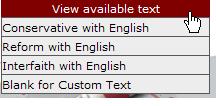
Selection list should look like this:
View available text (When clicking on this the selection list should open):
Conservative with English
Reform with English
Interfaith with English
Blank for custom text
What I did:
- I've created a taxonomy vocabulary called: ketubah text.
In there I have the term: Option One
-
I've created a cck type called: Available Text with file filed (multiple options).
-
I created content with the available text cck and uploaded a few pdf files.
-
I created a view base on this cck type.
The problems I have:
- The files open in the same window, I want them to open in a new window.
I looked at this post, but after trying all their suggestions, the file is still opening in the same window:
-
I want the list to show the file description and not the file name, but couldn't find a way to do that.
-
What can I use to display this list closed until the user either clicks it or hover the mouse over it.
I'm attaching a file that show how the list should look like.
Thank you,
Sigal
| Attachment | Size |
|---|---|
| list.JPG | 7.98 KB |
Comments
The thread you used showed
The thread you used showed the old Drupal 5 l() function's use. How you would solve this:
Since this has to do with the upload module and you want to theme outp[ut differently, you should start by looking for theme files and theme functions in the core upload module modules/upload/upload.module is where you will find the function theme_upload_attachments() as follows:
<?php/**
* Displays file attachments in table
*
* @ingroup themeable
*/
function theme_upload_attachments($files) {
$header = array(t('Attachment'), t('Size'));
$rows = array();
foreach ($files as $file) {
$file = (object)$file;
if ($file->list && empty($file->remove)) {
$href = file_create_url($file->filepath);
$text = $file->description ? $file->description : $file->filename;
$rows[] = array(l($text, $href), format_size($file->filesize));
}
}
if (count($rows)) {
return theme('table', $header, $rows, array('id' => 'attachments'));
}
}
?>
This, then, is the function you want to override. To do so, make sure you have a file called template.php in your own theme's directory, if it doesn't exist, create it, if it does exist, edit it to add the above function, but change the name of the function to replace the word "theme" with "phptemplate" of with your theme's name:
<?php/**
* Displays file attachments in table
*
* @ingroup themeable
*/
function phptemplate_upload_attachments($files) {
$header = array(t('Attachment'), t('Size'));
$rows = array();
foreach ($files as $file) {
$file = (object)$file;
if ($file->list && empty($file->remove)) {
$href = file_create_url($file->filepath);
$text = $file->description ? $file->description : $file->filename;
$rows[] = array(l($text, $href), format_size($file->filesize));
}
}
if (count($rows)) {
return theme('table', $header, $rows, array('id' => 'attachments'));
}
}
?>
Note, the only line changed so far is:
<?phpfunction theme_upload_attachments($files) {
?>
to
<?phpfunction phptemplate_upload_attachments($files) {
?>
The l() function, is the one theming your link. It is your links that you want to change, so you will go to the API site and look up the l() function to see how it works:
http://api.drupal.org/api/function/l/6
You'll see that in Drupal 6 the l() function works quite a bit more logically than in Drupal 5, the difference is significant enough that the Drupal 5 code you were using will not work. You now want to change the line:
<?php$rows[] = array(l($text, $href), format_size($file->filesize));
?>
to
<?php$rows[] = array(l($text, $href, array('attributes' => array('target' => '_blank'))), format_size($file->filesize));
?>
Don't just do it, read the API page on l() so that you understand what you're doing. This is the final function for your template.php file:
<?phpfunction phptemplate_upload_attachments($files) {
$header = array(t('Attachment'), t('Size'));
$rows = array();
foreach ($files as $file) {
$file = (object)$file;
if ($file->list && empty($file->remove)) {
$href = file_create_url($file->filepath);
$text = $file->description ? $file->description : $file->filename;
$rows[] = array(l($text, $href, array('attributes' => array('target' => '_blank'))), format_size($file->filesize));
}
}
if (count($rows)) {
return theme('table', $header, $rows, array('id' => 'attachments'));
}
}
?>
Finally, if you just created template.php, remember that Drupal has to learn of it's existence. It can't learn all about new files on every single page load, that would add unnecessary load, so go to your sites Administration -> Site Building -> Themes page and save the themes again to have Drupal learn of the new theme file's existence.
That should work.
Now that you know how, I have to recommend that you do not do this. Opening new windows is terrible usability. You should always allow the client (visitor) the option to choose whether a document opens in a new window. Even if your client (paying) requests this, just don't. I simply refuse any non-standard or bad usability standards work. target is also not an XHTML 1.0 Strict and XHTML 1.1 attribute, so you will set all browsers to quirks mode and break your standards compliance with this sort of thing. You can get around this with JavaScript, but you're battling usability standards, just don't do this, ever! ;-)
Thank you
Oh, I only saw you posted a reply now, thank you :)
A pleasure, let me know if
A pleasure, let me know if this works for you.
This is not working for me
Hi,
I am using drupal 6 for my site and I have tried your code but it is not working with pdf files in windows firefox webbrowser
Kidly do the needful asap
thanx
Same here, working on IE, but
Same here, working on IE, but not on firefox somehow!
greetings,
Martijn
iTweak Upload module can prevent this from working
As I've discovered during testing, the iTweak Upload module can prevent this from working.
I haven't looked into why it won't work, but it's something to be aware of.
Fixed the iTweak Upload issue
After some poking around, I was able to find the function in the itweak_upload.module file and modify it so that "target = _blank" will work.
NOTE: This applies to Drupal 6.
The specific function is: itweak_upload_upload_attachments
function itweak_upload_upload_attachments($files, $options = NULL) {
  $stats = function_exists('_download_count_stats');

  $header = $stats
    ? array(
        array('data' => t('Preview'), 'class' => 'preview'),
        array('data' => t('Attachment'), 'class' => 'file'),
//        array('data' => t('Hits'), 'class' => 'download_count', ), array('data' => t('Last download'), 'class' => 'download_last'),
        array('data' => t('Count / Last Download'), 'class' => 'download_stats', 'colspan' => 2),
        array('data' => t('Size'), 'class' => 'size'))
    : array(
        array('data' => t('Preview'), 'class' => 'preview'),
        array('data' => t('Attachment'), 'class' => 'file'),
        array('data' => t('Size'), 'class' => 'size'));
  $rows = array();
  foreach ($files as $file) {
    $file = (object)$file;
    if ($file->list && empty($file->remove) && empty($file->hidden)) {
      $extension = strtolower(substr(strrchr($file->filename, '.'), 1));
      $href = _itweak_upload_file_create_url($file);
      $text = $file->description ? $file->description : $file->filename;
      $row = array();
      if (isset($file->preview)) {
        $row[] = array(
          'data' => drupal_render($file->preview),
          'class' => 'mime mime-' . $extension,
        );
      }
      else {
        $row[] = array(
          'data' => '',
          'class' => 'mime mime-' . $extension,
        );
      }
   $row[] = array(
        'data' => l($text, $href, ($options && $file->access && (isset($file->preview) || _itweak_upload_isimage($file) || isset($options['custom']))) ? $options : array()),
        'class' => 'file',
      );
      if ($stats) {
        _download_count_stats($file);
        $row[] = array('data' => $file->download_count, 'class' => 'download_count',);
        $row[] = array('data' => $file->download_last , 'class' => 'download_last',);
      }
      $row[] = array(
        'data' => format_size($file->filesize),
        'class' => 'size',
      );
      $rows[] = $row;
    }
  }
  if (count($rows)) {
    return
      '<div class="itu-attachments">'
      . theme('table', $header, $rows, array(
          'class' => 'itu-attachment-list' . ($stats ? ' withstats' : ' withoutstats'), 'id' => 'attachments'
        ))
      .'</div>'
    ;
  }
}
Below is the relevant code that needs editing.
$row[] = array('data' => l($text, $href, ($options && $file->access && (isset($file->preview) || _itweak_upload_isimage($file) || isset($options['custom']))) ? $options : array()),
'class' => 'file',
);
Modify it as follows.
$row[] = array('data' => l($text, $href, array('attributes' => array('target' => '_blank')), ($options && $file->access && (isset($file->preview) || _itweak_upload_isimage($file) || isset($options['custom']))) ? $options : array()),
'class' => 'file',
);
So, you just need to add the following to your template.php file (remember to modify phptemplate so that it is your theme name).
function phptemplate_itweak_upload_upload_attachments($files, $options = NULL) {
$stats = function_exists('_download_count_stats');
$header = $stats
? array(
array('data' => t('Preview'), 'class' => 'preview'),
array('data' => t('Attachment'), 'class' => 'file'),
// array('data' => t('Hits'), 'class' => 'download_count', ), array('data' => t('Last download'), 'class' => 'download_last'),
array('data' => t('Count / Last Download'), 'class' => 'download_stats', 'colspan' => 2),
array('data' => t('Size'), 'class' => 'size'))
: array(
array('data' => t('Preview'), 'class' => 'preview'),
array('data' => t('Attachment'), 'class' => 'file'),
array('data' => t('Size'), 'class' => 'size'));
$rows = array();
foreach ($files as $file) {
$file = (object)$file;
if ($file->list && empty($file->remove) && empty($file->hidden)) {
$extension = strtolower(substr(strrchr($file->filename, '.'), 1));
$href = _itweak_upload_file_create_url($file);
$text = $file->description ? $file->description : $file->filename;
$row = array();
if (isset($file->preview)) {
$row[] = array(
'data' => drupal_render($file->preview),
'class' => 'mime mime-' . $extension,
);
}
else {
$row[] = array(
'data' => '',
'class' => 'mime mime-' . $extension,
);
}
    $row[] = array(
        'data' => l($text, $href, array('attributes' => array('target' => '_blank')), ($options && $file->access && (isset($file->preview) || _itweak_upload_isimage($file) || isset($options['custom']))) ? $options : array()),
        'class' => 'file',
      );
if ($stats) {
_download_count_stats($file);
$row[] = array('data' => $file->download_count, 'class' => 'download_count',);
$row[] = array('data' => $file->download_last , 'class' => 'download_last',);
}
$row[] = array(
'data' => format_size($file->filesize),
'class' => 'size',
);
$rows[] = $row;
}
}
if (count($rows)) {
return
'<div class="itu-attachments">'
. theme('table', $header, $rows, array(
'class' => 'itu-attachment-list' . ($stats ? ' withstats' : ' withoutstats'), 'id' => 'attachments'
))
.'</div>'
;
}
}
Try these modules
http://drupal.org/project/external
or
Or write a regular expression and use http://drupal.org/project/extlink