
Posted by dddave on September 25, 2009 at 11:09am
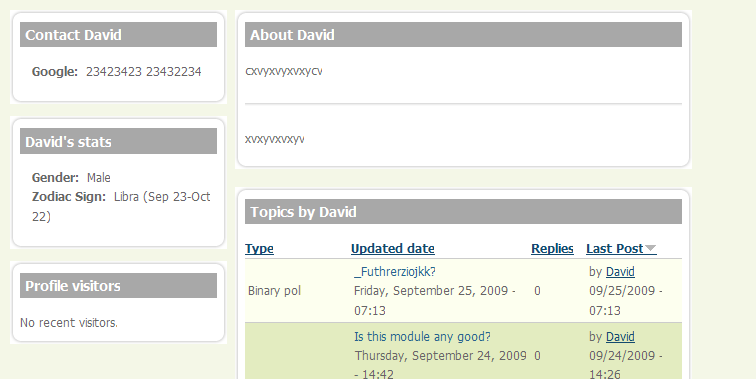
I am trying to make my profiles with APK but have the issue that I get rounded corners with a white background (see attached pic). I cannot switch to Acquia Marina Rounded Corners style because APK seems to be fixed on its own style. My solution would be to change the background colour to white but I cannot figure out where to put it. I figured how to change the main wrapper to white but I only want to change the colour on profile pages.
I tried changing
profile {
  background: white;
  clear: none;
  margin: 12px 0;
but this failed also. I think the fact that APK uses Panels makes this somewhat complicated (at least for me..).
Panels allows to provide CSS code directly in the settings of a variant but I my limited skills seem to block this road also. I tried my luck with
#main-wrapper {
  background: white;
  padding-left: 15px;    /* LTR */
}
You might have guessed that I am really at the beginning of learning CSS. Any helpful advise would be very appreciated.
| Attachment | Size |
|---|---|
| APK Background Issue.png | 21.47 KB |
Comments
Two ways to do this: One is,
Two ways to do this: One is, as you mentioned, change the Bg color. The other is to turn the APK panel images into transparent. The easiest is to just change the BG color.
So OK, to do this, open your css. Scroll down to:
/************************/
/* MAIN AREA WRAPPER /
/ (Sidebars + Content) */
/************************/
/#main-wrapper {
background: #F4F7E7 url('images/content-gradient.png') repeat-x 0 1px;
padding-left: 15px; / LTR */
Just change #F4F7E7 to #FFF (white). That will change your main area content wrapper. Now you'll also need to change the footer color as well to match the white. Also remove the image. what you'll end up with is:
/#main-wrapper {
background: #FFF;
padding-left: 15px; / LTR */
(uncomment first. Remove the /* at the beginning of the hash mark)
The culprit color is #F4F7E7, so you can search for all background references to that color. In the footer region in css, you'll see it as well.
The other thing is to download the image files that are being used, open them in Photoshop and make the white overflow transparent.
As a side note, here are two add-ons that will really help you learn css, as well as save you a ton of time and headache: Web Developer and Firebug. Both are amazing and let you totally change your css and see real time results without permanently changing the css until you're ready. There's a ton of other thing they can help with. I prefer Web Dev, but Firebug is more popular. Both are awesome, it's just a preference really. And if you're not using Firefox, you definitely should be. Firefox is the only browser that renders everything in absolute perfection... exactly the way it was meant to look.
Also, I'm using Acquia Mariana too... and totally love it. You'll have to customize every template you use, but man, Marina makes it's really easy overall. I've completely changed mine, moved the drop-down menu and search box and even added a 4th Postscript section. So needless to say, Marina is etched in my mine!
Best of luck to ya and I hope this helped! Don't hesitate if you need anything else.
Chris
Thx Chris, but...
Thx for the help first of all!
I am using firebug but haven't checked out the Web Developer yet.
I figured how to change the bg colour out already but the messy part for me is to restrict the change only to profile pages.
As far as I can understand the situation it seems to be a more feasible solution to change the images used here. I tried to use Panels own override option but I am unable to achieve a changed background. Inserting the changed css code for the main wrapper doesn't work. I tried:
#main-wrapper {background: #FFF;
padding-left: 15px;
}
Any suggestions about how to change the bg colour only on profile pages?
.
You could always just change the background color of #user-profile to just change the profile background.
Michelle
Totally forgot
to say thank you!
.
bump
Try this
Hey Dave,
I'm still trying to figure out an easy way to do this for you. But, in the meantime, here's what I'm doing myself: I wanted to be able to use different backgrounds and layouts on different main sections of my site... but I don't have time to do a lot of serious modding and re-coding or to create new tpl's and preprocess functions. So I found this module: http://drupal.org/project/themekey
It let's you assign different themes based on different protocols, like node, path, etc. I'm not changing my user profile pages like you, but this mod could do what you need, and you can define the user path to point to a different or modded theme. It has a lot of power and potential, but it can also be very simple too. Here's what I mean:
I've customized Marina to the point where it's really not Marina anymore, meaning that you can look at the site and never know it's a Marina-based theme. I want to keep the majority of the layout fluid throughout the site, with just some minor changes on certain sections, like TV, Movies, Games, etc. So what I did was download the Marina theme via ftp to my laptop, then changed the name of it to what I needed. Then I uploaded it back. I created a new folder in sites/all called "themes" (sites/all/themes), then uploaded it there. I cleared all caches, then the theme was there. From that point, I can load the theme based on path (in your case, the path would be user/% for all user pages). Now you have the ability to change your newly created Marina-based theme as a whole, including the background, and it will only show up on user pages, including profile because the Themekey module is restricting the custom theme to only those paths/nodes. Doing this could also give you the option to further customize layout to be completely different only on those pages.
It may seem time consuming or difficult, but it's honestly not, especially if you're already familiar with the Marina theme. Give it a shot and see what you think. It has saved me a load of time and headache.
If you try this, make sure that when you download the theme to your PC, you change all references of Marina. Change the .info file, as well as the name. Change the folder name to your custom theme name. Make changes in the tpl file as well. To make it easy, just open the files in Notepad and search for Marina, then change all references you find to your custom theme name. Then upload and start changing using Firebug or Web Developer. Let me know if you have any problems or need more help. The mod really is a lifesaver and provides another world of theming options... and makes it very easy.
Good luck!
Thanks
For this massive input. Definitely worth knowing but Michelle's hint solved the problem for the moment.