
Posted by btopro on March 7, 2008 at 9:41pm
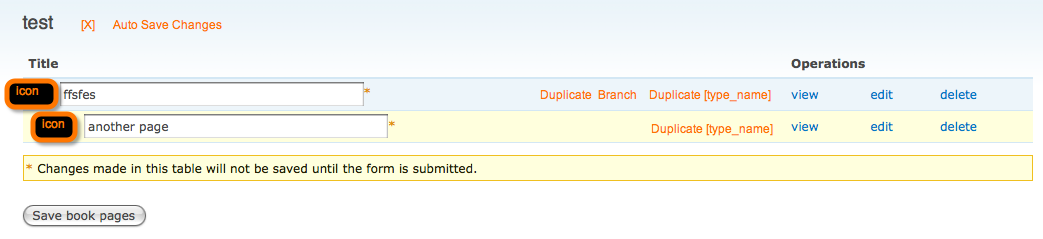
I attached a real quick and dirty mock up of possible improvements to make to the new drag and drop system that was created for D6. Having already invested sometime into making a drag and drop interface for 5 (will be released shortly) I noticed a lot of features that I included in my module that I think would be great to have as part of the core drag and drop interface. Wish-list / some things I'll be trying to throw into a patch once I figure out the drag/drop architecture :) :
- Duplication of content: We have saved hundreds of hours of work by the inclusion of a basic recursive duplication function. Ours duplicates both the content you click on and all children nodes beneath it. A context specific duplication that allows you to optionally grab all children below it would be awesome to have and the code for such an operation is fairly simple
- recursive node_load
- set nid to null
- update parentid associations in children
- node_save
- Ghosted Drag - Using a ghosted drag operation instead of the current way which just slides the content up,down,left,right gives the user a better sense not only of where content will land but also where it started. Click and drag should highlight the current entry as well as shift others around with a duplicate version that has a lower opacity. Then on mouse-up kill the original from the DOM and change the opacity settings on the one that was previously ghosted to demonstrate the new position. As with a lot of these usability suggestions this helps improve user knowledge of the context of the nodes they are moving. It also helps them see what the structure looks like before and after the drag is complete so that they can compare the two versions mid-drag and be able to recognize if they are creating the correct (new) structure the way that they intended.
- Content type improves awareness - Using the name of the content type in the view helps make the user aware of what that piece of content is. I could have 30 nodes all with similar names but I could have only one of those nodes of type "book heading". Being able to quickly identify that at a high level helps the user realize what they want to be editing instead of currently hitting view several times to open the potential node they want in several different tabs to ensure they don't leave that page and have to reload it. Use the word or representation of the word somewhere (see next point)
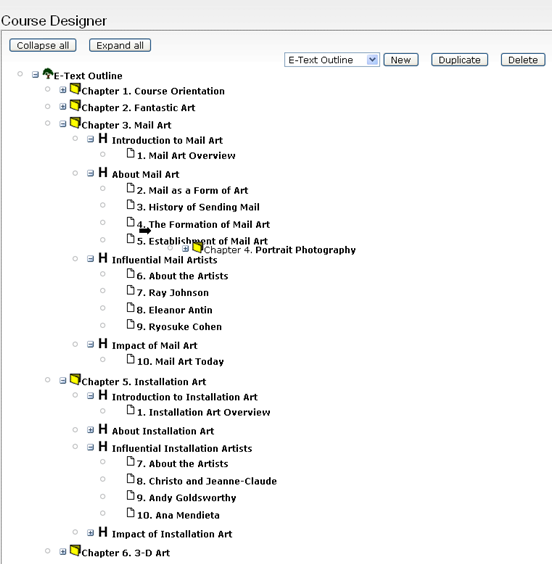
- Icon association to a content type - There's been a lot of talk of icons and allowing users to select an icon to associate to their content types could be extremely powerful. The sample image i've attached shows how much more information you can get about a tree of data just by looking at the icons used to describe each node. Placing these icons on the drag and drop interface would be great as well (then just overlay the movement arrows overtop of it while on drag is going on).
- Auto-save changes - This actually came up during a Drupal-con presentation about AHAH and drag and drop stuff. Our module auto saved in the past and I think that MOST (not all but the majority) of users would want their changes to be committed immediately. Including a minor undo history could alleviate any fears people have about screwing up the structure of their content royally
- Thick-box override of links - The link operations over on the right side of View, edit and delete should all have the ability to be ajax submits. Our system used a popup to allow this page to remain loaded but throwing up a thick-box for view and edit instead of changing the page could be a huge time saver. Also ajax based deletion of nodes with JS popups for confirmation could improve the workflow their as well. The ability to delete trees of data would also be nice (at least having the option to do so instead of directing them to be orphans).
- Context based nav - My favorite part about past code with books is adding a right-click based context menu. It severely reduces the clutter of redundant information on the page. An example of this is here (couldn't get it in a screenshot) - http://elearning.psu.edu/demo/elms . Using a right click environment paired with drag and drop could really destroy the amount of time it takes to administer sites. A permissions based structure for who can see what on what nodes on a right click would be fantastic. I've done some experimental work with context based right click on a node by node basis and had some limited success (too much of it was hardcoded in the JS though).
- Inline title edit - By default the current system (as well as pre-drag drop books page) has each title as an input field that is immediately editable. This not only clutters the screen but also can make it difficult to isolate (visually) exactly what title you are editing. By default, make all the text fields just that, text. Then on either a right-click operation or the clicking of an edit icon of some kind swap the text out with an inline text-field. The user will then know exactly what they are working on from a visual standpoint as it will be the only text-field on the screen. Upon hitting return, switch it back to plain text and save the title in the background (the example that I referenced earlier does this, just right click on the text of a node).
- Gmail like taxonomy display - If right click frees of space on the page it would leave more room for looking other pieces of information that would be nice to see at a quick view like taxonomy. Now we're starting to extend outside of just the books overview page and into the node list overview page as well. Centralize all operations there, in books, and in the block placement page via a system level drag-and-drop/right-click system (just extending the current one) I think would be killer in turning newbees into power users.
Thoughts? Flames? :)
| Attachment | Size |
|---|---|
| Proposed Usability | 32.32 KB |
| ELMS / Current Usability improvements to D5 | 67.28 KB |
Comments
You are a Heroe for me.
You are a Heroe for me. That's really an awsome project. I'm not a developer but if you need a test user I'm ready to help out at any time. Thanks.
My Begginners Sites http://www.adaccs.at
Cheers
Wolfflow
ha, thanks
Since DCBoston08 this project was made publicly available on d.o. as a module. If you'd like to try it out go here: http://drupal.org/project/outline_designer
There's also some more stuff coming down the pipe that I'm working on that has to do with book navigation slicing that i'll try to integrate into the outline designer.
"Plaguing the world with Drupal; One Plone, Moodle, Wordpress, Joomla user at a time since 2005." ~ btopro
http://elearning.psu.edu/
http://elearning.psu.edu/projects/
http://elearning.psu.edu/drupalineducation/
Ex Uno Plures
http://elmsln.org/
http://btopro.com/
http://drupal.psu.edu/