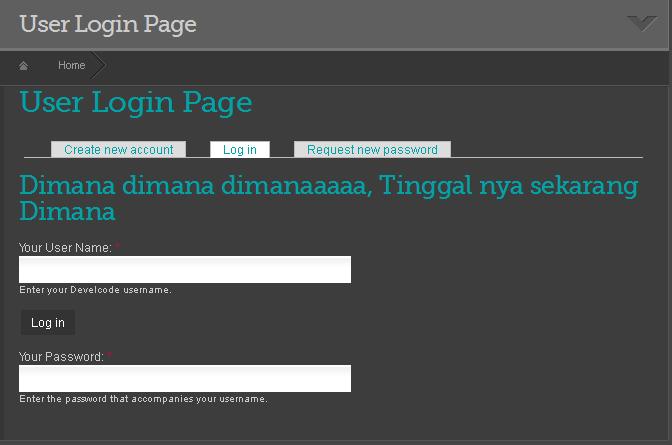
Posting Kedua aku ingin menerus kan Themig Form pada Login Form
langkah Langkah Nya hampir Mirip pada Post saya sebelum nya...
Oke Kita mulai dengan Membuat Hooks_theme pada Templates.php
ikuti code Berikut ini
<?php

/**
* Implmentation of hook_theme().
*/

function Thememu_theme($existing, $type, $theme, $path){

  return array(
    'user_login' => array(
      'arguments' => array('form' => NULL),
      // and if I use a template file, ie: user-login.tpl.php
      'template' => 'user-login',
    ),

?>
Kemudian Buat Anchor Preprosess nya seperti ini
<?php

/**
 * Custom function to User login !
 */
function Thememu_preprocess_user_login(&$vars) {

  // Costum title form
  $vars['form']['name']['#title'] = t('Your User Name');
  $vars['form']['pass']['#title'] = t('Your Password');

  //dsm($form);
  return drupal_render($form);
}

?>
Code di atas saya masuk kan sedikit untuk merename Title username & Password
langkah Berikut nya buat file user-login.tpl.php
dan ikuti code berikut ini
<?php
<h2>Dimana dimana dimanaaaaa, Tinggal nya sekarang Dimana</h2>
<!-- Let's print the form's XHTML -->

<?php print drupal_render($form['name']); // prints the username field ?>

<?php print drupal_render($form['submit']); // print the submit button ?>

<?php print drupal_render($form['pass']); // prints the Password field ?>


<?php
/**
 * Custom function to User login !
 */

  drupal_set_title(t('User Login Page'));


  // That's where $form_markup for implementasi $form
  print drupal_render($form);

?>

?>
Okeh Saya jelaskan sedikit tentang code di user-login.tpl.php
<?php

<h2>Dimana dimana dimanaaaaa, Tinggal nya sekarang Dimana</h2>
<!-- Let's print the form's XHTML -->

?>
Untuk Meng isert file Html anda
<?php

<?php print drupal_render($form['name']); // prints the username field ?>

<?php print drupal_render($form['submit']); // print the submit button ?>

<?php print drupal_render($form['pass']); // prints the Password field ?>

?>
Meng nge Print Form anda
<?php
/**
 * Custom function to User login !
 */

  drupal_set_title(t('User Login Page'));


  // That's where $form_markup for implementasi $form
  print drupal_render($form);

?>
untuk memasuk kan Variable Fungsi apa pun yang anda inginkan, tapi di sini saya hanya memasukan fungsi rename Title page.
silahkan Clear Chace anda dan lihat Reaksi nya
sebagai gambaran hasil nya akan seperti ini Klik pada attachment berjudul ayutingting.jpg
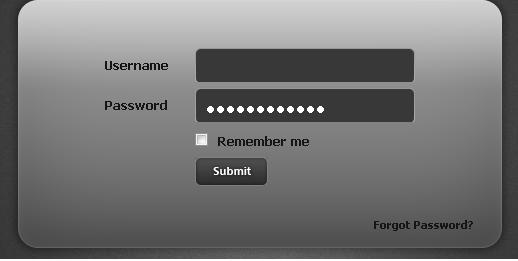
dan untuk inspirasi anda bisa di mark up dengan Html dan css seperti pada attachment berjudul burungbeo.jpg
| Attachment | Size |
|---|---|
| ayutingting.JPG | 25.5 KB |
| burungbeo.JPG | 11.94 KB |