Posting ke tiga saya akan membagi trik theming Request Password page dengan sedikit berbeda tetapi tetap sama.
okee kita buka file Templates.php dan buat Hooks_theme baru
ikuti code berkut ini.
<?php
/**
* Implmentation of hook_theme().
*/

function Thememu_theme($existing, $type, $theme, $path){

  return array(
    'user_pass' => array(
      'arguments' => array('form' => NULL),
      // and if I use a template file, ie: user-pass.tpl.php
      'template' => 'user-pass',
    ),
?>
Kemudian buat Anchor Preprocess seperti ini.
<?php
/**
 * Custom function to User request password !
 * Difrent Tehnik use form_markup to insert fields in user-pass.tpl.php
 */
function especial_preprocess_user_pass(&$vars) {

  drupal_set_title(t('User Request password'));

  // Costum title form
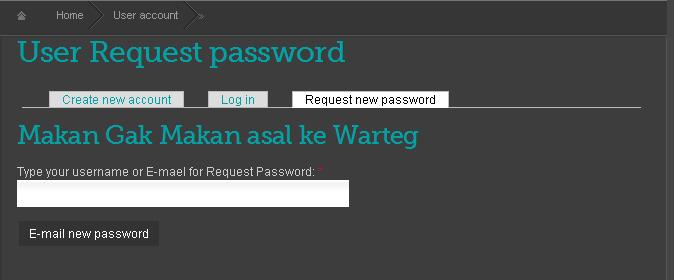
  $vars['form']['name']['#title'] = t('Type your username or E-mael for Request Password');


  // That's where $form_markup is created
  $vars['form_markup'] = drupal_render($vars['form']);
}
?>
code di atas sedikit berbeda karena menggunakan
// That's where $form_markup is created
$vars['form_markup'] = drupal_render($vars['form']);
untuk meng ngeprint Form nya
Terus buat User-pass.tpl.php
ikuti Kode berikut ini
Kemudian buat Anchor Preprocess seperti ini.
<?php
<h2>Makan Gak Makan asal ke Warteg</h2>

<!-- Let's print the form's XHTML -->

<?php print $form_markup;
?>
?>
di situ anda bisa menulis Xhtml anda sesuai bentuk dan rupa sesuka anda.
Clear Cache ... selesai !
sebagai gambaran hasil nya akan seperti attacment di bawah ini
| Attachment | Size |
|---|---|
| ranokarno.JPG | 18.38 KB |