
Posted by WebmistressM on December 14, 2009 at 5:33pm
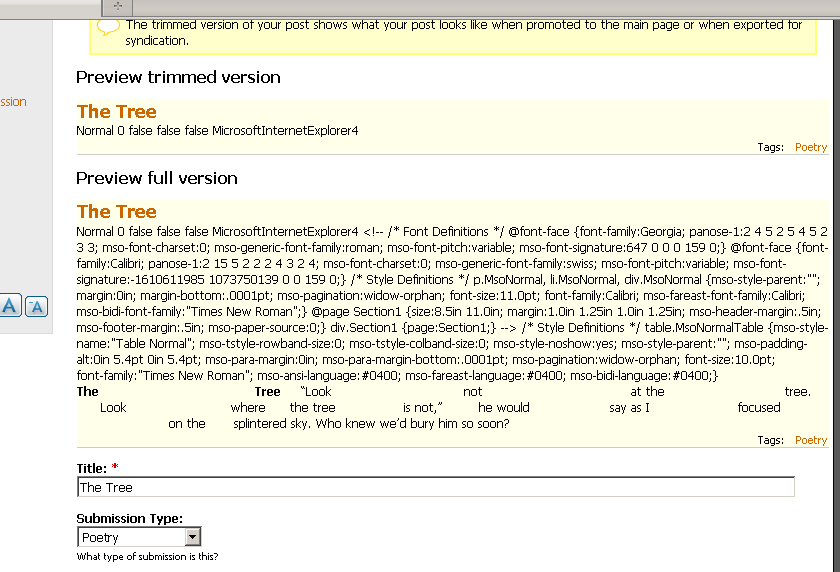
Im currently working on a website soon to release its first online "zine" of written works and poetry. One problem I encountered is that sometimes the styling in the original doc file is important to have maintained in the online version. At this time I am using the WYSIWYG module with the TinyMCE library. While I know I cant duplicate every font (since some poems use fonts that not all computer users would have loaded), I do need to duplicate spacing. So far a spaced article turned this little gem up when the submission was previewed.
| Attachment | Size |
|---|---|
| preview.PNG | 33.16 KB |
Comments
Word CSS
After reviewing your screencap, I would highly recommend is to not use the css generate by MS Word. All the "mso" items are non-standard and contribute to the formatting irregularities. To gain the greatest styling control I would also recommend not using TinyMCE. I find it to be cumbersome and frustrating when you need to layout and style text.
Also check out http://openfontlibrary.fontly.org/ this is a great way to display fonts on the web that are probably not loaded on the visitors machine.
Thank you, Maxxtraxx Yes,
Thank you, Maxxtraxx
Yes, this screencap was actually given to me by my client and I figured he literally copied and pasted from the document onto the Drupal browser page. I tried to save the same doc file as an html (hoping this would clean up the problem), but it did not preserve the spacing. What library for the WYSIWYG module would you recommend if not TinyMCE?
As for the openfontlibrary site, how would it integrate with Drupal? Is it really going to let the visitors view the site in its correct fonts without having to download anything themselves?
Well, this is actually where
Well, this is actually where I would deviate from the Drupal interface and just work it up in the css and content html for that page/story/post. Unfortunately (and hopefully this isn't your situation) if it is your client that is posting the new content straight from a Word doc you might be in a bit of a pickle. To answer your other question, I've only used Tiny in drupal but I have used FCK for other projects and I like it quite a bit.
The openfontlibrary usage would also just be a trick of css and html, not really something directly related to Drupal. So if for example, your client wanted to use NotCourierSans typeface you could download the font from the library and load it onto your site, edit your Tiny configuration to reference the new font face and then they could use it. But if it is your clients that are loading the content, I don't think this is a viable solution.
Whoa
OK I'm lost... How is that happening? Like is it
Write poem in Word >> Select all/Copy >> Paste into Drupal? Or are you using a CCK for poems? Is it Word 2007?Sorry for all the q's but I'd be curious to know just for my own knowledge... Well, that and I've ran into more Win vs Lin problems than I care to discuss (but that's neither here nor there).
Hmm....Drupal.org is having a
Hmm....Drupal.org is having a hell of a job in letting me put an attachment, so Ill post you the link to my imagehost.
http://leopardspot.endofinternet.net:81/ImageServer/thetree.jpg
Basically, both the client and I have tried a straight copy and paste. I have OpenOffice to open doc files (Im a Linux user) and my client has Microsoft Office 2003. Both him and I get the exact same result so I think it is less about an error and more about Drupal not knowing how to parse that kind of spacing in the post, even with the WYSIWYG module and TinyMCE library. As Maxx suggested, I might need to use a different library which Im more than open to.
As of now, I do not have CCK activated but will need to reactivate it for other things not pertaining to this topic. Any chance that CCK can handle the problem?
OK now I totally know what
OK now I totally know what you're saying. It's probably a matter of the "Input format", its settings, the use of WYSIWYG, and/or a combination of them all. Have you tried copying/pasting and then wrapping the pasted part with
<pre>and</pre>tags? (Something like this?):The Tree “Look not at the tree. Look where the tree is not,” he would say as I focused on theOr am I still way off?
Oh yeah.....Im wondering why I had not thought of that.
I could try and use pre tags. I had actually not thought of that but it will be what I will add as an available button to TinyMCE if this works right. However, will it have the blue outline around all of it, like it does here on Drupal groups?
CSS white-space
There's also the CSS white-space property. Something like div.poem{ white-space: pre-wrap; } would preserve all the extra spaces. It would also let text wrap onto the next line if it reached the edge of the container, and also let you use whatever font was already being applied. The pre tag, by default, lets text flow off the side of the page instead of wrapping and usually sets a monospace font like Courier New.
Edit: Here's a reference I forgot to link: http://www.w3schools.com/CSS/pr_text_white-space.asp
Also, judging by the screenshot, I think the styles from MS Word would be applied if you set the input filter to Full HTML. Of course, it's dangerous to give Full HTML input to every user. But it could be an option if you only let trusted users submit content.