
There is a sea of modules for Drupal. The selection can be daunting. I am going to list a few modules that I have discovered while solving real issues on a new intranet that I created for our library. Many of these I learned about from various Lullabot resources.
Token - http://drupal.org/project/token
Most people know about token, but I use it in so many so many situations I am including it. A token is a small piece of text that stands in for chunks of data. Tokens can be used to call information in node edit forms and in views and many other modules. Tokens are brilliant.
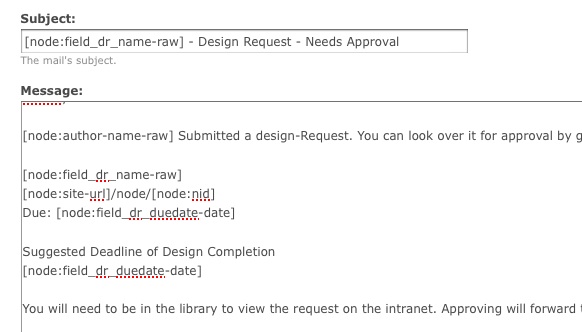
Auto NodeTitle - http://drupal.org/project/auto_nodetitle
Sometimes you want a titles of nodes to be consistent or be a combination of other fields in a post. You can just hide the title and use Auto NodeTitle to grab data from other fields.

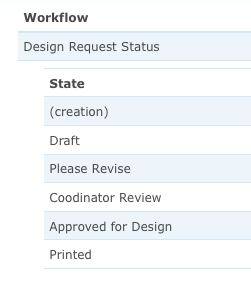
Workflow - http://drupal.org/project/workflow
By default you can save published and unpublished content. I used Workflow to create a series of states for a content type called Design Request. You can control what people of certain roles can do under each state. The Design Requests have the following states. Draft, Coordinator Approval, Approved, Printed.
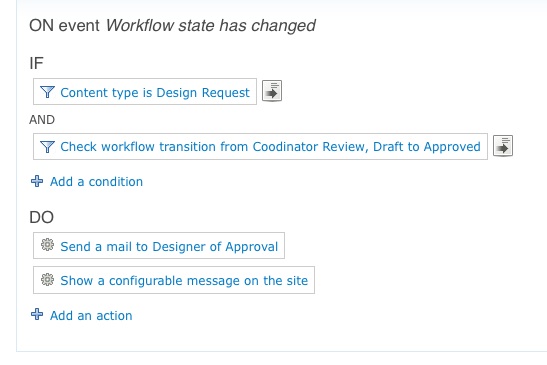
Rules - http://drupal.org/project/rules
You can use rules to make things happen under certain conditions. I used rules to send emails, publish content, and show messages to people as design requests are saved, approved, printed etc. Rules can do a lot more.
Flag - http://drupal.org/project/flag
Simple and powerful, A flag is a simple toggle like link on a node. I use flags to show links that certain roles can click to trigger an effect. For instance: A Design request is saved as "send coordinator approval." When the coordinator looks at the Design Request there is a link that they can click to send the Design Request to the Designer. The rule is the flag is the link that leverages the rule that does the work.

Context - http://drupal.org/project/context
Combines conditions and reactions. I often use context to create more elaborate situations where a block will show up. It offers a lot more flexibility than blocks administration. One thing that makes sense is that you can have one block that shows up in various places, rather than being locked to a the old path and role system. Plus once you put the block somewhere, you can do something different with it. As an example you can have one block on as many regions as you want at one time . I'm only scratching the surface.
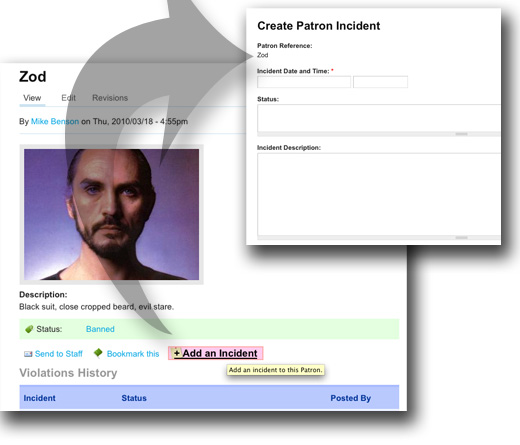
Prepopulate - http://drupal.org/project/prepopulate
Automatically selects form elements in a node based on the place that you clicked it from. I have two content types that are related. Content type one is "Patron" content type two is "Patron Violation." Adding a patron violation to a patron auto populates the violation form with a reference to the patrons description.
Vertical Tabs - http://drupal.org/project/vertical_tabs
Tired of ugly node edit forms? Vertical tabs makes ajaxy tabs for each field set. It makes thing more organized and clean.

Poormans cron - http://drupal.org/project/poormanscron
Makes scheduling cron jobs easy.
Views Bulk Operations - http://drupal.org/project/views_bulk_operations
Like the admin/content page but with options to make changes to many things at once.
Backup and Migrate - http://drupal.org/project/backup_migrate
Fantastic module that automates backups of your database. It's smart, automated and easy as pie to set up.
Pathauto - http://drupal.org/project/pathauto
Automate the path that your content lives at - build views to compliment the paths.
| Attachment | Size |
|---|---|
| prepupulate123.jpg | 44.75 KB |
Comments
I'd like to add
I'd like to add http://drupal.org/project/pbcore and http://drupal.org/project/creativecommons to the list of modules libraries consider. I also prefer http://drupal.org/project/cck_fieldgroup_tabs over vertical tabs. Field Group Tabs gives you the option of creating multistep forms with vertical tabs.
Other useful modules
Webform: easy to implement single step forms.
Node clone: makes copies of your node, especially useful for cloning Webforms
Captcha: "A CAPTCHA is a challenge-response test most often placed within web forms to determine whether the user is human."
IP Login: yes, I had to allow login of some users by their IP address, very useful in an intranet scenario.
Menu breadcrumb: this module saved my life.
Site Map: Well, does a great job in automating my site's navigation system along with Menu breadcrumb.
Node privacy by role: well, I think this is one of my favorites, as it gives a very fine grained control over access to individual nodes and is so easy to use.
Nodewords: we are in the libraries world, we need metadata in our pages!
Printer, e-mail and PDF versions: who doesn't need a print version of their web pages? Serves well for pages that contains long lists, for example.