
Posted by tinarey on March 1, 2011 at 6:46am
Hi,
I've just switched from a previous version of the Omega theme to the recent one with the zones and regions and am struggling a bit.
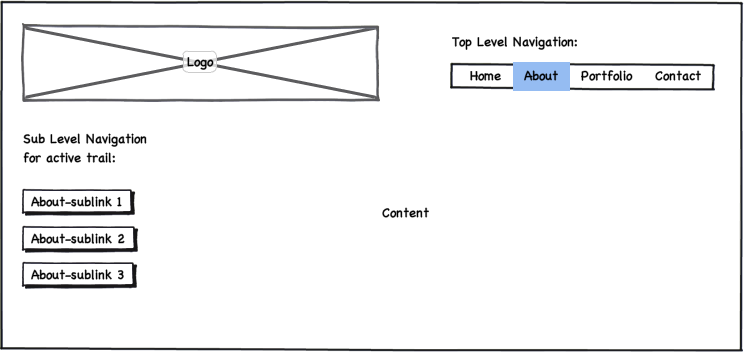
I've got a main menu with sublinks (depth of 2) and want to display the top level of the navigation at the top of the page and the sub-links of the active trail only in the sidebar. (See attached mockup)
Could you please tell me how I can accomplish this? So far, I've set the Main Menu as source for the Secondary Links, but that's about it.
Thanks,
Tina
| Attachment | Size |
|---|---|
| mockup.png | 29.6 KB |
Comments
As Jake is phasing out the
As Jake is phasing out the menu system in Omega it's probably a good idea to do this with the Menu Block module.
You'd basically create a menu block that would sit in the menu region being the top level of your main menu and then create a second menu block that would sit in whichever sidebar region you wanted it to appear in that would only show the secondary/child links which can be done in the advanced settings when creating the men block.
This is quite a flexible approach as you can set the pages the secondary block would show on via the blocks settings and could also combine this with the context module.
I think you might struggle hardcoding this at the moment as there is a bug with the active trail in D7 which is another reason to use the Menu Block module.
Hope this helps.
Andy
Hi Andy,Thank you for the
Hi Andy,
Thank you for the quick answer! The Menu Block Module did the trick in no time. Even though I didn't want to create any dependencies by using modules, with that D7 active trail bug I seem to have little choice. Thanks again!
Cheers,
Tina
That is correct...
@Andy, Thanks for the great response to this.
@Tina, Yes it IS sad to need to "really" rely on modules for "good" menu support.. but it seems to be the way things are moving, and likely in D8, menus will be 100% block controlled, much like search form in D7 is now only in a block, and not on the theme layer.
That context/active trail bug is a horrible one that I've investigated time and time again... and it does cause issue with my own development, and so... I find it best to either use default drupal menu implementation (primary/secondary) or just turn that off via Omega theme setting, and use blocks (either drupal core blocks) or some contrib block placement.
Jake Strawn (@himerus)
ThemeGeeks | Development Geeks
Omega - 960.gs
How to hide the secondary links in main menu
I'm looking for exactly the same implementation as Tina.
Using Menu Block I have created both main and secondary blocks, however I do not want to show any secondary links (or expansion bullets) in the main block.
I can't see any options for this, so how is it best achieved?
Paul
@MrPaulDriver
Same scenario
I'm trying to achieve the exact same thing as well, but with no luck. I've tried the Menu Blocks module but it's not supported in Drupal 7.2.
All I need to do is move the secondary menu from the "Menu" zone to the "Sidebar First" zone, which seems impossible to do.
Any ideas? Or do I just have to wait it out?
If you just want to move the
If you just want to move the secondary menu you could disable the menu check box in the omega theme and then place the secondary menu block in the blocks page