
Posted by jacouse on October 10, 2011 at 11:21am
I'm using Omega 3 on drupal 7.
I have no content in my sidebar region and I expected my content region to fill this space.
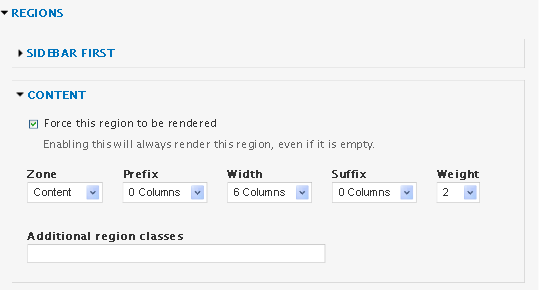
Do I need to set this region to by dynamic rather than static? If so, how do I do this? I don't seem to be getting the dialog option as detailed in the documentation. Do I need to install anything else? I already have the Omega Tools and Delta modules installed. Screen shot attached.
Arthur
| Attachment | Size |
|---|---|
| omega dynamic dump.png | 6.36 KB |
Comments
Did you try unchecking the
Did you try unchecking the box that says "Force this region to be rendered"?
Also, under the "Content Zone Configuration" there is the option to make it dynamic or static.
unable to set content region to be dynamic
I've got the "force this region to be rendered" unchecked for all the regions. The "Content Zone Configuration" option for static or dynamic doesn't seem to be appearing. Help much appreciated.
Arthur
also unable to
Same problem here. The "zone configuration settings" seem to be missing.
Try this
If you have no content (lets say for eg.) in the sidebar_first region, you can disable the whole region, making other regions (content) take its place. If you want this to take place only to some pages, you can do it with context also. After you have disabled the region you can make other regions more wide/narrow using the push/pull method (included in the 960 grid) depending what grid you use, a 12 , 16 or 24 is the widest.
Dynamic option is missing, it
Dynamic option is missing, it isn't cool :(
Just because it's missing
Just because it's missing doesn't mean it's not there. Content is dynamic by default. If you force render the other regions around it then it will not override the render of the regions. In content, if you want dynamic content sizing, set the column count for each region but don't force render. Content will take whatever is unrendered and available.
Drupaler and Mobile Ninja
Cellar Door Media - Beautiful Mobile Solutions
Yes! I found, why it did not
Yes! I found, why it did not work for me. Rendering debugging placeholder blocks must be disabled.
Yes, we've made sure to put
Yes, we've made sure to put that into the omega documentation in order to help others as it's a common issue. When the debugging blocks are turned on the regions have content placed into them and then the debugging javascript shows/hides the placeholders but since the regions have content loaded they are not dynamic.
I normally use the debugging blocks to layout structure for the wireframe then turn them off as I theme so I don't run into any issues with regions rendering when not wanted.
Glad you were able to get it working!
Drupaler and Mobile Ninja
Cellar Door Media - Beautiful Mobile Solutions