
Oke Saya Buka Discusion ini mengenai Bagaimana Theming User Interface untuk Client Web kamu Kamu
Saya akan Membagi Pengalaman bagaimana membuat Term & Condition di halaman Register Form web Drupal kamu,
Client ku kemaren orang yang tidak mengerti mengenai Pemograman tetapi dia ingin sesuatu yang lebih mudah dalam memanage web nya tanpa masuk ke file file .Php maka dari itu aku melakukan hal ini agar dia dapat dengan gampang mengubah ubah Baris baris peraturan web nya atau Term & Condition tanpa menyentuh file file Tpl atau Html di dalam folder Sites
Pertama anda kudu buka file Template.php anda di dalam folder Theme.
buat hook_theme baru seperti ini
<?php

/**
 * Implmentation of hook_theme().
*/

function Thememu_theme($existing, $type, $theme, $path){

  return array(
    'user_register' => array(
      'arguments' => array('form' => NULL),
      // and if I use a template file, ie: user-register.tpl.php
      'template' => 'user-register',

 ),

?>
Kemudian Buat anchor seperti ini di masih dalam file Template.php kamu
<?php
/**
 * Custom function to User Registraton !
 */
function Thememu_preprocess_user_register(&$vars) {

  // That's where $form_markup is created
  $vars['form_markup'] = drupal_render($vars['form']);
}

?>
Kemudian silahkan anda membuat File Baru dengan nama user-register.tpl.php
dan Copy code saya seperti ini
<?php

<h2>Kelakuan Si Kucing Garong</h2>
<!-- Let's print the form's XHTML -->

<?php print $form_markup; ?>

?>
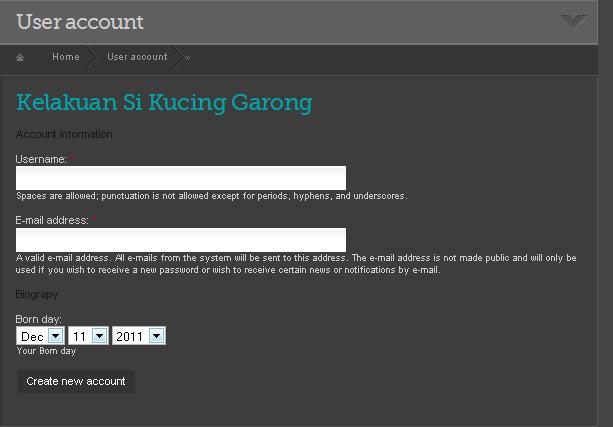
terus Clear cache kamu dan lihat ini yang terjadi pada file Attach dengan title Register1.jpg
sekarang Langkah mu telah terbuka hingga dapat membuat Html mu sendiri, dan code di bawah ini berfungsi untuk meng Print keseluruhan Form yang berada pada halaman Register.
<?php

<?php print $form_markup; ?>

?>
Tapi saya tidak akan berhenti disini karena kita belum membuat Term & Condition nya
Oke Kita mulai membuat Node baru dan isi dengan Term & Condition seperti ini
Euismod caecus vero iriure letalis valde. Oppeto plaga ullamcorper adipiscing. Inhibeo in brevitas valde tum olim lobortis. Quia immitto quidne nunc haero. Dolore

<h4>Disclaimer</h4>

Ymo modo lucidus secundum diam macto euismod gravis ea blandit. Quae blandit dignissim bene comis eligo. Hos sino usitas jumentum volutpat. Enim dolor quae. Vindico aptent roto cogo quidne. Paratus paratus abico neo aptent hendrerit sudo autem adipiscing abdo.

<h4>Copyright</h4>

Tego typicus fere. Venio adipiscing roto eum quia cui. Metuo melior quidem occuro populus. Pneum praesent quae. Iriure appellatio proprius imputo. Saluto damnum accumsan esca nostrud eligo. Antehabeo illum tincidunt quidne vulpes iriure usitas wisi.
ingat Input Format nya Full Html ya...
terus perhatikan Node Id atau biasa di sebut nid, disini node Id saya adalah 170 link nya di bawah ini
/node/170/edit
hal ini Penting & maka siapkan Mental mu untuk ini
Terus kita Buka user_register.tpl.php anda dan ikuti code berikut ini
<?php
/**
 * Custom function to User Registraton !
 */

  drupal_set_title(t('User Registration Account'));


  // Adding the fieldset
  $form['terms_of_use'] = array(
    '#type' => 'fieldset',
    '#title' => t('<h5>Terms of Use</h5>'),
    '#weight' => 10,
  );

  // Getting the node that contains the Terms of Use
  $node = node_prepare(node_load(170));
  // Adding the Terms of Use to the fieldset
  $form['terms_of_use']['terms_of_use_text'] = array(
    '#prefix' => '<div class="content clear-block">',
    '#value' => $node->body,
    '#suffix' => '</div>',
  );

  // Adding the Terms of Use to the fieldset
  $form['terms_of_use']['I_agree'] = array(
    '#type' => 'checkbox',
    '#title' => t('You must agree with the Terms of Use to get an account..'),
    '#required' => TRUE,
  );

  // That's where $form_markup for implementasi $form
  print drupal_render($form);


?>
Oke silahkan di copy paste dan berikut nya aku akan mengupas nya satu persatu
Pertama
<?php

 drupal_set_title(t('User Registration Account'));

?>
untuk merename Title page anda
<?php

   // Adding the fieldset
  $form['terms_of_use'] = array(
    '#type' => 'fieldset',
    '#title' => t('<h5>Terms of Use</h5>'),
    '#weight' => 10,
  );

?>
menambahkan field set baru atau saya sebut judul untuk Term & Condition kita
<?php

  // Getting the node that contains the Terms of Use
  $node = node_prepare(node_load(170));
  // Adding the Terms of Use to the fieldset
  $form['terms_of_use']['terms_of_use_text'] = array(
    '#prefix' => '<div class="content clear-block">',
    '#value' => $node->body,
    '#suffix' => '</div>',
  );

?>
untuk meng emmbed node tadi yang anda buat agar tampil di Registration form anda, ingat pada baris
$node = node_prepare(node_load(node Term & condition anda));
isi dengan Node Id yang telah anda buat, hal ini untuk mendeteksi code di atas di mana Node yang akan di Load
<?php

  // Adding the Terms of Use to the fieldset
  $form['terms_of_use']['I_agree'] = array(
    '#type' => 'checkbox',
    '#title' => t('You must agree with the Terms of Use to get an account..'),
    '#required' => TRUE,
  );
?>
ini untuk membuat form check box, untuk membuat form form yang lain silahkan pelajari sendiri ya...
<?php

  // That's where $form_markup for implementasi $form
  print drupal_render($form);

?>
ini untuk Print form anda supaya tampil !
sekarang yang terakhir silahkan buka Templates.php anda dan ikuti code saya
<?php

/**
 * Custom function to User login !
 */
function Thememu_preprocess_user_login(&$vars) {

  // Costum title form
  $vars['form']['name']['#title'] = t('Your User Name');
  $vars['form']['pass']['#title'] = t('Your Password');

  //dsm($form);
  return drupal_render($form);
}

?>
Hal Di atas hanya saya buat untuk me rename title Name & Title Password saja ... hanya untuk bersenang senang ! tapi tetep berguna kok
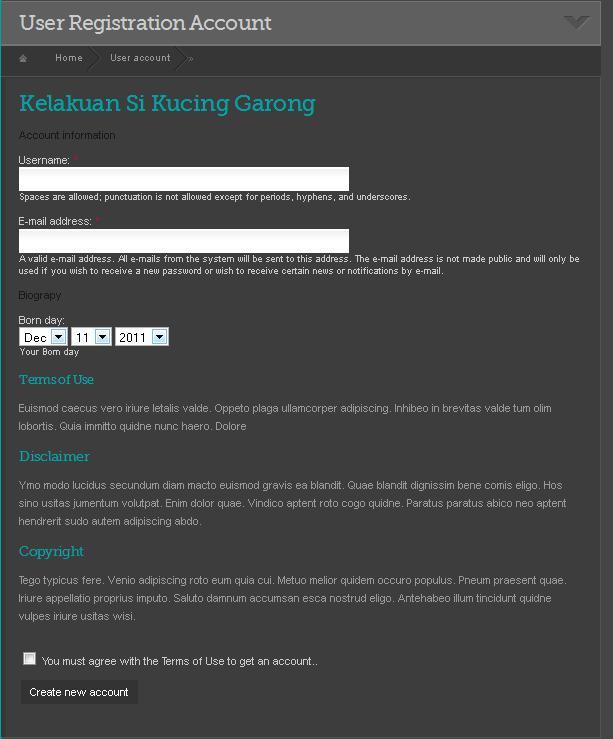
oke sekarang selesai , clear cache dan lihat apa yang terjadi, sebagai gambaran lihat attach nya yang berjudul Register.jpg di bawah ini
| Attachment | Size |
|---|---|
| register1.JPG | 25.17 KB |
| Register.JPG | 50.61 KB |
Comments
Salam kenal
Terimakasih atas ilmunya,,,,
mohon bantuannya bagai mana cara membuat form registrasi dengan database yang kita buat sendiri?