
Posted by arnemaine on December 14, 2011 at 11:00pm
I'm styling a layout based on Omega. I have one issue I can't seem to figure out.
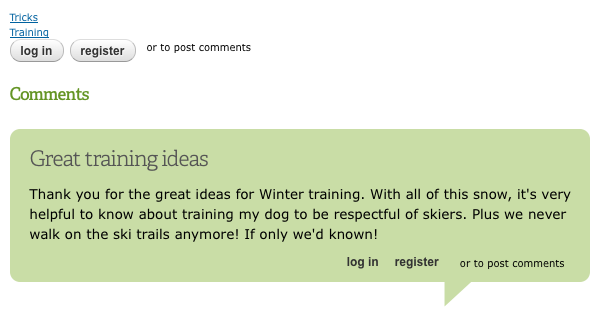
The button style "login" and "register" link words in the comment links that are supposed to read "login or register to post comments" are out of order.
They read instead "login register or to post comments".
When I make Bartik the default theme this issue goes away, so it's obviously Omega styling. Where's the CSS that is making this happen in Omega?
Please see the attached image to see what I'm referring to.
| Attachment | Size |
|---|---|
| comment-links.png | 39.16 KB |
Comments
Floaty crash bang
It looks like the buttons are floated but the text isn't.
Have you got Firebug for Firefox or the web inspector in Google Chrome? It will show you what rules & files are styling the current elements (be sure to disable CSS caching in the Config> Dev> Performance section to see the filenames).
It looks like it might be the node & comment links …
.node-links ul li a, .comment-links ul li a {}in omega/omega/css/omega-visuals.cssTry overriding (maybe in the your global.css)…
display: block;
float: left;
…in your subtheme, (float:none; display:inline; ?) I'm not sure where these rules are used so test it :)
This should be fixed in the main theme, please create an issue on the Omega issue queue if there isn't one already.
http://drupal.org/project/issues/search/omega
Is this a template issue?
I just checked another fresh D7/Omega install and I'm not having the problem, so it shouldn't be inherent in Omega.
But then again I'm not seeing it when I change the theme over to Bartik, so it would seem it's a theme issue. I was thinking it could also was a template issue.
I do have Firbug, and have looked for way too long to find any clues.
I'll check the omega-visuals.css to see what I can come up with. It doesn't seem to be any CSS I've written, but not sure. I'll keep looking and let people know what I find out. Any other suggestions are welcome as well.
Seems to be the CSS in omega-visuals.css
I found the styles
.node-links ul li a, .comment-links ul li a {}in omega/omega/css/omega-visuals.css that control this.And yes, when I over-rode these Omega styles:
display: block;float: left;
And changed to:
display: inline;float: none;
it solved the issue.
Thank you for the expert advice!
Not sure if this is something to post as an issue, or if this has been fixed. I sould check the version number.
Here is a screengrab of what
Here is a screengrab of what I see…
http://dl.dropbox.com/u/59660/Screen%20shot%202011-12-15%20at%2001.41.47...
If you right click the login or register button & select 'inspect element' Firebug should jump right to it in the markup. Note the login link is selected. I disabled the two bad rules too.
The css file with the rule is sites/all/themes/omega/omega/css/omega-visuals.css.
I also see this with Omega 7.x-3.0 as the theme default.
My subtheme is the HTML5 variant that inherits from Alpha, it would be worth mentioning if you create an issue.
I'm not sure if you just edited the omega-visuals.css or added the rules to your subtheme css. It's bad to edit the original because your edits will be overwritten by any updates - another reason to get this addressed in the main project. Add the changes in the subtheme (please excuse me if I'm patronising :^)).
Changed in my stylesheet
I didn't change the CSS in the omega-visuals.css, but rather added the correct styles to the global.css filel in my sub-theme.
I am using HTML5 version as well. I can create an issue, as it seems others are seeing the same thing?
Drew, do you mind if I submit your image when I create the issue?
Nope I don't mind, you should
Nope I don't mind,
you should probably attach a copy to the issue since I may forget to leave it up on Dropbox.
I should have checked you profile for your join date before assuming you were hacking contrib code :)
Great, thanks. I have a copy
Great, thanks. I have a copy of your image, so you can take it out of your Dropbox now. Thanks for your help.
Wonderful. I find this
Wonderful. I find this incredibly useful and handy. Thank you for sharing.
__
Andrè Ross from his websites about electronic devices and the vhs to dvd converter.