
Posted by dotman on January 6, 2012 at 5:35am
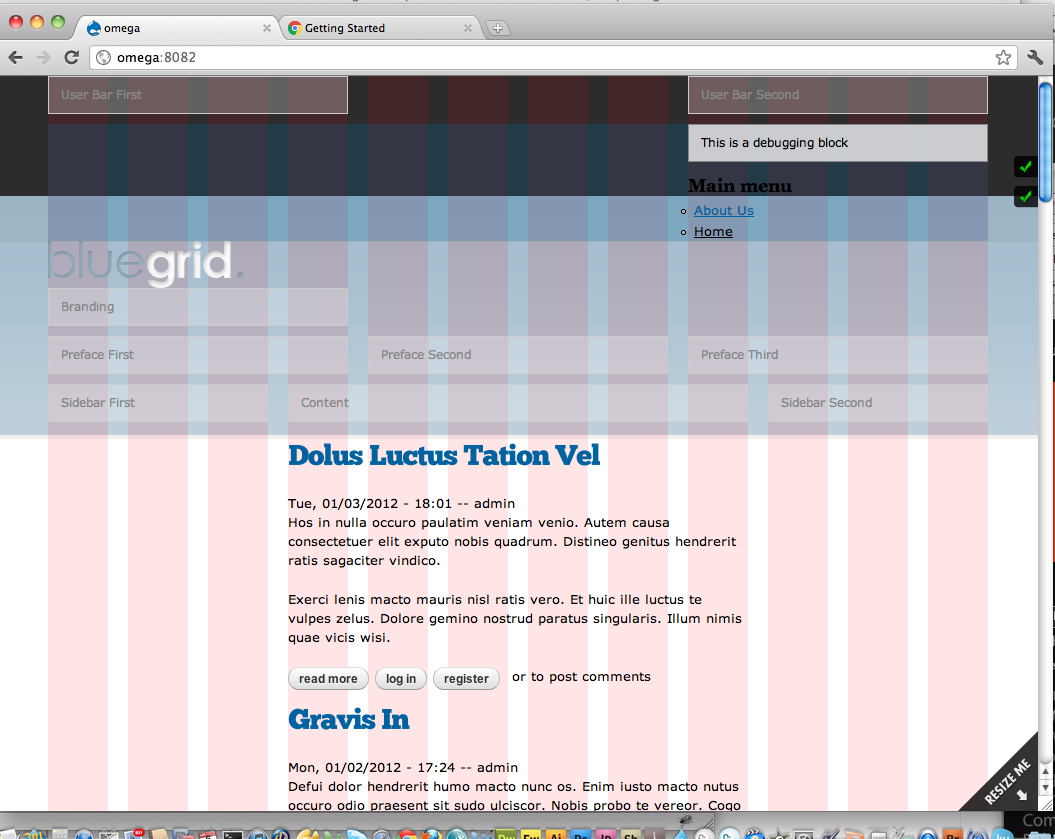
I know I'm missing something simple, but I've tried every combination of reordering zones and regions in delta, but everything I've tried pushes the logo down since they all have to be configured to at least 12 grids.
All i'm trying to do is have the logo left, and the menu right in the header section.
I've attached a screen shot. Could someone give me their settings for for that so I can get my head around positioning using sections and zones?
thank you
| Attachment | Size |
|---|---|
| logopushed.png | 120.65 KB |
Comments
Hi dotman,I can see you have
Hi dotman,
I can see you have your logo is in a region called 'branding'. And that region is in the 'branding zone'.
If you expand 'configuration' just under 'branding zone' you can set the 'Column count' to be 12, 16 or 24 columns across.
Now I presume your main menu is in a region 'main-menu' (or similar) and that is in a zone called 'main menu zone'. All this is in the 'header' section. It goes section > zone > region.
It looks by your screenshot that:
a) your region 'branding' is about 4 columns.
b) your region 'main-menu' is 12 columns.
c) your zone 'branding zone' has a lower weight (in configuration) than your 'main menu zone'.
Now, with the menu zone being 12 columns wide, the two regions can't site side by side, they can't anyway because it appears they are in different zones.
You need to put region 'branding' AND region 'main-menu' into the same zone, and put that zone in the 'header section'. For example, the following settings:
HEADER SECTION
Branding zone
Branding zone configuration - 12 columns - Customize the region positioning - CHECKED
Regions:
'branding' - 4 columns - position - 0
'main-menu' - 8 columns - position - 1
Now you will have ONE zone, with TWO regions, side by side with the logo on the left, and the menu on the right.
The user bar first/user bar second and all that will disappear if they contain nothing when you disable debugging.
Hope this helps.
Sam.