
Hello everyone,
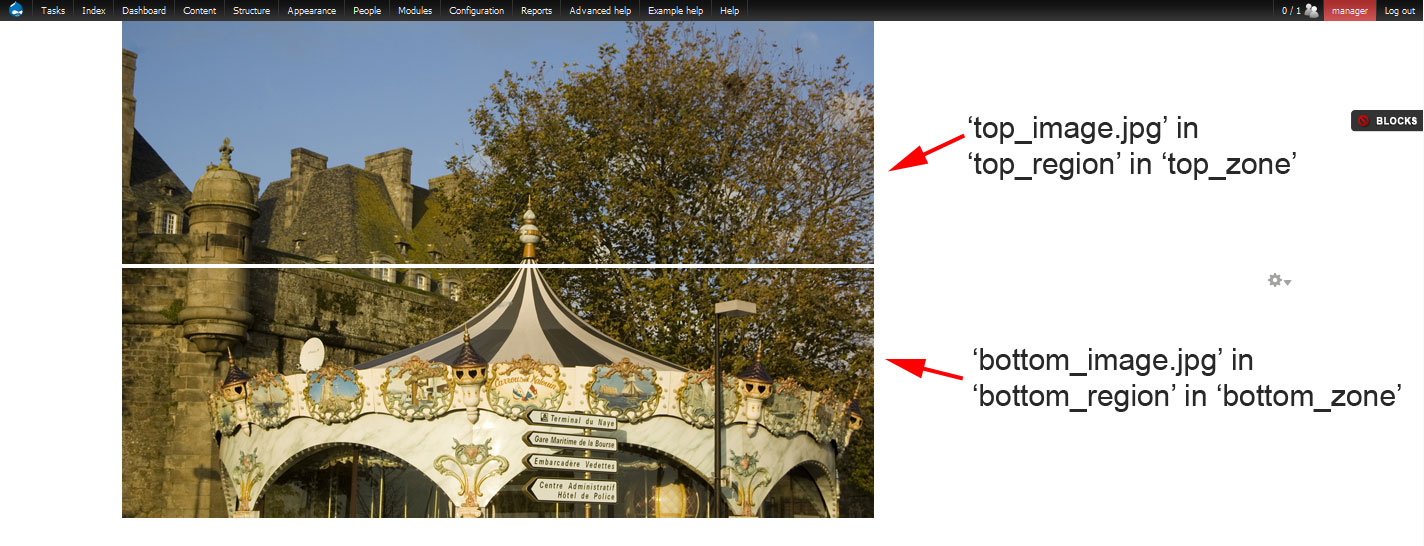
I have an unwanted gap between two 12-column zones stacked vertically in Omega. I'm trying to understand why there is such a gap. I tried to reset all margins and paddings to 0 in every possible item but to no avail. I enclose a screen capture which shows you the problem. As you can see, there is a thin white line between the top image and the bottom image. I would like the two images to be "connected" (no space between them). I need them in two different regions: I can't have them in the same region.
Here is the structure as indicated on the screen capture:
'top_zone' contains one region, 'top_region', which contains 'top_image.jpg'. There are no other items.
'bottom_zone' contains one region, 'bottom_region', which contains 'bottom_image.jpg'. There are no other items.
Would you have any ideas? Many thanks for your help!
| Attachment | Size |
|---|---|
| omega_gap_between_zones.jpg | 177.81 KB |
Comments
Correction: this is a "div" problem
After further testing, I found this had nothing to do with zones and regions. It's simply that the div container doesn't adapt automatically to the size of the image, there is an empty space added below the image. I have to add "height:[xx]px" to the div so that it fits to the image. Would you have any idea why this happens? Thanks again.
Hi Johnny, Does this still
Hi Johnny,
Does this still happen when you turn debugging off and/or log out? I have seen similar strange behaviour which I found was usually because of extra tags in the html source code which aren't there when debugging is off and when you are logged out.
You should not have to set the height of the zone for this to work. I use the web developer toolbar in firefox extensively (not a great firebug fan) and one of the css settings is to outline block level elements, really helps me a lot with visualizing which regions are where and find possible problems.
Sam.
Web Developer
Thanks samwillc for your advice. I will try Web Developper and see what I get. I will let you know. I tried to disable debugging but got the same result.
Had this happen on other themes
I was not sure if it was a failure in understanding drupal or some esoteric CSS thing, but I've seen the same.
A div with the only contents being an image inside it ... margin/paddings all zero, but the parent div does not automatically size correctly to the height of the image.
Just found this
http://www.codingforums.com/archive/index.php/t-39211.html
When an image is floated inside a div, the div does not adjust its height automatically.
Overflow: auto fixes this ... as I recall the other theme I was using , fusion, made copious use of overflow: none on block and row elements, that really borked alot of the CSS 'tricks' I normally used.
Are the images floated
Are the images floated though? Can I just add this to clarify:
<div class="image-container" style="overflow:hidden"><img src="image.jpg" style="float:left" />
</div>
Another method here too: http://fordinteractive.com/2009/12/goodbye-overflow-clearing-hack/
Sam.
Are the images floated?
Thanks hackersword and samwillc for your suggestions. I will try your solutions. My images are not floated though, except if they are floated at a higher level.