
Posted by kakajoe on May 14, 2009 at 5:40pm
hi there..may i know how to add region in this theme?? because the template.php different with the default..sorry newbie trying to exposed this cool theme.. thanks for the help
hi there..may i know how to add region in this theme?? because the template.php different with the default..sorry newbie trying to exposed this cool theme.. thanks for the help
Comments
What theme?
What theme?
The new region would have to be specified in the .info file then it has to be added to the template file.
im using waffles, i want to
im using waffles, i want to add region beside the 'side_last' and over 'content' region, because i want to put video playlist in this region..when im using content_top, its to wide..and leaving white space in the right of my video block, can u help me ??
sorry for my bad english..
this is what i did ... put
this is what i did ...
put the region name in .info
regions[slank_tube] = slank tubeput region on template.php
function phptemplate_preprocess_block(&$vars) {// Add regions with rounded blocks (e.g., sidebar_first, sidebar_last) to $rounded_regions array
$rounded_regions = array('sidebar_first','sidebar_last','postscript_first','postscript_middle','postscript_last','slank_tube');
$vars['rounded_block'] = (in_array($vars['block']->region, $rounded_regions)) ? TRUE : FALSE;
}
add new css in style.css
#slank-tube {margin: 0 0 10px;
overflow: hidden;
min-width: 600px;
}
ps : i copied from content-top css
and i put this code under content-top
<?php if ($slank_tube): ?><div id="slank-tube">
<?php print $slank_tube; ?>
</div><!-- /slank-tube -->
<?php endif; ?>
cause i want it showing over the 'content' right ?
unfortenally...its wont show up.. but in the region option at the block page, my region is in the list ... something wrong i did ?? please help me..
It works
It is all there. It works fine. The powered by drupal is the top content then slank tube below it
Make sure you have a block assigned to that region.
With the template.php you just added
,'slank_tube'nothing else?
Get rid of the "min-" in the css you added if I understand the post above correctly it doesn't make sense.
Did you flush the cache?
This was placed in the page.tpl.php of the theme correct?
<?php if ($slank_tube): ?><div id="slank-tube">
<?php print $slank_tube; ?>
</div><!-- /slank-tube -->
<?php endif; ?>
Also what are you editing the files with?
I still am not sure why you don't use the content top and tweak that.
hey it wox!! i just flush
hey it wox!! i just flush the cache u told me before, thanks!!..but unfortanelly the position is just not i want..cause i want it above the 'content' and beside 'sidebar_last' ..
this is the position right now
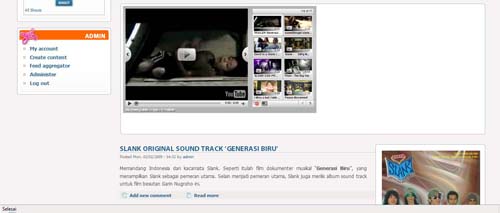
and this is what i want to be

thanks
I Want
I Want this:
http://img269.imageshack.us/img269/6809/marinaregionmap2.png
it's possible?
Actually, you already have
Actually, you already have this in Mariana. All those blocks are already "pre-built" into Mariana.
mmm..... the width of
mmm.....
the width of "content top" is not equal like "Main content area"
and watch well the height of "sidebar last" in my attachment ;-)
I have drawn with red lines what I want....
(I'm going crazy from 4 days)
I see what you're after now.
I see what you're after now. Sorry about that :)
So ok, here's what you need to do: First, you should be using either Firebug or Web Developer with Firefox. If not, then you can grab either. Both will allow you to make changes to your css and see them in real time before you make any permanent changes to the css file itself. I prefer Web Developer, but it's just a preference.
Alright, here's what you need to change:
Scroll down to
/*******************/
CONTENT REGIONS
Under that, go to content-top.
content-top
margin: 0 0 2.5em;
margin-right: 17em; <--------- add to code, then style based your layout.
width: 33em; <--------- add to code, then syle/adjust based on the actual width you need.
This changes the width of the content top region and keeps it inline with your main content wrapper.
Now go down to:
/****************************************/
COLUMN LAYOUTS
From here, you need to edit the code based on which format you're using, ie; sidebar:main, main:sidebar, or 3 column layout. Under the appropriate layout code, add:
margin-top: (enter your need value using -). For example, under the 3 column layout, it should look something like this:
body.layout-first-main-last #content-wrapper #sidebar-last
background-color: #F4F7E7;
margin-top: -4em; <----------------------------- add in and adjust to the height you need. Remember, it'll be a - value.
padding: 0 0 0 1.667em; /* LTR */
width: 23.3em;
Your actual codes may not look exactly like this because I've modded my theme heavily. But in any case, adding the snippets will achieve what you need.
Let me know if you need anymore help.
Good luck!
Chris
Wow
Chris, you are Great!!!
You are the god of css!
Thank you!!!!
(p.s.: margin-top: -X em; --> X is very variable.. if content-top is not show then sidebar-last goes above preface-region..)
Now a last thing, if it's possible.....
I would like to move the "main-content" to left and all sidebars to right..
http://img215.imageshack.us/img215/9218/acquiamarinapreviewcopy.png
http://img217.imageshack.us/img217/9100/marinaregionmapcopy.png
(I will not give you more trouble. I swear!)
Try this
Glad I could Help!
Moving the blocks around can get pretty tricky, but isn't extremely difficult. Some will be trial and error, and you may find that once you make changes, you then may need to adjust something else, like content-top or prefaces, for example. I start out loading the content regions that you plan to use; put content in top and both sidebars. To start with, you'll make changes to the Sidebar and Content regions, then on to the Three Column Layout.
It's a lot to explain, so I included a link to the actual css that I changed. The easiest way is probably to just copy the attached css, then paste it into the open css using Firebug or Web Dev. Then you can instantly see the changes I made and then make the necessary adjustments needed to fit with your exact layout. I noted each change and why the change was made... so you can have an understanding of what happens when those codes are modded. This may make it a bit easier for you to change as needed.
www{dot}tvdelicio{dot}us/sites/modded-style.txt
(Sorry. Couldn't put the actual url because the spam filter here on Drupal is going crazy and blocking any of my posts with attachment or url. But this is one of my sites. I just dropped the file into my server, so you cna go to the url and open the css file I modded).
Here ya go.... and good luck!
thank you! I had already
thank you!
I had already solved :-)
In fact I changed the float and some margin...
I also changed the ".layout-first-main-last table" because I've a view with table in my home page (width: auto)
Thank you again and excuse for my bad English ;-)
sidebar_last broken links
I know this is an old thread for this discussion. I am posting here out of sheer desperation. I added a custom block in the $content area pretty much like what is done above. I did not make any modification content-top and content-bottom just added another block to the content area region right below the title. The home page looks beautiful and everything renders properly, however all the links in my sidebar-last do not work or even show up as links where the new block overlaps with the sidebar-last. Not sure I have explained this clearly but if I can even get someone to help I can provide more information. Have been struggling with this for the last 4 days and site has to be demoed on 10th.
Thanks for any help.
Maria