
While the internet was originally designed to withstand a nuclear attack, today a single Anonymous member took down millions of sites and a large part of the domain registry system. AnonymousOwn3r claimed that he/she did this to "test how the cybersecurity is safe".
In the process, AnonymousOwn3r made sites for Alliance for Community Media, PhillyCAM, channelAustin, and thousands of other organizations inaccessible for most of the day. Many of these sites weren't using GoDaddy for hosting, but they had used GoDaddy to both register their domain name AND continued to take advantage of the free DNS hosting GoDaddy provides.
When GoDaddy finally get's their DNS servers back online, you'll be able to get to these sites again. The sites haven't been hacked. The servers haven't been attacked. In fact, the servers have been running the whole time. It's just a user's ability to access them that was interrupted. How long the sites appear offline will be different for each user depending on their DNS settings.
This seems like a good time to review how DNS works and how you can take some simple steps to avoid a problem like this.

- When you ask your browser to show you a website, one of the first things the browser does is ask the computer for the number associated to the name based on the Domain Name Server (DNS) settings. It's like looking up a phone number in a phone book. You know the name. The phone needs the number to route the call.
- The first place the computer looks is locally. Normally only web developers configure DNS locally. Most users get their DNS settings from the network or their ISP, but you can override that and use a public DNS service like Google. Google's DNS servers tend to be updated more often and respond to requests more quickly. The difference of just a few millisecond for each request adds up when looking up hundreds of domains each day. If the DNS servers in the network configuration have the number for the domain name in their cache, they give it your computer and that's the end of the DNS lookup. You can now see to the web page.
- If the DNS servers in the network configuration do NOT have the number for that name, they pass the request up a chain of servers until they either find it or it gets to the "top".
During the GoDaddy outage, GoDaddy was both the top of the DNS server chain AND the only place someone who registered their domain with GoDaddy could change which DNS server was at the top. When the DNS at the top wasn't working, there was no way to fix it. Even if the site was hosted on a server somewhere else, without that number users can't get to the site. This is a classic case of having too many eggs in one basket.
I'm not going to get into the reasons why progressive organizations shouldn't support GoDaddy. I'll let someone else make the case to save the elephants, internet freedoms, or women's self worth. It's also possible an organization already paid GoDaddy to use a domain for several years. In that case, transferring the domain won't hurt GoDaddy... just your organization. Whatever the reason you are using GoDaddy or any other domain registrar/DNS provider, what you should take away from today is if you are hosting your DNS the same place you registered the domain there won't be much you can do when that company has a problem.
Both eastoncat.org and allcommunitymedia.org registered their domain names with GoDaddy, but ECAT was up while the ACM was down.
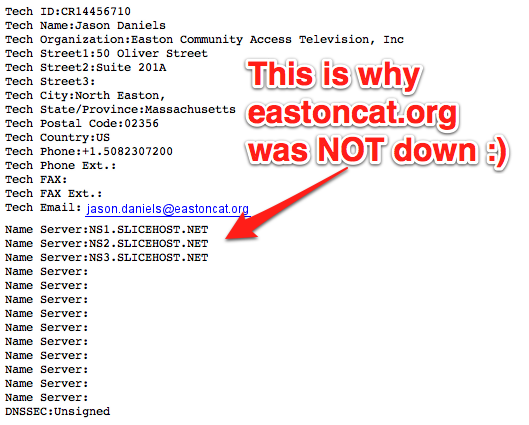
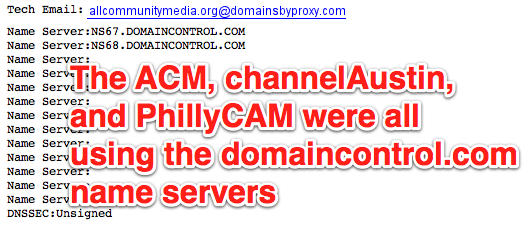
It's less likely Anonymous would attack a company that didn't support SOPA, but natural disasters don't care about politics. Moving BOTH your domain registration and DNS hosting from GoDaddy to another, single provider might make you feel better, but you would still be setting yourself up for failure. Whether it's a hurricane, hacker, or car accident, if online communication is critical to your organization, you need to understand how important DNS is. If your website and email are important to your organization, you should be able to answer these questions:
- When does your domain expire?
- Who can make changes to your domain?
- Who can make changes to your DNS server?
- If that person leaves your organization, does anyone else know how to do this?