
Hi all and happy holidays!
In this post I will explain how I built a responsive website for a local Crossfit gym and how I migrated the old WordPress blog to Drupal.
The Background Story:
Madeincrossfit.com was originally a WordPress site hosted in WordPress.com with over 100 unique visits per day. The WODs page which included a list of daily workout routines was the most viewed page.
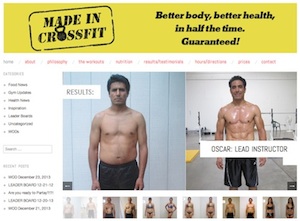
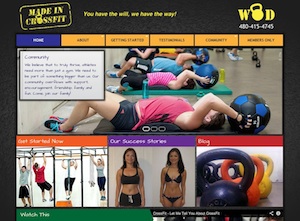
Before and after.
The Design:
Kevin Russell was hired by my client to create a comp for the home page. Kevin was asked for a Metro style (Windows 8 boxes) and was handed a list of features that should be included in the new site and features that should be discontinued from the old site. I was not heavily involved in the design process, but I received the same handout Kevin did.
The CMS:
I chose Drupal over WordPress because of the superior flexibility and extendability Drupal provides. Though, the downside was a small loss in editorial features (i.e.friendly WYSIWIG editor, Media management, etc) which is where WordPress excels.
The Front-End Development:
I chose AdaptiveTheme as my base theme because it was responsive, came with SASS integration, and had tons of documentation. The dropdown main menu is powered by Superfish. On small screens superfish is turned off, and the main menu turns into a dropdown single button. At the moment, this functionality is only available on AdaptiveTheme 7.x-3.x-dev.
Since my front-end development skills were rusty, theming the site took me more hours than I had originally anticipated. After talking to a few experienced front-end developers and after reading a few tutorials on building responsive websites, I put together a list of tips that will help me build responsive sites faster:
- Set up support for SASS on the dev environment.
- Use global.styles.scss for styles that will be used in all screen sizes
- Create mixins in _custom.scss and load them in your other .scss files
- Use variables for color scheme values.
- Use a mobile-site-first approach and stick to it. That means start with all of the elements (i.e. blocks, fields, etc) stacked in one column, then float them to the sides as the screen becomes wider.
The Site Building:
The Home page and Getting Started page are both powered by Panels. Trainers, Testimonials, Events and Blog are all Views pages, and each one of them has a corresponding content type. The Recent Posts and Categories blocks on the Blog page are views blocks. All core taxonomy vocabulary listings were taken over by Views. The slide show on the home page is powered by Views and FlexSlider. The "Watch This" block is powered by Views, YouTube and QuickTabs. The "Sign Up Form" on the Getting Started page is provided by Constant Contact. Constant Contact is a third party email marketing tool, similar to MailChimp.
The Content Migration:
The blog migration was done in 2 steps. First a .wrx file was obtained from the old WordPress website via the built-in Export Website tool. Next,
Wordpress Migrate took care of importing the .wrx file and creating drupal nodes. Even the categories were imported! The downside was that images needed special care, but I won't go into those details here.
The Go-Live Prep Work:
Since this site does not get heavy traffic and most of the visits are from anonymous users, I decided the site was a good candidate for shared hosting. Before making the site go live, I turned off Devel, Display Suite UI, Views UI, Coffee, etc, and uninstalled the migrate modules. Additionally, I enabled Page Caching, Block caching and CSS and JS compression. The website was not lighting fast but it was pretty decent. The day after the site went live my client emailed me a note to let me know that new blog posts do not immediately show up on the Blog page for anonymous users. After reading the note I realized that the whole Blog page was being cached. The initial solution I had in mind was to educate the client to always clear the cache after creating and editing content, but I knew there had to be a better way. Rather than using Rules to clear the cache after saving content I decided to change my caching strategy and went with the Boost and Boost Cache Cleaner combo. I must say after setting up Boost, the site's load time decreased significantly. Thank you Boost and its developers!
For the sake of SEO, I installed Redirect, Global Redirect and XML Sitemap.
The Contributed Modules:
(in alphabetical order)
admin_menu
boost
boost_cache_cleaner
coffee
colorbox
constant_contact
crumbs
ctools
date
devel
display_suite
entity
flexslider
fontyourface
google_analytics
globalredirect
libraries
media
menu_attributes
migrate
migrate_extras
module_filter
panels
pathauto
quicktabs
redirect
sharethis
superfish
token
views
views_slideshow
wordpress_migrate
wysiwyg
xmlsitemap
youtube
The Other Resources:
Favicon Generator
Website Metrics Tool
Building http://madeincrossfit.com was very educational. I hope you enjoyed this article and found it useful. If you have any questions about this case study, feel free to use the comments box below. For other questions such as freelance availability, contact me directly.