
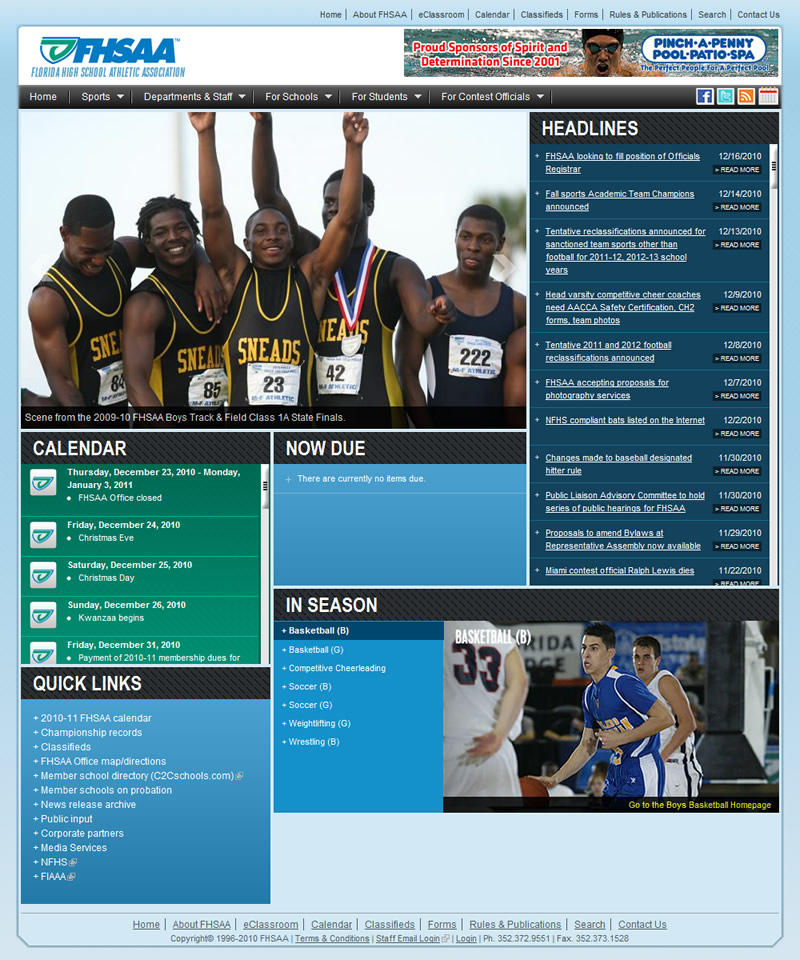
The Florida High School Athletic Association is pleased to announce its new Drupal based website! Read below for details on how the theming and development was accomplished.
About the FHSAA
The Florida High School Athletic Association is the official governing body for interscholastic athletics in Florida. The FHSAA sponsors championship programs through which over 100 teams are crowned state champions in 30 sports each year. Through participation in these athletic programs, an estimated 798,500 students annually are extended opportunities to receive lessons in leadership, sportsmanship and citizenship.
FHSAA.org History
The official website of the Florida High School Athletic Association, FHSAA.org, has been in operation since 1998 (original version on archive.org), and has been flat HTML files for most of it's life. In the mid-2000's it was switched to server-side includes running under classic ASP. This presented serveral problems including different themes for different pages, many broken links, and inconsistent content. At Google's last count, the FHSAA.org website had over 14,700 individual pages and documents. Many of these documents are outdated and unused. The website currently receives between 5,000 and 25,000 visits per day depending on sports, championship events, etc.
Redevelopment Goals
- Integration into one common theme - Previous versions of FHSAA.org had several themes integrated into separate parts of the website. They did not have standard navigation, masthead, or page elements. One of the primary goals for the CMS integration is to integrate all the pages under one common theme.
- Easier ability to manage - Previous versions of the website were managed by editing the HTML through Adobe Dreamweaver, and then transferring the files via FTP. This presented several problems including all content editors needing copies of Dreamweaver whereever they need to edit the website.
- Set up different permission levels (roles) - We have several content editors who only need to edit certain types and categories of content.
- Consolidation of data - Within the previous website versions, if a change neededbe made, it would have to changde in many different places. Inevitibily, changes would get missed and outdated and invalid data would result.
- Increased Usability - The previous website was difficult to navigate due to inconsistent menu structures, multiple superfish fly-out menus, and broken links.
- Elimination of old/unused/invalid data - Throughout the 12 year history of FHSAA.org many html files and documents have been placed on the server, and then unlinked to. These files never see the light of the day, but may result in broken links if removed.
Theming
Ninesixty was chosen as a base theme for the new design due to the ease of postitioning all elements. The css was overriden to allow for 4 pixel gutter widths through the custom css generator located at http://www.spry-soft.com/grids (please note that you need to replace all underscores with hyphens).
Admin Usability
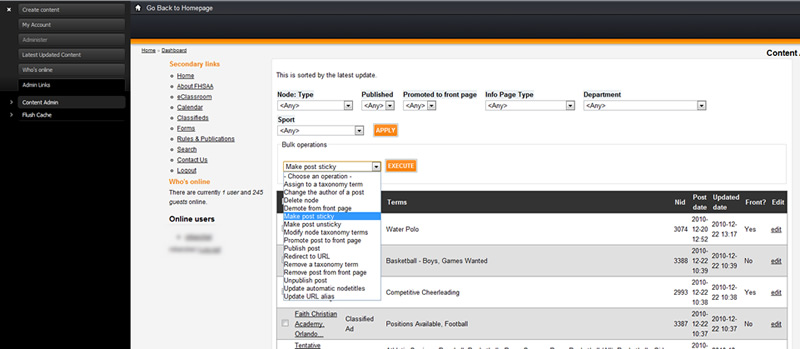
Usability from the conent editor's point of view is important in the FHSAA's situation, as not all editors are highly technical. Rootcandy was choosen as the administration theme, but the main interface to the data is through the following:
- Use of the Admin module
- Creation of custom pages and blocks using Views Bulk Operations which were then integrated into the Admin module UI.
- Content HTML is created using CKEditor via the WYSIWYG API module with several plugins including IMCE, Node Embed (one of the modules contributed from WhiteHouse.gov), and CKEditor Link.
- Each content type has its default format selected using the Better Formats module.
- Data is run through the WYSIWYG Filter module in the default input format. This enables the site administrator to set which HTML tags, attributes, and attribute properties are allowed.
In addition to the Administration interface, each content type has a description, and each custom CCK field has help text where applicable.
New Features
In addition to streamlining current functionity Drupal brings additional functionality to the table.
- Calendar Module - The FHSAA's entire yearly calendar was imported to the calendar module. This enables several types of views to be created, and also enables us to filter the views using taxonomy arguments on specific sport pages, so only sport applicable data is presented on the appropriate pages. Several exposed filters were set up within the views to enable specific coaches/athletic directors to drill down to their respective points of interest. The calendar module also provides an iCal export feature, which enables school personel to import the calendar into Outlook or other calendar applications.
- RSS Feeds - The FHSAA has published one RSS feed, and plans to add several more where needed. This is easily done through the Views module.
- Content Revisioning - Drupal's built in revisioning system enables content editors to revert revisions if necessary.
Increased Usability
As one of the primary goals of the CMS, increased usability was handled through
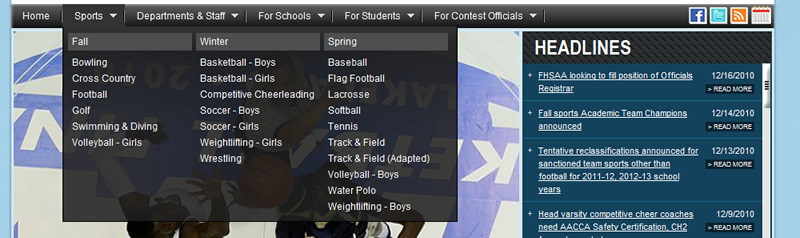
Consistent theme/navigation throughout the website. The Megamenu module was used for the primary navigation. Drupal's standard menu was used for the secondary (header and footer) navigation, and the Menu Block module was used for sport and department specific naviation.
Common header tags were defined in both the theme's CSS file, and within CKeditor's CSS (so the content creator can view the text with the appropriate style). In addition, the External Links module is used to visually differentiate external links and email links.
Consolidation of Data
Consolidation of data was done primarily through referencing items through views, and through node reference (included with CCK). When creating specific types of content (headlines, calendar items, etc), the content creator can reference forms easily through the node reference widget. This ensures that it will always reference the most up to date data.
Performance
Performance is currently handled using Drupal's built in caching mechanisms. The Boost module is currently installed and tested, but is not enabled through the .htaccess file at this point. Since launch, the site generates pages consistently under 1 second, with the entire page (images, stylesheets, etc) loading within 5 seconds. Mysql has been optimized by setting the query_cache_limit, and its continually being tuned in accordance with the Tuning Mysql article on Drupal.org.
In addition the settings.php file has been modified in accordance to this article on 2Bits.com to give quicker 404s when a static file (such as a jpg, gif, or css) does not exist. This should help free up resources as the FHSAA.org website has many deep links, and some linked HTML files still reference files that do not exist.
Data Migration
Data migration was largely done manually though several bored interns and one bored system administrator (me!). Most of the previous data had horrible and invalid markup including several levels of nested tables, un-semantic css, font tags, inconsistent styling, open tags, etc. This data was largely copied and pasted into Dreamweaver, where several macros were set up to strip/modify the markup. Then the HTML was manually fixed and transferred into the new site. At last count, there were over 3,300 nodes created. So, as you can imagine, this was a very lengthy process.+
Because the URL structure changed, several 403 redirects were set up in the .htaccess file to allow for popular deep links to continue working. In addition, the Custom Error module was implemented to give helpful error messages on 404 page not found pages.
Thanks!
Thanks to Ryan Price (liberatr) from Drupal Easy for help in figuring out a specific tough Jquery issue in addition to a Views issue! Also, a special thanks to the Drupal community as a whole. The community is really what makes this CMS stand out among all others.
Partial Module List
| Admin | UI helpers for Drupal admins and managers. | IMCE | An image/file uploader and browser supporting personal directories and user quota. |
| Admin Role | Automatically assign all permissions to an admin role. | IMCE Mkdir | Allows users manage directories in IMCE |
| Automatic Nodetitles | Allows hiding of the content title field and automatic title creation. | IMCE Wysiwyg API bridge | Makes IMCE available as plugin for client-side editors integrated via Wysiwyg API. |
| Backup and Migrate | Backup or migrate the Drupal Database quickly and without unnecessary data. | Insert | Assists in inserting files, images, or other media into the body field or other text areas. |
| Better Formats | Enhances the core input format system by managing input format defaults and settings. | Job Scheduler | Scheduler API |
| Better Messages | This module adds simple functions to make Drupal messages look and act better. | jQuery plugins | An API and home for miscellaneous jQuery plugins. |
| Boost | Caches text (html, ajax, xml) outputted by Drupal as static files for performance and scalability purposes. | jQuery UI | Provides the jQuery UI plug-in to other Drupal modules. |
| Calendar | Views plugin to display views containing dates as Calendars. | jQuery Update | Updates Drupal to use the latest version of jQuery. |
| Calendar iCal | Adds ical functionality to Calendar views. | JW Media Player 4 | Enables support for JW Media Player 4. |
| Calendar Popup | Replaces the links to calendar items with a javascript popup that gracefully regresses if javascript is not enabled | Link | Defines simple link field types. |
| Clone module | Allows users to clone (copy then edit) an existing node. | Location | The location module allows you to associate a geographic location with content and users. Users can do proximity searches by postal code. This is useful for organizing communities that have a geographic presence. |
| Content | Allows administrators to define new content types. | Location CCK | Defines a Location field type. |
| Content Taxonomy | Defines a field type for taxonomy terms | Location Feeds | Provides location mappers for feed importers |
| Content Taxonomy Options | Defines a option widget type for content_taxonomy for selects, radios/checkboxes | LoginToboggan | Improves Drupal's login system. |
| Content Templates | Create templates to customize output of teaser and body content. | LoginToboggan Rules Integration | Integrates LoginToboggan with Rules module |
| Custom Error | Enables the creation of custom error pages for 404 and 403 errors, as well as redirects for 404s. | Mega Menu | Transform any menu into a Megamenu (aka megamenu-dropdown), a jQuery-based menu with third level links grouped under the second level. |
| Date | Defines CCK date/time fields and widgets. | Menu attributes | Allows administrators to specify custom attributes for menu items. |
| Date API | A Date API that can be used by other modules. | Menu Block | Provides configurable blocks of menu items. |
| Date Popup | Enables jquery popup calendars and time entry widgets for selecting dates and times. | Node Reference | Defines a field type for referencing one node from another. |
| Date Popup Authored | Provides a datepicker for the 'Authored on' field on node forms. | Number | Defines numeric field types. |
| Date Timezone | Needed when using Date API. Overrides site and user timezone handling to set timezone names instead of offsets. | Option Widgets | Defines selection, check box and radio button widgets for text and numeric fields. |
| Diff | Show difference between node revisions. | Override node options | Allow non-admins to override the default publishing options for nodes they can edit. |
| Defines an email field type for cck | Page Title | Enhanced control over the page title (in the <head> tag). | |
| External Links | Adds icon next to external links on the site. | Pathauto | Provides a mechanism for modules to automatically generate aliases for the content they manage. |
| Fieldgroup | Create display groups for CCK fields. | Phone - CCK | The phone module allows administrators to define a CCK field type for phone numbers. |
| FileField | Defines a file field type. | Quick Tabs | Create blocks of tabbed views, blocks and nodes. |
| FileField Paths | Adds improved Token based file sorting and renaming functionalities. | Rotor Banner | A rotor banner functionality that shows content for some seconds and keeps changing |
| FileField Sources | Extends FileField to allow referencing of existing files, remote files, and server files. | Rules | Lets you define conditionally executed actions based on occurring events. |
| Global Redirect | Searches for an alias of the current URL and 301 redirects if found. Stops duplicate content arising when path module is enabled. | Rules Administration UI | Provides the administration UI for rules. |
| Google Analytics | Adds Google Analytics javascript tracking code to all your site's pages. | Rules Forms support | Provides events, conditions and actions for rule-based form customization. |
| IE CSS Optimizer | Optimizes CSS files for development in Internet Explorer. | Rules Scheduler | Schedule the execution of rule sets. |
| Image resize filter | Filter to automatically scale images to their height and width dimensions. | Search config | Configure display of the advanced search form |
| ImageAPI | ImageAPI supporting multiple toolkits. | Semantic Views | Views 2 plugins for UI management of output markup |
| ImageAPI GD2 | Uses PHP's built-in GD2 image processing support. | SpamSpan | The SpamSpan module obfuscates email addresses to help prevent spambots from collecting them. It implements the technique at http://www.spamspan.com. |
| ImageCache | Dynamic image manipulator and cache. | SWF Tools | This is the core component of SWF Tools and provides a common API for handling Adobe Flash related media. |
| ImageCache UI | ImageCache User Interface. | SWF Tools API | This is the core of SWF Tools and exposes a lightweight embedding API that others can use. |
| ImageField | Defines an image field type. | SWF Tools profiles | Enables the use of SWF Tools profiles with the input filter and CCK. |
| SWFObject2 | Enables support for the SWFObject 2 embedding method. | Used modules | Displays as a table, within a block or a page, all the modules installed on a Drupal site. |
| Table Alternate Rows | Automatically adds even/odd classes to tables. | User Reference | Defines a field type for referencing a user from a node. |
| Tabs | A helper module for creating tabbed pages. | Vertical Tabs | Provides vertical tabs for supported forms like the node edit page. |
| Taxonomy Multi Editor | A mass category editor. Adds a new operation to the content management screen. | Views | Create customized lists and queries from your database. |
| Taxonomy Required per Node Type | Sets required option per taxonomy per content type. | Views Bulk Operations | Exposes new Views style 'Bulk Operations' for selecting multiple nodes and applying operations on them. |
| Taxonomy Token | Taxonomy Token provides token replacements for selected vocabularies. | Views Custom Field | Provides a number of custom fields (rownumber, phpcode, ...). |
| Text | Defines simple text field types. | Views Nivo Slider | Display a view with Nivo Slider |
| Token | Provides a shared API for replacement of textual placeholders with actual data. | Views UI | Administrative interface to views. Without this module, you cannot create or edit your views. |
| Token actions | Provides enhanced versions of core Drupal actions using the Token module. | Webform | Enables the creation of forms and questionnaires. |
| TokenSTARTER | Provides additional tokens and a base on which to build your own tokens. | Weight | Add weight-based sorting to nodes. |
| Transliteration | Converts non-latin text to US-ASCII and sanitizes file names. | Wysiwyg | Allows users to edit contents with client-side editors. |
| Upload elements | Two FAPI elements to handle file uploads, an image and a file upload element. | WYSIWYG Filter | Provides an input filter that allows site administrators configure which HTML elements, attributes and style properties are allowed. |
Comments
Forgot to hyperlink the website...
Forgot to hyperlink the website. The URL is http://www.fhsaa.org.
The spam filter is preventing me from editing my own post to fix this :(
Premium Drupal Commercial themes
Congrats on getting this
Congrats on getting this website launched, dude.
Ryan Price
DrupalEasy Podcast
Very nicely done
Great job on a beautiful and well-done site
I'm impressed!
I'm doing research before jumping into a similar project. It was helpful to see the modules you used. Congrats!
AWESOMENESS
Great Job on this project. The list of modules is great!