
Posted by texas-bronius on March 11, 2011 at 9:01pm
I thought this was strange: I am using D6 Views 2, I have selected a fistful of fields that don't render if I check "Exclude from Display" in Custom Text field:
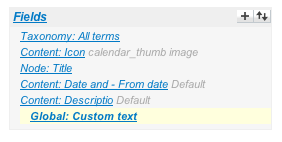
I want to include their output in a Global: Custom text field as:
<a href="#" class="css-hover">
  [field_event_icon_fid]
  [title]
  <div class="css-hover-contents">
    [field_event_icon_fid]
    [field_event_description_value]
  </div>
</a>
As a workaround, I have unchecked Exclude from Display and am having to css them out.
Sure, the right and proper solution might be to toss up a view template, but it shouldn't be necessary in this case, should it?
Comments
view export?
Do the fields that you are placing in the anchor contain anchors of their own? might be confusing the renderer.
Sometimes fields provide more than one token, is that the case here?
And last, have you made sure that they aren't in fact appearing and that your css is hiding them (I've done that more than once ... lately).
good tips
All wonderful suggestions, really they are ;), but I assure you this is just weird.
It works like a toggle switch: If I check "Exclude from Display" on any of the fields, the field doesn't show at all. If I uncheck "Exclude from Display", the field shows twice: once as Fields output as expected, once in the Custom Text (also as expected). The rendered html is empty.
In fact, I just switched over to another project where a co-developer was doing something similar: his works fine..! I am tempted to spend a bunch of time really digging deeper, but I think the right thing to do is to just surgically css display:none the fields I don't want and call it a day.
Has anyone else encountered this?
it's a calendar view
I might mention that this is of course Calendar View. It doesn't use the same "Fields" Row Style setting as other Fields-based View styles do. Could be a tiny little oversight in KarenS' implementation of Calendar Views.
Oh this is really useful. The
Oh this is really useful. The display was something I was very interested in because some of the render logic had to change to support the hidden/token replace suppurt and if the display does it wrong the global field will not work.
Pun't
was hoping to see the view export to debug, then I thought to myself, it would probably be more meaningful to get the content types too so I could actually import it and see it first hand.
To do that though, you'd have to convert that bug to a feature. And we all know that it's impossible to accomplish that.
not at all
I convert bugs to features all the time
There are no bugs only
There are no bugs only features replaced by other features. ;)
Seriously though a views export would give us some insight. Maybe a description of the fields and their type or a cck export too. If you can't reproduce it there's nothing to fix :)