
Posted by glide on August 3, 2011 at 1:40am
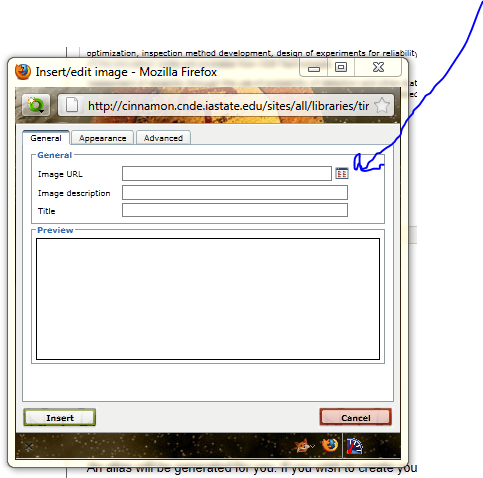
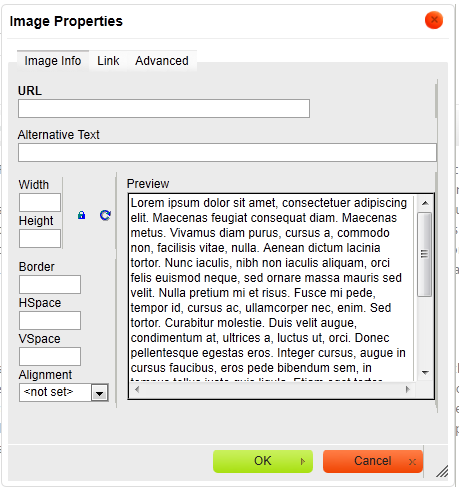
In D6 I had a "browse" button for inserting files from IMCE in the wysiwyg toolbar image button widget. I dont seem to have that it D7.7. How do I get it back? or can I?
| Attachment | Size |
|---|---|
| drupal 6 what I want.PNG | 100.81 KB |
| Drupal 7 version.PNG | 33.79 KB |
Comments
I take it you are using
I take it you are using WYSIWYG module with TinyMCE? I just switch from using the WYSIWYG module + CKEditor to using CKEditor module without WYSIWYG and it seems people are finding CKFinder as a good file browser, but CKEditor will support the IMCE plugin. There is also the option, mentioned here earlier, of using Insert with Image Resize Filter.
Otherwise, I think there should be a checkbox for IMCE under the "Buttons and plugins" in the WYSIWYG profile at admin/settings/wysiwyg/profile. However, I don't have a site that has both WYSIWYG and IMCE installed at the same time to confirm.
Solution
I was using tinymce + WYSIWYG in D6
Im trying CKeditor + WYSIWYG in D7.
What I was missing was just the imce_wysiwyg module
Its always the little connector pieces I forget.