
OK, so I feel like I'm missing something terribly obvious, but I cannot for the life of me get my CSS classes to show in the "Styles" dropdown.
Drupal 7.9, WYSIWYG 7.x-2.1, ckeditor 3.6.2.7275. Steps taken: Configuration->Wysiwyg profiles->Edit->CSS. Under "Editor CSS", select "Define CSS". For "CSS path", enter the path to the CSS files I would like applied. Under CSS classes, I entered "Test Blue=blue-title". The class blue-title is defined in the CSS listed in the CSS path configuration. After saving this configuration, I expected to see "Test Blue" listed in the Styles dropdown box, but the only entries there are the ckeditor defauts. Am I misunderstanding how the Styles configuration is supposed to work? All I want to accomplish here is to give the contributors to my website a selection of formatting options via the Styles dropdown to help keep a consistent look to the site. Yes, I know I should rely on themes/CSS only, but you don't know my contributors... ;)
Thanks
Matt
Traverse City, MI
| Attachment | Size |
|---|---|
| ckeditor-css-config.png | 97.68 KB |
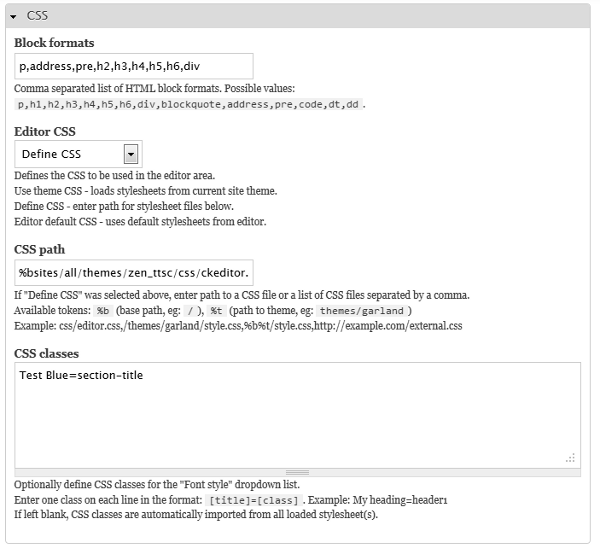
Comments
I don't use tokens in the
I don't use tokens in the path or put any classes in the "CSS Classes" text box. I let WYSIWYG read the class definitions and fill out the drop-down list.
My path looks like this: /sites/all/themes/my-theme/css/markup.css
The file markup.css only holds styles that deal with text markup.
If this doesn't work, clear your cache and if you change your stylesheet also clear your cache.
Andrew
Andrew,Thanks for the reply.
Andrew,
Thanks for the reply. I have tried with and without tokens with the same results. Ditto on clearing the cache. Near as I can recall I have tried without defining the style, felying only on the CSS file to populate the Styles box. I "know" that the CSS path is correct, as my styles defined in the CSS are being applied to block elements (h1, p, etc) in the editor window. Everything seems to be working except for populating the Styles box.
Matt
thanks, it works.
thanks, it works.
CKEditor Styles Documentation
I think you're looking for this:
http://docs.cksource.com/CKEditor_3.x/Developers_Guide/Styles
Fred, Thanks for the link to
Fred,
Thanks for the link to the docs. I had taken a look at these, but I was hoping that I could use the WYSIWYG configuration instead of mucking about with the ckeditor config directly.
Matt
Oh, I wonder if there's the
Oh, I wonder if there's the difference between yours and mine Matt. I'm using TinyMCE and you're using CKEditor. I've probably got a dozen and a half WYSIWYG/TinyMCE installations using the same configuration I mentioned last evening.
1) I always put any markup styles I want the user to access in markup.css
2) I include it in my theme.info: stylesheets[screen][] = css/markup.css
3) I set up my path as described earlier: /sites/all/themes/my-theme/css/markup.css
Andrew
Andrew, Thanks for the
Andrew,
Thanks for the detailed reply. I'm not married to ckeditor - Just more familiar with it than any of the other options. I'll give Tiny a whirl and see what happens.
Matt
Does anyone have any suggestions for CKEditor?
I have the same issue as original post. Before I switch to TinyMCE from CKEditor to solve this issue, I'm hoping that someone will have some advice.
Out of curiousity, I just installed TinyMCE and have it up and running quite easily. I will experiment more with CKEditor, but it looks like a vote for using TinyMCE with Wysiwyg.
Still hoping someone can help with how to set up CKEditor to solve the original issue.