
Hi,
Due to a difficult migration process, I have found myself cloning the same site over and over again.
Just to give you an example of the problem, if I clone the site , then migrate it to the new platform I get an Error 500 message. Now, if I clone the site , disable all modules , migrate the site , then enable the modules. No error message.
A couple of times I've managed to get rid of the error and get the site back by removing the o_contrib symlink. Adding the symlink after the site was up didn't create any issues. But this doesn't work every time... Disabling the contributed modules before migration doesn't work either...
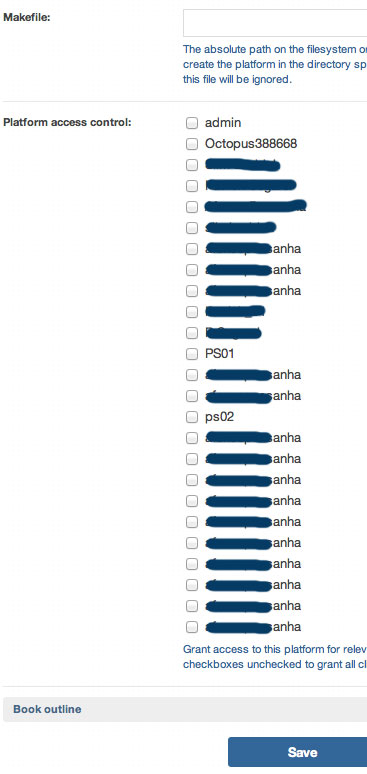
Anyway, one of the side effects of this process is that when I need to create a new Platform, the list of clients in "Platform Access Control" gets bigger and the same client name gets repeated a number of times. I've tried to find a place where I could delete some of these clients ( most of the cloned sites have already been deleted ) but I can't find a place where to do so.
"Manage clients" only gives me a list of three unrelated usernames.
The probable cause for the list of Clients is that when I started creating sites with Octopus, I was using the "Add Site & Client" menu item. I don't use this anymore since it didn't seem possible to use the same client name twice (!).
Now I use
Content Management / Create Content/ Site
which doesn't require a client name.
- Is it expected behavior not to be able to use the same Client name for various sites?
- Why does the same Client name get added to the Platform Access Control list?
- Is there a way to clean up this list in order to remove duplicate entries?
As for the migration, I think I'll end up deleting the original site , then migrating the clone back to the original site domain name... This is a last resort solution, because if I do so, I will never know the cause of the issue.
Thanks,
Patrick
| Attachment | Size |
|---|---|
| platformAccessControl.jpg | 45.08 KB |
Comments
This is Drupal
So Clients are just nodes associated to users and you can easily delete them via admin/content/node/overview
You don't need to use that awful Content Management / Create Content/ Site menu. There is an "Add Site" tab in the main menu: https://skitch.com/omega8cc/ghfmk/o1.v189q.nyc.host8.biz-aegir-hosting-s...
You may want to read also: http://omega8.cc/the-best-recipes-for-disaster-139
Grace,So Clients are just
Grace,
So Clients are just nodes associated to users and you can easily delete them via admin/content/node/overview
Yes, I've finally found that out but the list of nodes goes several pages and it doesn't seem possible to filter by Content Type.
You may want to read also: http://omega8.cc/the-best-recipes-for-disaster-139
Thanks, I have read "The best recipe for disasters" and the Advagg module in the wrong directory still had me stumped for a while!
It's easy to get side tracked when experimenting with a new system and it takes time to digest the various info you've kindly provided. This being said, we also do learn a lot when things break! It can be very frustrating but I guess we all learn in different ways & somtimes information only starts to make sense after I've actually broken things :)
This being said, I finally managed to migrate that site after both disabling Advagg & Cache & re - enabling them after the Migration process.
In any case, thanks for your amazing work! Not everything is fully clear yet but BOA has already changed my workflow for the better. I love the Clone feature, which allows you to experiment and quickly spawn various versions of a Site. Updating is now 100% safe and the performance tuning gives you so much peace of mind. It gets easier to debug a slow site... and this amongst all the other goodies!