
Posted by wiliam_steven on March 23, 2012 at 6:19pm
Hi Guys,
I have facing this issue and really need help, basically I have using the delta to make layout different from other page. right now, i have been theming the layout and facing the stacking for the problem, just to put content region and first sidebar right under the preface first region (attachment).
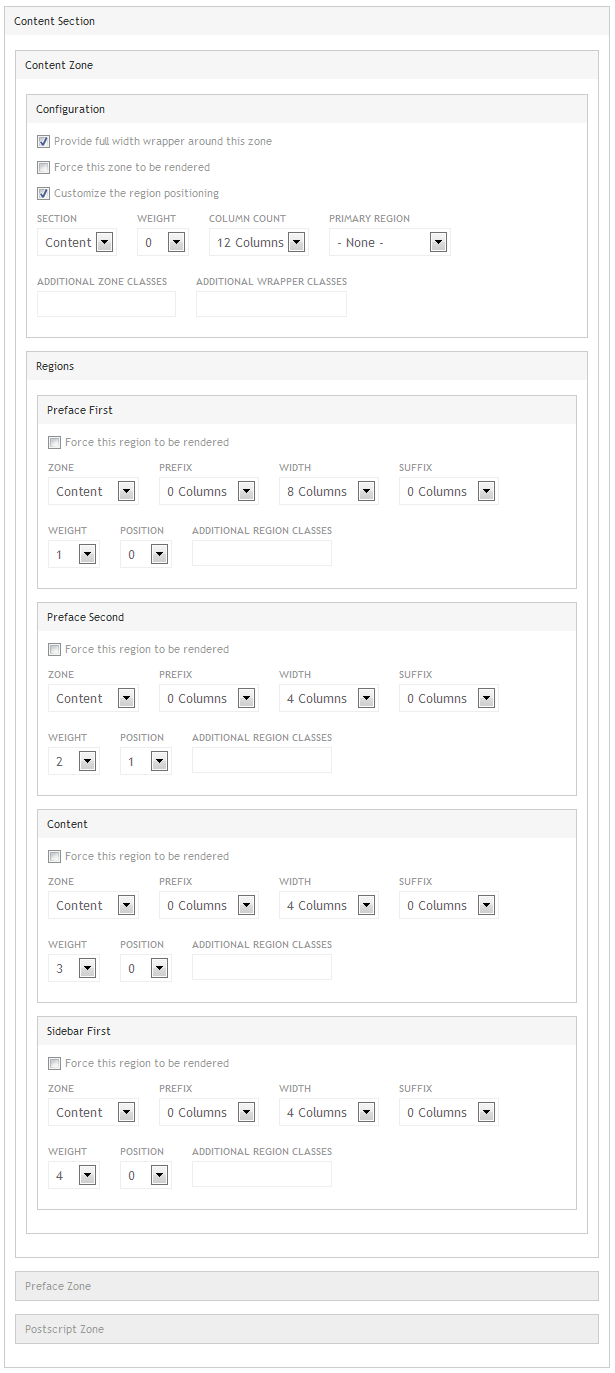
I have trying to using "Customize the region positioning" in Delta but seems the position by number (using the weight rules) cannot done it always come with error message "You have chosen to manipulate the region positioning of the Content zone but the summed region width is greater than the number of available columns for that zone."
Anyway to solve this problem?
| Attachment | Size |
|---|---|
| IRNEWS.jpg | 364.8 KB |
| demo.indonesiarayanews.com - 2012-03-24 - 11h-30m-11s.png | 34.17 KB |

Comments
Hi William,I have asked
Hi William,
I have asked myself the same question, logic tells you that it should layout the way you are after but it doesn't work that way.
You need 2 regions only in one zone (let's say 24 column for this entire example).
Make region content width 16 (weight 0) and region sidebar width 8 (weight 1).
The slideshow needs to be added as a block to content, then add another block beneath that with your blog posts or whatever they are (with the read more links).
Then add your other content to the sidebar.
You can do all this with the context module which works very nicely with the Omega theme.
I tried it your way at the beginning and it doesn't work! You will end up with that error because you are making the combined region width greater than the (24 column) container.
You could try:
ZONE PREFACE
Region preface first (24 columns)
ZONE CONTENT
Region content (16 columns)|Region sidebar (8 columns)
or
ZONE PREFACE
Region preface first (16 columns)|Region preface second (8 columns)
ZONE CONTENT
Region content (16 columns)|Region sidebar (8 columns)
You can see that each zone is a horizontal container. The regions aren't 'stacked' as you are trying. You can however stack blocks very easily within regions.
The hierarchy is as follows: SECTIONS > ZONE-WRAPPERS > ZONES > REGIONS > BLOCKS.
I hope this helps.
Sam.
Hi Sam,Thanks for the
Hi Sam,
Thanks for the response, i will trying to doing like you said, however Im using 12 Columns, so I Think i should separate each zone into exact grid, not using 12 columns.
I Have been adding the screenshot for the setting at my delta... so, what should i change in there ?
NB : I have been doing the new delta but seems if I stack the block in the same region, the block it self have the same width with the region, for example zone (12 Columns) and the content region is 8 columns and the sidebar is 4 columns, if I stack all the block in the content region, all the block are using the same width (8 columns) and how i supposed to make it half so it will be in 4 columns.
Thanks
Hi William, Regarding total
Hi William,
Regarding total column numbers, 12 or 24, doesn't matter, you can try:
ZONE PREFACE
Region preface first (8 columns)|Region preface second (4 columns)
ZONE CONTENT
Region content (8 columns)|Region sidebar (4 columns)
You are right about the blocks, they will be the same width as the number of columns.
If I need 2 blocks next to each other (in a 12 column zone) i.e.:
ZONE - 12 column
Region 8 column*|Region 4 column
*Inside Region 8 column:
Block 1|Block2 (need to be 4 columns each)
I generally use views column class module ( http://drupal.org/project/views_column_class ), make a view that includes these 2 blocks, and add css 'grid-4' so that they will both sit alongside each other nicely. Then save that view block and insert it into the region via context module. You end up with 2 blocks side by side, 4 columns each, inside an 8 column region.
You will have to experiment to find what works best for you but it is possible to have many different styles of layout using Omega/delta/context/views.
I have yet to need the panels module in any of my projects although I am not ruling it out. Have a play around on a test site to see what you can do.
Sam.
Thank you very much sam, i
Thank you very much sam, i have done it, and its beautiful. I think I can manage from here.
Anyway Sam, I have trying the modules and I don't see how to configuring it on block views. can you tell me how to use it.
Hi William, There's a video
Hi William,
There's a video about views column class here:
https://vimeo.com/28416526
Hope this helps.
Sam.
Thank you very much Sam, for
Thank you very much Sam, for your help. right now i happen to working some website, but tell me if you need help to repay your kindness.
regards,
Steven Wiliam
I'm glad to help and you are
I'm glad to help and you are more than welcome to help me out if I post any problems here!
Sam.
primary region?
Had this issue as well. I noticed that by changing the Primary Region (under Content Zone > Configuration) from "Content" to "-None-", the blocks would then stack again as expected.
Not totally sure this affects this particular situation... might be a fix for somebody though!