
Posted by laken on June 11, 2009 at 12:43am
Using latest Panels 5.x-2.x-dev
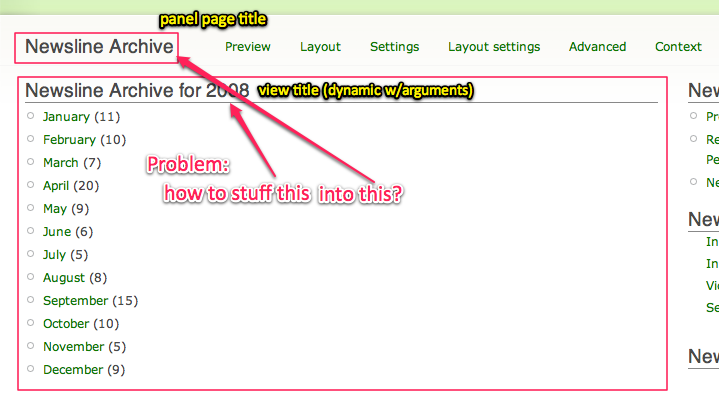
I have a panel page where the main content area is an embedded View. This view takes arguments which become part of its title, so the title changes dynamically (it's a year/month archive drill-down view). (See screenshot attached)
I want to set the title of the overall panel page to the embedded view's title. Anyone know how to do this? If it can't be done through the UI (which I suspect), please suggest code approaches.
This forum seems pretty quiet, hoping some of the experts are still out there!
| Attachment | Size |
|---|---|
| panel page title question.png | 71.32 KB |
Comments
My quick response is to say
My quick response is to say that "data don't flow up dat far." Which is to say, while it's probably possible to achieve the effect you want, the idea of having the overall panel get its title from some of its embedded content is inherently not the way data flows with panels. Panels works because it insulates the wrapper level data (of which the panel title is very much a part) from the embedded data.
That said, there's no reason it shouldn't be possible to replicate the mechanism Views itself uses to generate that title in that outer Panels layer, and arrive at the same title as the View produces. Means some playing with arguments and maybe a custom plugin or two - I'll mull it over some more and come up with something more concrete presently.
Here's a simpler problem
Forgetting for a moment the processing that Views uses to get its titles, here's a simpler issue: I'm passing a single argument into the panel in the path (which is then passed to an embedded view). This is a simple path argument, so I'm not using context. How do I get that argument to show up in the Panel title?
Thanks Sam, just noticed
Thanks Sam, just noticed your reply, much appreciated. Looking forward to hearing more of your ideas on this.
Also, http://groups.drupal.org/node/22410 is a related issue relating to titles…
How do you set the page title of a panel page, period?
I am using the latest 6.x RC. The panel page's title defaults to the home page title and there does not seem to be way to change that.
Never mind
Panel title = Page title, duh
FYI - this is possible now...
This question is ancient history now, but since this page still ranks highly in Google (drupal +panels page title from view) I thought I would update this..
You can do this the latest Panels and Views 2, using "View Context" of Panels. View Context is quite awesome, and does a lot more than set the Page title... it exposes ALL the fields in Views, and you can build Relationships in Panels that takes advantage of that.
Prior to this latest Panels release, a Panel Pane was technically able to set the page title... but only under a more limited set of circumstances (or at least, only with much simpler pages than I was building).