
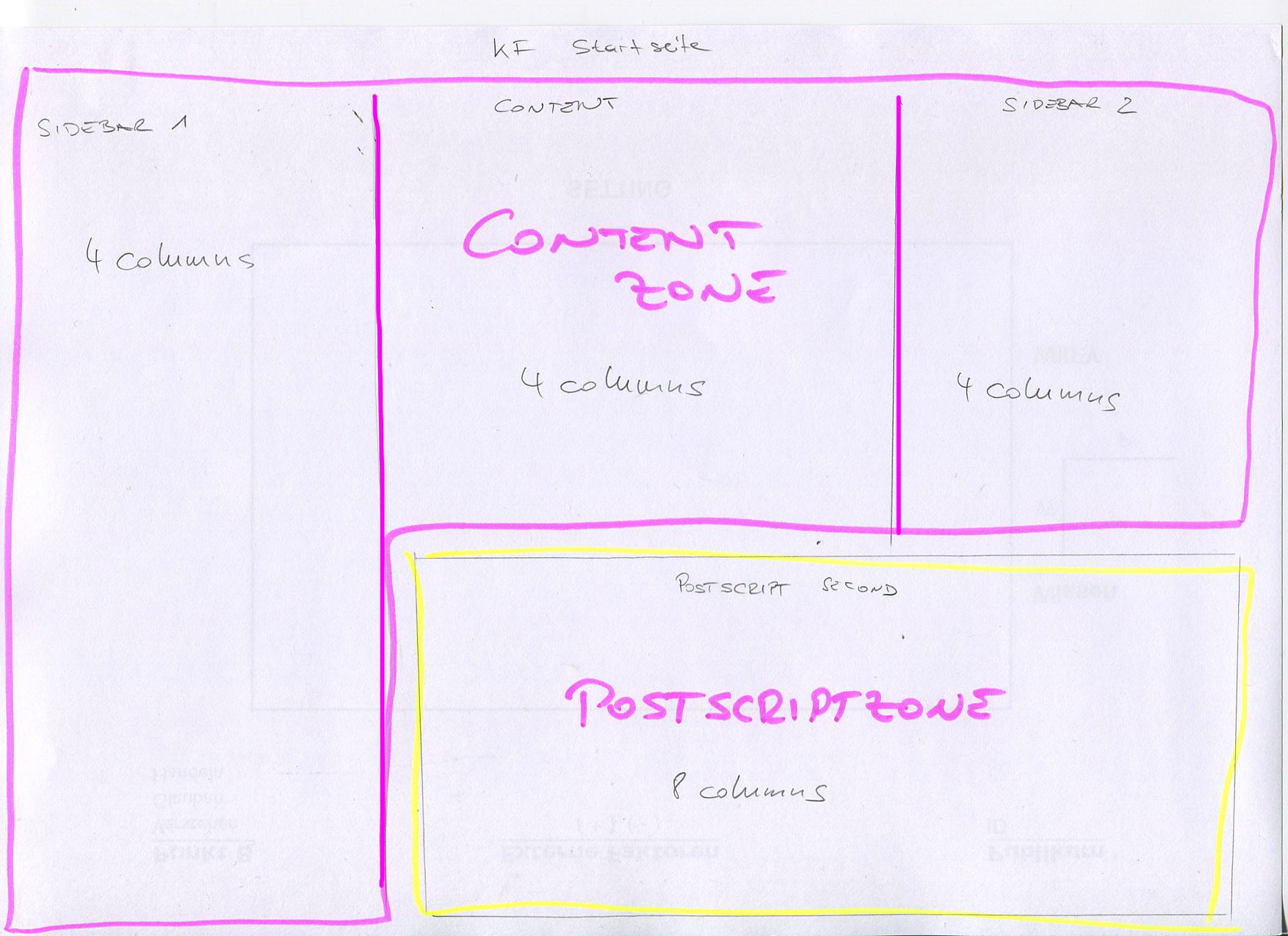
I want to create a rather complicated frontpage.
I have two zones:
Content Zone
Postscript Zone
And there are 4 regions:
Sidebar First
Content
Sidebar Second
Postscript Second
The goal is to have this structure:
Sidebar First (4 columns) | Content (4 columns) | Sidebar Second (4 columns)
Sidebar First (4 columns) | Postscript Second (8 columns)
Sidebar First, Content and Sidebar Second should be 3 columns
Postscript Second should be positioned below Content and Sidebar Second (spanning these two columns) but aligned right to Sidebar First (floating to the right).
I have attached a picture to help visualize it.
Would you put Region Postscript Second in its own Zone or put it in the same Zone as SB First, Content, SB Second?
It would be great if you could throw in some suggestions. I am a bit stuck there.
| Attachment | Size |
|---|---|
| frontpage.png | 2.53 MB |
Comments
Creating a 3 column frontpage layout with Omega
Have you tried to utilize a postscript zone, prepend the first four columns and give it a size of 8?
Ken Weigand
Hey Ken, thanks for this
Hey Ken,
thanks for this idea. I will try and test it. Not sure whether sidebar 1 will float the postscript zone.
Best,
Chris
No floating needed
From the default Omega layout, I would remove the Postscript Second, Postscript Third, and Postscript Fourth regions, and then, like Ken suggested, give Postscript First a prefix of 4 columns and a width of 8 columns.
sidebar first pushes postricpt first down
Thanks Python and Ken.
I did what you suggested.
https://skitch.com/criscom/eyxyp/settings-korn-ferry-briefings-and-insti...
However Sidebar 1 pushes the postscript first region down. Sidebar 1 has more content than Region Content and Region Sidebar 2 so there is a lot of whitespace below Region Content and Region Sidebar 2. I thought that this would happen. I would like Region Postscript 1 to be positioned right under Region Content and next to (right to) Sidebar 1 and thus suspected that a float would be needed. Am I missing something?
Zones are "stripes" across
Zones are "stripes" across the entire width of a page. You are currently putting a sidebar, the main content, and another sidebar into one "stripe" (the Content zone), and are putting additional content into a separate "stripe" (the Postscript zone). If you want the additional content to appear in the same "stripe" as the main content, you will have to do it with regions/blocks, not zones.
That is not yet a feature of Omega
You need to think of the Omega "Sections" as being a Horizontal unit. Everything in the Content Section (regions Sidebar 1/2, Content) will display across one horizontal plane. Not other sections can be in that plane (for now, I hear Omega 8 might help out on this), so Your Postscript 1 region cannot display under Content and next to Sidebar 1.
James Sinkiewicz
Drupal Site Builder and Generalist
http://MyDrupalJourney.com
Yes, I thought so, too. Not
Yes, I thought so, too. Not sure how to solve this then? Maybe Panels?
Suggestion
What you might want to do is create a view for whatever you have in the Sidebar 1 region and only display the first 5 items say. Then clone the view but change to display the next five items. Then put the first view in Sidebar 1 and the second view in Postscript 1. They will stack on top of each other. Then add your old Postscript 1 content to the Postscript 2 region. It will appear under the Content and Sidebar 2 regions and to the left of Postscript 1 (which is a continuation of sidebar 1 above).
James Sinkiewicz
Drupal Site Builder and Generalist
http://MyDrupalJourney.com
Thanks, James! This is a
Thanks, James! This is a great idea! This could work. I'll try it out immediately. Thanks.
IF it does not work out
Since I have no idea what kind of content you wanted in Sidebar 1 (obviously one long ad image would not work as I suggested), then you can use page manager/panels to take over the entire content region and display things as you would like. There are a few pre-made responsive Omega panel "layouts" in the Omega Tools module (I think that is where they come from) that you can use in panels.
James Sinkiewicz
Drupal Site Builder and Generalist
http://MyDrupalJourney.com
jscsjscs suggestion
In Sidebar one there are three teasers of nodes with Title / Teaser / More Link; The teasers are trimmed to a specific length; below these three teasers there is a Newsletter Signup block.
I have moved the Newsletter Signup block to Postscript Zone into the Region Postscript 1 with a width of 4 columns. In the same zone (Postscript) I have put the Region Postscript 2 with a width of 8 columns which holds an image slider.
This could work well if it was not for the Tabs in the first sidebar (quick tabs) which lets the user switch between two different views of three teasers. One view of teasers is slightly different in height and thus the slider in the Region Postsript 2 also jumps up when I switch to the second view of teasers.
I think I will still go with this solution, since it is the quickest and easiest to do. Thank you all for your input.
One more option
Omega allows you to move regions from one zone to another. So another option might be to move Postscript Second from the Postscript Zone to the Content Zone.
You can do this in the Zone pulldown menu for that region. You also have to then adjust the Weight (in the Weight pulldown) to set the order for all four regions now in the Content Zone.
You'd probably want to create this with a new layout using Delta and Context to have this as a separate Front page layout.
Roger
_________________
Art has gone to the dogs
GoodeGallery.com