
Posted by Crinstam Acres on August 13, 2012 at 9:36pm
I downloaded and installed open outreach without too many problems. Had to get my server to make some changes to their setup but mostly it was a breeze.
However, I know find myself at a loss... I've started to set it up, you can see it here
Right now, my main confusion is getting profiles set up. They don't seem to contain any information and I don't know how to change that.
I am using social login, if that matters.
Even if someone could point me to a page that says "Do this", it would be greatly appreciated.
Beyond that, if anyone wanted to help on the site it would be appreciated.
It is for a free natural health retreat for people who are sick with generally terminal illnesses.
Thanks in advanced
Tom
Comments
First, before you get too
First, before you get too far, what functionality of the Openoutreach distribution do you need?
The reason I ask, is because sometimes it is much easier to start from scratch, than pick apart a distribution and redo the parts that you need.
If you do want most of the functionality that is already in place for open outreach, to answer your original question, you need to add fields to the user profiles.
I assume that when you say "profiles" you mean the user profiles and want to add things like "Location" "Social Media Links" etc. right?
You'l find the user profile fields at admin/config/people/accounts/fields
Or by clicking on Configuration>Account Settings>Manage Fields
I don't have an option that
I don't have an option that says anything about managing fields... there is nothing under Account Settings to choose from, no section for it on the account settings page that I can see.
Are you logged in as an
Are you logged in as an administrator? Can you visit this url in our browser:
http://www.crinstamacres.net/site/admin/config/people/accounts/fields
Edit: I just tried to visit that url and I got a 404.
I think you have a problem with your .htaccess file. How did you install this?
I installed it using the
I installed it using the directions;
http://openoutreach.org/section/using-open-outreach
As for that address, like the menu option, it just isn't there.
Actually... I just checked the actual directories...
There is no admin folder at all...
Why did I choose open outreach?
Oh, I don't know... From the open outreach About page;
"Open Outreach provides an out of the box feature rich website for nonprofits."
It sounded like something that would be useful for a non profit and not cause me extra bs trying to figure out things that should be simple...
Good plan so far eh?
You won't find an admin
You won't find an admin folder or a config folder. These urls are generated by drupal when the url is requested.
Can you log in to your server and verify whether you have an .htaccess file present in the site's root directory?
I think this is your problem. You should be able to at least be able to visit yoursite.com/admin and not get a 404 error.
Are you planning on using the functionality offered by open outreach? Image galleries etc.? That was why I asked originally if you planned on using the features it offers. What features do you want your site to have?
No there is no .htaccess
No there is no .htaccess folder in the root directory. I also find no mention of anything about it in any of the install instructions.
And yes, I am planning on using the extra parts of open outreach.
That is your problem. You
That is your problem.
You need to get an .htaccess file at the root of your site.
Most likely when you copied the files over, it was hidden since it is preceded by a . in the filename.
The Drupal Installation guide may prove helpful as well.
Part of the installation
Part of the installation instructions are this;
"Files
From the main cPanel page, click on “File manager”.
Click the “Upload” button, browse to find the Open Outreach file you downloaded and click “Open”.
Click the “Extract” button to extract the uploaded file.
Rename the directory with the name of the site you are installing.
Within this directory, you now have the core Drupal files, as well as in the “profile” folder Open Outreach and all its modules, themes and libraries.
Within the “Sites” directory, go into the defaults folder.
Copy the file default.settings.php, paste into the same folder and rename settings.php."
Unless I am not understanding something here, it wouldn't be possible for me to miss it if it was included in the package AS IT STATES IT IS;
"Some of these settings are contained in the default .htaccess file that ships with Drupal, so you shouldn't need to set them explicitly. "
So, if I am missing it, it was missing from the install file that open outreach is putting out no?
I downloaded it as a tarball from the open outreach site;
http://openoutreach.org/download version 7.x-1.0-rc3
and then (as per the instructions), extracted it right to the site.
I am offering no explanation
I am offering no explanation for this, but apparently, even though the htaccess file IS in the archive, and I extracted it right to the site, it didn't include it...
I uploaded it now, give me a few minutes...
No, it isn't missing. It just
No, it isn't missing. It just didn't get copied over to your server. Are you using windows by chance? I just extracted that same file and it is there. Do you by chance see a .gitignore file there? If you don't then you aren't seeing files that start with a .
You need to simply upload the .htaccess file to the root of your webserver. You could just copy and paste the text from the link I provided earlier and call it 1.htaccess. Upload that file to your server and then rename it to .htaccess
ok, now that link that you
ok, now that link that you posted earlier goes to the main 'Accounts' page... still nothing about fields
niether the .htaccess or the
niether the .htaccess or the .gitignore file extracted to the site from the archive, although I can confirm they are indeed included in it...
No clue why.
and yes, I am using windows
You need to log in as an
You need to log in as an administrator. This: http://www.crinstamacres.net/site/admin/config/people/accounts/fields says "Access Denied" for me.
You are so close now to getting it working!
that links logs me into this
that links logs me into this page
.../admin/config/people/accounts
Still no fields there.
send me an email and I'll make an admin account for you
Now that you are logged look,
Now that you are logged look, in the upper-right-hand corner for the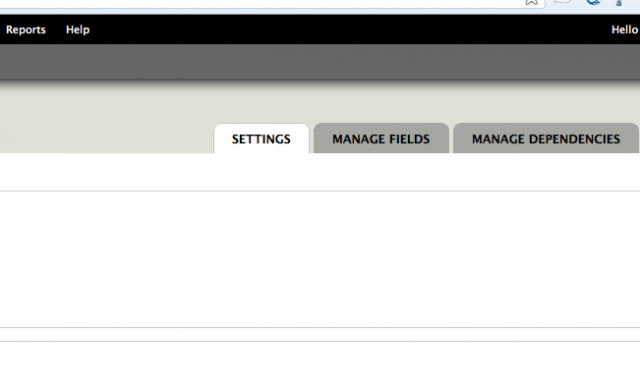 manage fields tab.
... except I don't have those
... except I don't have those tabs... or any tabs for that matter... lol
http://crinstamacres.net/images/pic1.png
Click on account settings.
Click on account settings.
Field UI module
Field UI is not enabled by default on Open Outreach as many site administrators will make not changes to the fields being used. So if you do want to access this, you need to enable the Field UI module (same for View UI and Context UI if you need access to those.)
Fields UI it was!!! Okay,
Fields UI it was!!!
Okay, thanks for both of your help so far... I'll come back when I next get confused lol
Ok, next question, same topic
Ok, next question, same topic (profiles)
Where do I find what fields have already been defined?
Also, where do I map the info from social login to the fields?
For a list of fields:
For a list of fields: /admin/reports/fields
For a module specific question, like Social Login, you might try the specific module's Documentation page.
You're welcome for all of the
You're welcome for all of the free support and help I gave you yesterday. Please don't contact me any more.
Okay, you want to be an ass,
Okay, you want to be an ass, be an ass.
I did NOT contact you, you contacted me. I asked specific questions for help. Telling me to read the documentation is the act of a troll... so how about you just stay away from my posts and not respond to them.
And remember, I tried to keep it quiet in order to not point out to the community at large what an ass you are.
Field name: body
Field name: body Field Type: Long text and summary (module: Text) Used in: Article, Blog, Book page, Event, Forum topic, Link, Member page, Section
I am assuming that when it says something like this, there is further definition of the field somewhere to differentiate which part it has been used in, or are they just saying the same input shows in all those places?