
Posted by nicktr on October 9, 2012 at 6:10am
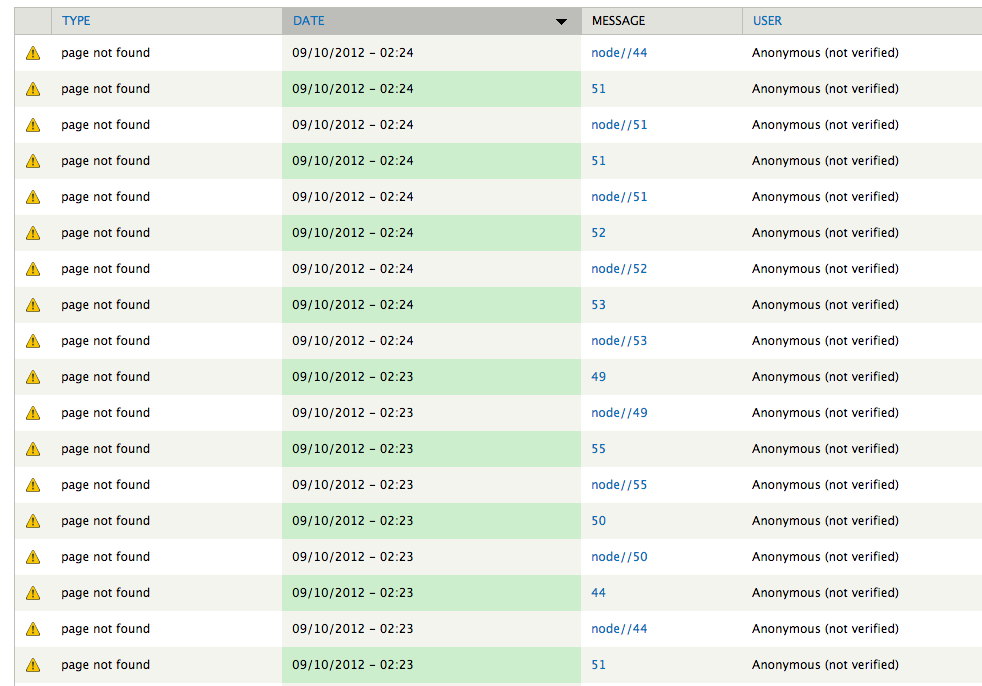
Just perusing the logs of a site i've recently built for someone. Seems like some sort of spambot is attempting to find random pages on the site. Is it anything to worry about? See screen shot 1.
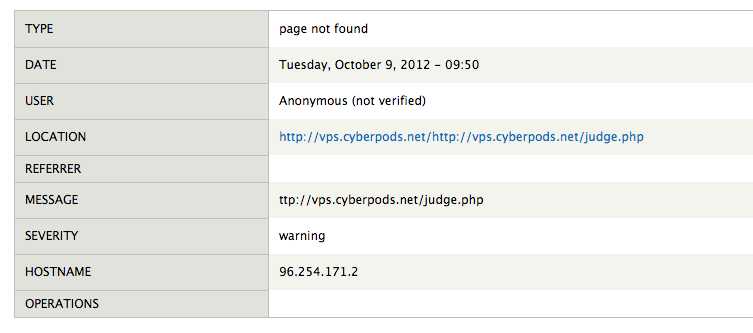
Also - see screenshot 2 - why is that cyberpods.net URL logged, if it's nothing to do with my website?
Cyberpods.net is apparently an internet marketing and web dev company, so what are they doing snooping around on my site?
It says page not found - location is http://vps.cyberpods.net/http://vps.cyberpods.net/judge.php which looks suspicious to me....what could judge.php be??
Any ideas?
Nick.
| Attachment | Size |
|---|---|
| Screen Shot 1 | 129.37 KB |
| Screen Shot 2 | 35.27 KB |
Comments
The 404s just looks like your
The 404s just looks like your average misbehaving bot. But the fact that the location is 'vps.cyberpods.net' means that someone routed that domain name to your IP address (either via configuring their DNS to use it, or by manually setting it in their /etc/hosts file). Usually web servers are configured so that if a request comes in for an unrecognized domain it gets routed to the default domain. Your Drupal site must be setup as the default domain.
In short, it looks like someone from cyberpods.net made a configuration error and now your site is getting some extra 404 traffic. If it becomes a problem you can block these requests at the web-server level, or earlier (You could block them in Drupal, but it would be more efficient to block them on a lower level).
--
Dave Hansen-Lange
Director of Technical Strategy, Advomatic.com
Pronouns: he/him/his
Thanks for the explanation
Thanks for the explanation Dave, much appreciated.
I'm hosting on linode vps - so I have full SSH access etc, but i'm still finding my way around so if you could point me in the direction of blocking these requests at the server level i'd be very grateful - i'm not quite sure what to search google for in this respect.
I'm also tempted to contact the folks at cyberpod.net too and tell them to fix whatever it is they've done.
On the point of my drupal site being setup as the default domain, I think you're right. I do have another domain name that is the system 'FQDN', but when I type in that URL, it resolves at the website mentioned above - i;ve figured out that I need to configure my default vhost on apache, or something along those lines.
on another note, any feedback on the website - my first drupal 7 site, welcome!
http://hkfcbadminton.com
cheers,
Nick.
Ban at the firewall level (or
Ban at the firewall level (or if you don't have any one, install apf and use it to block the IP).
Julien Didelet
Founder
Weblaa.com
For Apache config, it's
For Apache config, it's better to keep the vhost restrictful and accept only the right request instead of all requests.
Julien Didelet
Founder
Weblaa.com
Thanks Ben, still looking
Thanks Ben, still looking into the vhost issue.
Had another look at the logs this morning - see screen shot:
http://cl.ly/image/1D113b0g2L2V
Why is yahoo.jp now giving me page not found warnings?
I can see how an individual running small web business might mess up their server config file, but not yahoo.jp. Is there something else going on here that i'm missing?
Huuum difficult to say like
Huuum difficult to say like that without more infos. Did you check your apache log files (access/error)? Its the best way to understand this problem. Probably you'll have more details.
Julien Didelet
Founder
Weblaa.com
This is all I can see in the
This is all I can see in the apache error.log
[Sun Oct 07 06:36:43 2012] [notice] Apache/2.2.22 (Ubuntu) PHP/5.3.10-1ubuntu3.2 with Suhosin-Patch configured -- resuming normal operations
[Wed Oct 10 00:54:43 2012] [notice] caught SIGTERM, shutting down
[Wed Oct 10 00:54:44 2012] [notice] Apache/2.2.22 (Ubuntu) PHP/5.3.10-1ubuntu3.2 with Suhosin-Patch configured -- resuming normal operations
[Wed Oct 10 00:57:26 2012] [notice] caught SIGTERM, shutting down
[Wed Oct 10 00:57:27 2012] [notice] Apache/2.2.22 (Ubuntu) PHP/5.3.10-1ubuntu3.2 with Suhosin-Patch configured -- resuming normal operations
I restarted the webserver a couple of times at about that time/date so I assume this is just to do with that.
No I'm talking about the
No I'm talking about the connexion log file and not the apache service log. You have a log file in Apache where you keep a tracking of all connexion maged by your apache webserver. I don't remember exactly where it is because I'm working now with Nginx but Google have to be able to help you.
In this connexion log file, you'll have more detail information about your errors. Might be helpful to understand and analyse what's going on.
Julien Didelet
Founder
Weblaa.com
Ok I tracked down my log
Ok I tracked down my log file. It's huge....33MB!
Managed to search for a few suspicious strings from the recent log messages admin screen:
66.249.69.194 - - [11/Oct/2012:13:27:32 +0800] "GET /node/53 HTTP/1.1" 200 6530 "-" "Mozilla/5.0 (compatible; Googlebot/2.1; +http://www.google.com/bot.html)"
113.140.75.222 - - [11/Oct/2012:13:30:50 +0800] "GET /w00tw00t.at.blackhats.romanian.anti-sec:) HTTP/1.1" 404 5755 "-" "ZmEu"
113.140.75.222 - - [11/Oct/2012:13:30:51 +0800] "GET /phpMyAdmin/scripts/setup.php HTTP/1.1" 404 5738 "-" "ZmEu"
113.140.75.222 - - [11/Oct/2012:13:30:52 +0800] "GET /phpmyadmin/scripts/setup.php HTTP/1.1" 404 5737 "-" "ZmEu"
113.140.75.222 - - [11/Oct/2012:13:30:53 +0800] "GET /pma/scripts/setup.php HTTP/1.1" 404 5728 "-" "ZmEu"
113.140.75.222 - - [11/Oct/2012:13:30:54 +0800] "GET /myadmin/scripts/setup.php HTTP/1.1" 404 5734 "-" "ZmEu"
113.140.75.222 - - [11/Oct/2012:13:30:55 +0800] "GET /MyAdmin/scripts/setup.php HTTP/1.1" 404 5741 "-" "ZmEu"
I looked up the w00tw00t.at.blackhats ZmEu stuff - this link was very useful: http://ensourced.wordpress.com/2011/02/25/zmeu-attacks-some-basic-forensic/
Turns out that it's a bot searching for vulnerabilities in phpmyadmin setup files.
My server is returning all 404's so nothing has been accessed by the looks of it.
also another:
96.254.171.2 - - [03/Oct/2012:22:48:51 +0800] "GET http://vps.cyberpods.net/judge.php HTTP/1.1" 404 6296 "-" "Mozilla/5.0 (Windows; U; Windows NT 6.1; en-US; rv:1.9.2.28) Gecko/20120306 Firefox/3.6.28 (.NET CLR 3.5.30729)"
Don't understand why it is trying to 'GET' vps.cyberpods.net/judge.php from my server. Why would it be there in the first place - and what would it do if it was found?
I'm a novice at this kind of stuff so it freaks me out a little!
Remember that the DNS system
Remember that the DNS system is just like the postal system. If you got a letter in your mailbox addressed to:
John Doe, CEO
CyberPods VPS Services
[your postal address]
You would write "Wrong address" on the letter and return it to the post office.
Your server is doing the same thing (only replace "name/title/org" for URL and "postal address" for "IP address"). If the quantity of these bad requests is negatively effecting the performance of your server, then block them. Otherwise they're safe to ignore.
--
Dave Hansen-Lange
Director of Technical Strategy, Advomatic.com
Pronouns: he/him/his
Ok, thanks for the
Ok, thanks for the reassurance, Dave. I'll ignore for now, will look into blocking later if needs be.
This could be of help....
Similar issue with probable solutions :
http://drupal.stackexchange.com/questions/45678/watchdog-404-page-not-fo...