
Posted by frankdesign on February 5, 2015 at 11:59pm
Hi
I'm testing a Commerce site using Realex 3D Secure and I'm getting an odd visual error. This error is happening on my theme as well as Bartik and Seven, so it's not my theme. It's also appearing in Safari, Chrome and Firefox.
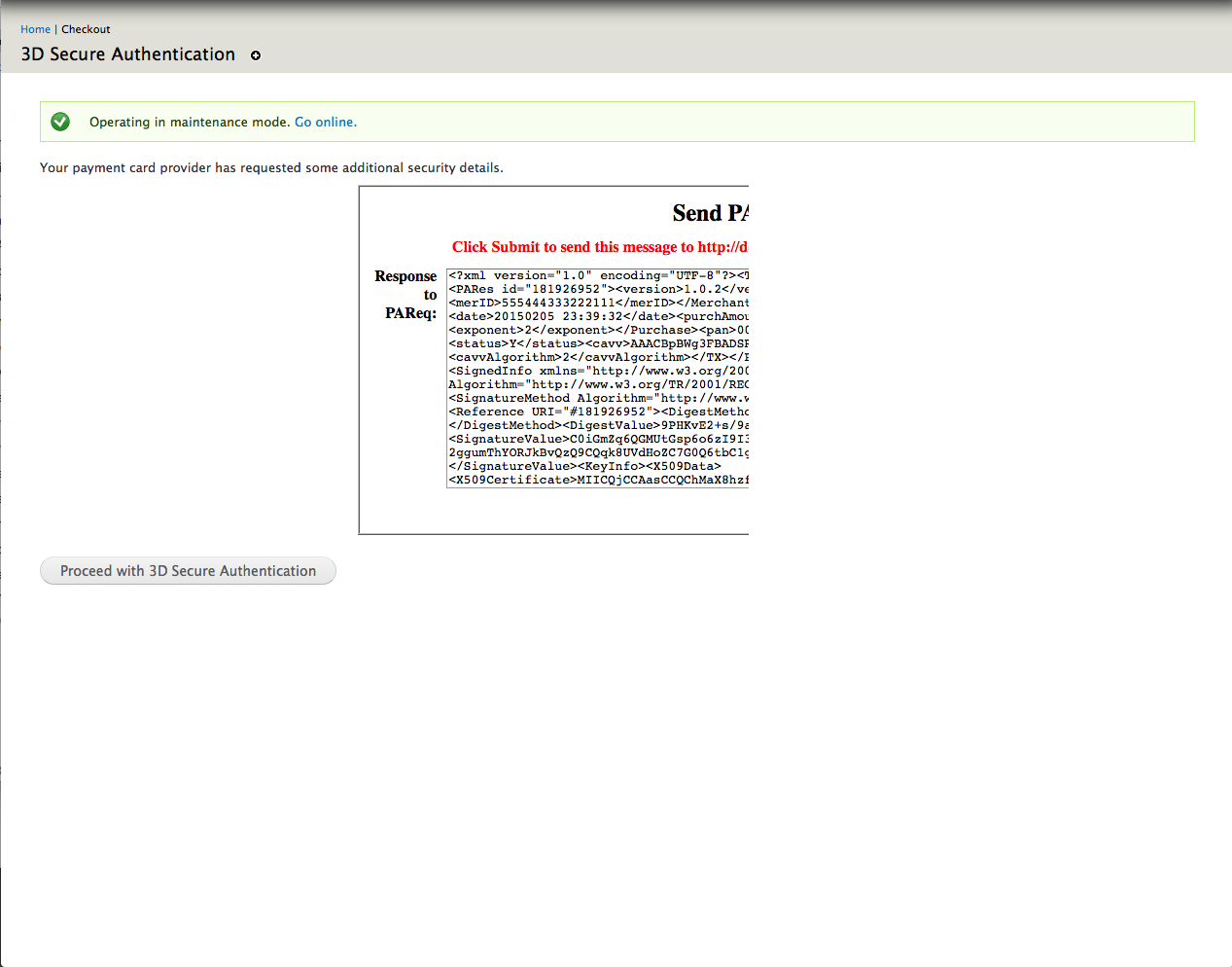
Anyway, Realex aren't offering much help, so I'm wondering if anyone else has seen this. The 3D Secure test iFrame is chopped in half. I've tried all sorts of CSS tweaking in Firebug but to no avail. The only additional CSS that has some effect is if I add width:100% to the iFrame (but the content in the iFrame is still chopped off). See attached grab which is is taken using Seven as the theme.
Any advice?
Thanks
Frank
P.S. Does anyone know the name of the person in Realex who knows a bit about Drupal?
| Attachment | Size |
|---|---|
| 3D-Secure.png | 144.42 KB |
Comments
Hi Frank, I remember I had
Hi Frank,
I remember I had this "error" before, but it turned it wasn't an error, I think it was a confirmation window with a "submit" button, but it is at the bottom of the iframe and is not visible.
Try to play with firebug moving the iframe and click the confirmation button, I think that was my problem. This screen represents the customers 3D secure password.
This only happen with the account in test mode. I have a screenshot from the last time I got this "error" but I cannot attach it.
I hope this help,
Luis.
I could upload the image to a
I could upload the image to a public server, is here:
http://i.imgur.com/F9njsfG.png?1
Works fine without Drupal
I don't know if this is any help, but I've recently been working on a 3D Secure payment implementation via Realex's RealMPI, though not Drupal-based. I had no problem with the test iFrame - it was fully displayed - so I'd guess the problem is with some CSS coming from Drupal.
Not that helpful, I suppose, but it may at least eliminate some lines of enquiry. :-)
Ray.
Update from Realex
Thanks Luis and Ray.
I got an update from Realex. They are aware of the issue and it only appears on the testing area. It's due to the size of the testing XML data pushing the iFrame off to the right causing it to be cropped. It apparently doesn't occur on the live site as that is just a narrow form. I'll let you know if I have any problems when it goes live.
F
yep, only in test mode
@frankdesign yep it only happens with the testing version. I've no control over what appears in the iframe and the test mode version is substantially different from what the user will see when it's live.
But wait - there's more....
I've been testing the 3D Secure with the test credit card numbers supplied by Realex. All transaction types processed correctly except for the card type which isn't registered for 3D Secure. While this transaction correctly goes through the ECI on Realex's backend for this transaction is '1' whereas it should be '6' (as the test cards are all VISA numbers - 1 is for Mastercard). I have no idea where this number is coming from but the guy I'm dealing with in Realex has asked me to see if it is a Drupal issue before he checks it at his end as he has no record of there being an issue.
Has anyone seen this before?
I'm using Commerce 7.x-1.10, Commerce Realex Payments 7.x-1.0 and Drupal Commerce 3D Secure Support 7.x-1.x-dev.
Thanks
Frank
Found the ECI function
OK, so I found the ECI function in the file commerce_realex_remote_3dsecure.inc and it looks correct to me. So this looks like a Realex issue. Anyway, let me know if you have come across the '1' instead of '6' issue before.
Thanks
F
ECI doesn't come from Realex
Hi Frank,
As luck would have it I'm actually working on my (non-Drupal) payment system this evening.
In the case where the card isn't enrolled (the response to the 3ds-verifyenrolled request has code "110" and enrolled tag "N"), the payment system then has to set the ECI tag to either 6 or 1 explicitly. This code doesn't come from Realex... if the card is enrolled, it comes from the ACS - if the card isn't enrolled, then your system sets it.
This would indicate to me that the problem you're seeing is somewhere in the Drupal/Commerce stack you're using.
No more helpful than my previous post, I know... :-) But I hope it helps point you in the right general direction.
Ray.
Frank - that's fixed now
Frank - that's fixed now in the latest dev.
Thanks a mil Stella for
Thanks a mil Stella for looking at this. I have updated to the latest dev version and I'm afraid there is a host of new problems.
Rather that post them all here, I thought it would be better (and probably more appropriate) to post it to the modules issue page. So I'll post there shortly
Thanks
Frank
Yep, the issue queue is the best place
Yep, the issue queue is the best place for those. Though I can't think of what they could be! Will have to wait and see :)