
Hello everyone,
I have built a church website using the OpenOutreach distribution. In addition, I have created a new content type, "Business Meeting", to save our church's business documentation. I have a number of user roles, including Contributor, Editor, and Administrator. I have added permission for an Editor to create a new node of type "Business Meeting", as well as editing and deleting them. But when I use Masquerade to test this, I keep getting the following message: "Error The website encountered an unexpected error. Please try again later." I have re-ordered the roles list so "anonymous user" is on top, followed by "authenticated user", "contributor", "editor", and at the bottom is "administrator". After making the above changes and running cron, I continue to get this error message.
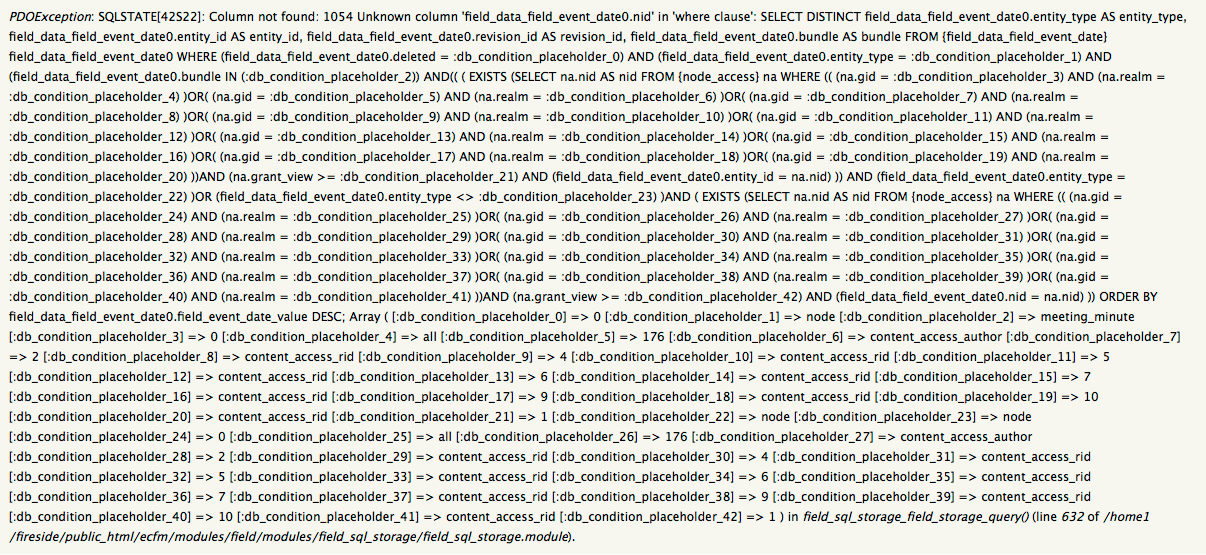
Looking at the error log, I find the following message:
PDOException: SQLSTATE[42S22]: Column not found: 1054 Unknown column 'field_data_field_event_date0.nid' in 'where clause': SELECT DISTINCT field_data_field_event_date0.entity_type AS entity_type, field_data_field_event_date0.entity_id AS entity_id, field_data_field_event_date0.revision_id AS revision_id, field_data_field_event_date0.bundle AS bundle FROM {field_data_field_event_date} field_data_field_event_date0 WHERE (field_data_field_event_date0.deleted = :db_condition_placeholder_0) AND (field_data_field_event_date0.entity_type = :db_condition_placeholder_1) AND (field_data_field_event_date0.bundle IN (:db_condition_placeholder_2)) AND(( ( EXISTS (SELECT na.nid AS nid FROM {node_access} na WHERE (( (na.gid = :db_condition_placeholder_3) AND (na.realm = :db_condition_placeholder_4) )OR( (na.gid = :db_condition_placeholder_5) ANDThe full message is much, much longer, but I've tried to give enough to get the general idea.
As administrator, I can create a node for this content type just fine.
I like Drupal because my coding skills are minimal, and Drupal can do what I cannot do with code.
What am I overlooking? What do I need to do to fix this?
Any helps would be greatly appreciated.
Thanks in advance!
(screen shot of error log attached)
| Attachment | Size |
|---|---|
| screen shot of error log message | 52.64 KB |
Comments
Judging from that huge SQL
Judging from that huge SQL query, it looks like you've run into a bug in the Node Access module. For some reason, it's looking for an "nid" column on your field data table, but it should be looking for an "entity_id" column and matching it with "entity_type = node" somewhere. I would take a look at Node Access's issue queue and look for any existing issues where people are getting an error like "column 'nid' not found" or something like that. You may just need to update your module, or there may be a patch or small bit of code change needed to fix the issue, but I'm sure someone must have found the same problem.
Not using Node Access
Thanks for the quick reply, bobojo !
I've searched the list of nodes, and do not appear to be using that particular module.
Do you have any other thoughts or ideas?
Thanks in advance!
I'm not sure if it was a typo
I'm not sure if it was a typo or if you meant to say "list of nodes," but just in case, you'll want to look at your list of modules, not your nodes.
The query you posted in the original post is accessing a table called "node_access." If that table doesn't come from a Node Access module, it might be in core or some other module could be providing it. I would at least research that table and see where it might be coming from, then look at the issues for whatever module provides that table.
Your issue sounds similar to these
Your issue sounds similar to these:
https://www.drupal.org/node/2102045
https://www.drupal.org/node/2245827
Suggested solutions from those issues include:
- Drop the sort on the field. This skips the issue entirely, but, you know, no sort.
- Change the sort to a property of the base table of the entity. Created date is handy for instance.
- If you absolutely must have the sort based on a field of the referenced entity, you can change the Mode from Simple to Views. This of course requires that you have Views installed and have created an entity reference view. I have no tested this solution myself, but I am reasonably certain it should work as it operates outside of Entity Reference.
Does any of the above seem familiar to your setup? Separately, if you assign the Editor role the "Bypass content access control" permission and then masquerade as an Editor, does the error go away?
Bypass worked
Thanks oraculi, the bypass access control did the trick.
I was not sure which field to drop the sort on. This issue was cropping up on a new content type I had created, and only that content type.
Thanks again1
Bypassing access control is not a good permanent solution
I think the recommendation to bypass access control was only a temporary troubleshooting step to narrow down the bug -- in general this is a dangerous permission to give out to non-administrators. Be careful with it at least. :)
This is a workaround
As xjm suggests, I also would consider this more of a workaround than a final solution. Bypass access control is a powerful thing, especially if you are posting potentially confidential business/church records information.