
IRC channels are named like this:
- #drupal-za for the quiet spont on IRC just for us South Africans.
- #drupal is a lounge of sorts. Here, we talk about patches we need reviewed, quick how-to questions, and what we've been doing with Drupal lately, among other things. If it's Drupal-related, and isn't in-depth enough to take over the channel with lots of text, and doesn't need a quiet venue, it is fair game in #drupal.
- #drupal-contribute is the place to go if you want to help with core and contrib coding work, promotion, advocacy, infrastructure, and general Drupal community tasks. The rule of thumb here: if it ends up on the drupal.org infrastructure, and you are working on it or want to work on it, then this is the place to talk about it.
- #drupal-support is for long or deep support discussions. While quick questions are okay in #drupal, some discussions are just too long for that channel, or need a quieter venue -- that's when they go in #drupal-support.
There are many more: https://www.drupal.org/irc
I like desktop clients, but if someone prefers web clients, please mention them here. These work for Windows, Linux and if you have to a Mac ;-)
HexChat : https://hexchat.github.io/
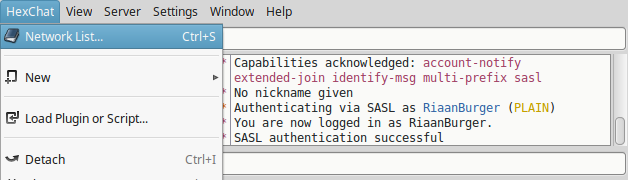
Install, then select the network list:
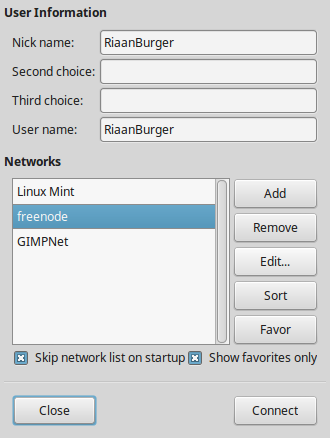
Fill in your name (twice), select freenode (freenode hosts the Drupal channels) and click edit:
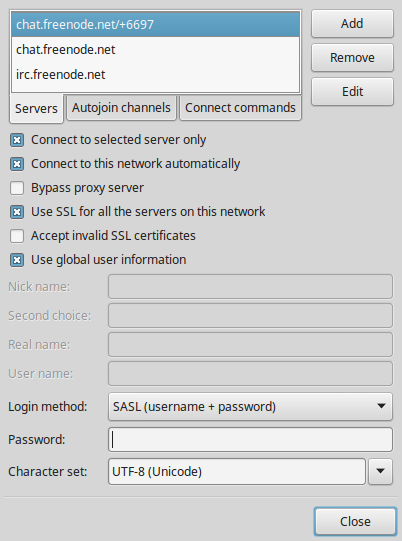
Tick "Connect to selected server only" and "Use SSL for all the servers on this network" and set the login method to "SASL (username + password)":
Send a message to the freenode server to register your nickname (you only have to do this once). Obviously replace the tokens with your actual password and e-mail address:

You will get a confirmation e-mail with a new confirmation message you have to type in. When that is done...
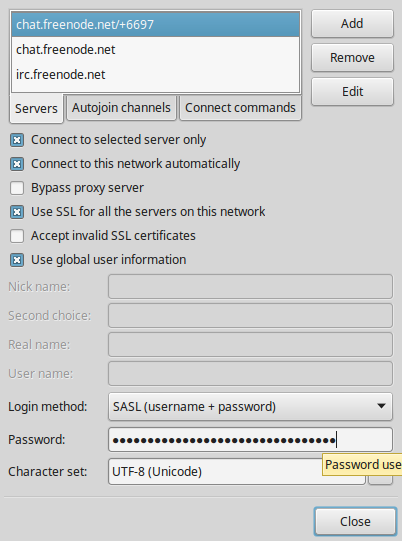
You can now add your password to HexChat if you want to store it that way:
Join a channel:
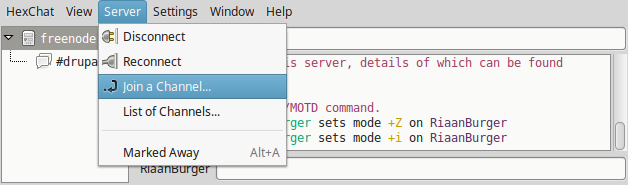
First see the quiet #drupal-za ;-) Then you can add the busy main Drupal channels mentioned above, like #drupal, #drupal-contribute and #drupal-support

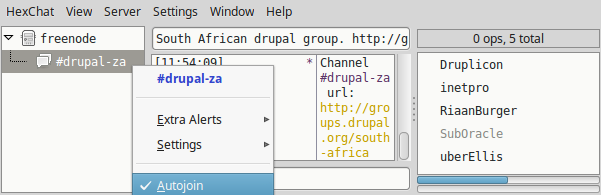
Select auto-join for the channels you want to join immediately each time you start HexChat.
If any of you want Pidgin screenshots, let me know.
| Attachment | Size |
|---|---|
| hex-a.png | 26.39 KB |
| hex-b.png | 22.59 KB |
| hex-c.png | 38.04 KB |
| hex-d.png | 27.8 KB |
| hex-e.png | 39.35 KB |
| hex-f.png | 24.69 KB |
| hex-g.png | 5.91 KB |
| hex-h.png | 28 KB |








Comments
Your Drupal Profile
Of course, since this is a well integrated part of the Drupal community, you can then go to edit your profile on Drupal.org to add your IRC nickname ;-)
Thanks, will do so.
Thanks for the explanation on how to set-up.