
Posted by kelvis97 on January 5, 2011 at 9:57pm
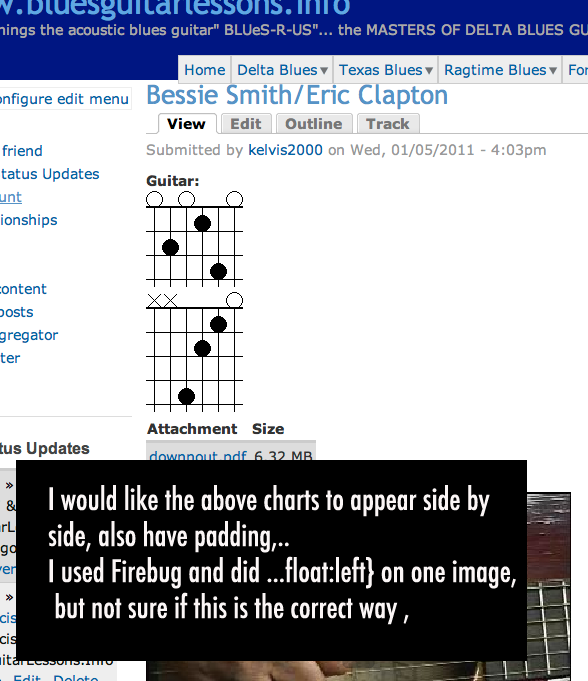
I used a module which creates a guitar chord graphic,
when I add more than one chord the images go from top to bottom
instead of left to right which I would prefer.
http://www.bluesguitarlessons.info/Eric_Clapton
Trying to figure out what is the best way to go about
doing this
| Attachment | Size |
|---|---|
| bessie.png | 83.68 KB |
Comments
Target the CSS wrapper for
Target the CSS wrapper for the element and then "float:left;" in the stylesheet.
You can then set margin/padding to space the images.
Target the CSS wrapper for
Target the CSS wrapper for the element and then "float:left;" in the stylesheet.
You can then set margin/padding to space the images.
Thank You
Thanks For Your help
Thanks,
Kevin
http:www.delta-guitar.info
http://www.Twitter.com/delta_blues
More about targeting these items
So, just to flesh out what ArtistConk said above, you would go to your zen-classic.css file and add something that targets these items, like
.node .content .field-type-guitar-chord .field-items .field-item {
float:left;
padding:5px;
}
That should be specific enough to these guitar chords fields and leave the rest of your page alone.
It 'should' result in the chords stacking up left to right until you get too many for the containing element and then they 'should' wrap onto 2 lines.
ymmv
Hi Anne Thanks
Thanks Anne so would this look right in zen-classic.css ?
<
div class="field-item even">
{ float:left;
padding:5px
}
what confused me a bit was that the Guitar chord module
generates the graphic, the chord, so I did not know what to call it.
Again Thanks Anne..
Kevin
Thanks,
Kevin
http:www.delta-guitar.info
http://www.Twitter.com/delta_blues
close
You're close. The form
<
div class="field-item even"> is being generated by the module and added to your page html.
So, the way to get the css to "target" those fields with that class is to put
.field-item {
float:left;
padding:5px;
}
into the css file that your page is using. That statement says "for all of the elements with the class of field-item, do this".
But just "field-item" might be generated by some other module too. It looks pretty generic. So, to make sure that you are just targeting the chords, you can put "field-item" within some more specific containing element. By looking at your page I can see that either you or the chord module also is putting all of these chords in an element with the class of ".field-type-guitar-chord".
So to be safe, I just recommended including the main containing elements in the statement.
.node .content .field-type-guitar-chord .field-items .field-item {
float:left;
padding:5px;
}
This says "for all of the elements with the class 'field-item', which are in an element with the class 'field-items', that are within an element with a class 'field-type-guitar-chord', that is in the element with a class 'content', that is with an element with the class 'node'...... do this.
Thank You Anne
It works, I thought you would be singling out one of the
graphics to float left, but by doing both you are telling the css to
change the orientation?
I think I have every spammer known to mankind requesting
a membership, maybe I should have created a spam website instead
of Blues, it seems easy enough to generate traffic.
Now when I open Firefox I see data is being transferred to this address:
gw009.lphbs.com I looked it up and a person from a wordpress site
had a similar problem said his site was hacked and maybe the htaccess
file was altered.. So I am going to make sure all folders have the correct permissions
now (This scurvy ole seadog will batten down the hatches).
Thanks for your help Anne
Thanks,
Kevin
http:www.delta-guitar.info
http://www.Twitter.com/delta_blues