
Motivated by migrating to new Debian v6 and Apache/PHP/MySQL combo, I have discovered interesting results about difference in performance between old v5 and v6 platform.
For comparison I have setup two platforms:
- Debian 5 (Apache/2.2.9, PHP 5.2.6-1+lenny8, MySQL 5.0.51a-24+lenny3)
Base installation + following binary packages: apache2, mysql-server, php5, php5-gd, php5-mysql, php5-cgi, php5-cli, php5-curl, php5-xcache - Debian 6 (Apache/2.2.16, PHP 5.3.3-7+squeeze1, MySQL 5.1.49-3)
Base installation + following binary packages: apache2, mysql-server, php5, php5-gd, php5-mysql, php5-cgi, php5-cli, php5-curl, php5-xcache
Each server platform has the same Drupal website. Further more each server platform has the same clean netinstall with manually installed binary packages that are needed for Drupal LAMP hosting.
I have started by measuring different memory consumption and comparing the results. The main motivation for these benchmarks is that I needed to increase the memory_limit on Debian v6 (squeeze) installation, in order to prevent memory limit exceed problem. Note that on on Debian5 memory_limit is set 128MB and on Debian6 I had to increase it (for this test I set it to 200MB).
I've searched this topic all over the Internet and drupal.org and it appears that php v5.3 is faster and better at memory consumption management. This assessment appears to be true for the most parts, which is illustrated in the following test results:
Test 1
For the first test I've chosen Performance module from Devel suite because it is utilizing memory_get_peak_usage function that is measuring exactly the thing that made me do all this.
I've installed fresh Drupal with some basic modules (admin_menu, content, filefield, imagefield, nodereference, number, optionwidgets, text, userreference, color, comment, dblog, help, menu, path, php, taxonomy, block, filter, node, system, user, performance, imageapi, imageapi_gd, pathauto, token, views, views_ui, garland)
Here are the values for memory that Performance showed for:
- node(anon) - front page as anonymous
- node - front page as admin
- modules - admin/build/modules page
- block - admin/build/block
- views - admin/build/views page
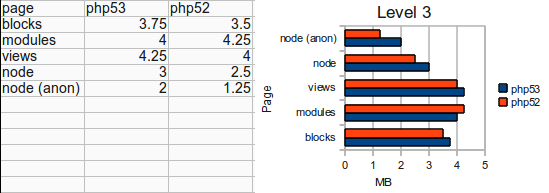
We can see that memory peaks are really bigger on php v5.3 than on php v5.2.
Test 2
Here I wanted to check general memory consumption from server point of view (opposite from memory_get_peak_usage php function). So I've used pretty basic approach - I've stressed the sites and measured how much memory apache2 process was using.
To stress I've used siege:
siege -c 1 -b -t 1m http://localhost
Results:
Debian6 (php v5.3)
Average apache2 process private memory allocation: 32.50 kb
Debian5 (php v5.2)
Average apache2 process private memory allocation: 73.60 kb
This memory allocation is combined from all apache2 processes. It showed me the thing that I've red on lots of places - php v5.3 handles memory better than php v5.2.
Test 3
To cross reference the above results, from the different approach, I've installed xdebug.
xdebug setup:
zend_extension=/usr/lib/php5/20090626+lfs/xdebug.so
xdebug.profiler_output_dir = /tmp/
xdebug.profiler_output_name = cachegrind.out.%s
xdebug.profiler_enable = 0
xdebug.profiler_enable_trigger = 1
xdebug.show_mem_delta = 1
and hacked drupal's index.php and surrounded all the code with:
xdebug_start_trace('/tmp/mytrace');
-- code --
xdebug_stop_trace('/tmp/mytrace');
Traces are done on the same basic Drupal install. I've opened front page, loged in as admin and cleared all caches.
Because there is no easy way to get how much memory used every function call, I've used a script tracefile-analyser.php (done by derickrethans.nl) that is summing up memory and time for each functions.
Below is the table list with few functions that used most of the memory:
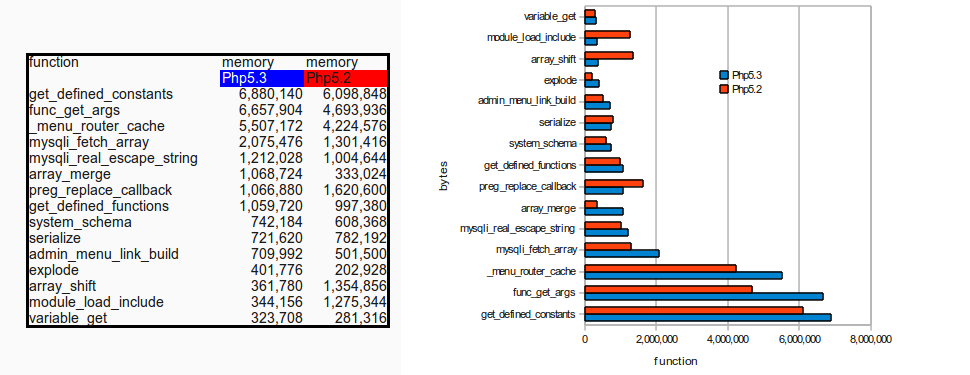
Here we can see that memory usage is similar. Some functions use more in older and some use more memory in newer version but overall it looks like there is not too much diferences. 0
I am going to do this benchmarks on another linux distro (with php5.3) to check it more. Also I have observed an speed performance in v5.3 as well, but did not compose the bench marking results yet.
In conclusion:
I am observing the expected decrease in memory consumption in PHP v5.3.
- I am observing an clear increase in PEAK memory consumption in PHP v5.3.
- My concern is in regard to considerable PEAK memory increase with PHP v5.3, which lasted only for microseconds, but caused the memory exceeding problem in the first place.
Did someone else encountered similar problems or benchmark results with php v5.2 vs php v5.3?
| Attachment | Size |
|---|---|
| Selection_018.png | 76.54 KB |

Comments
Hm, didn't the maintainer of
The only good way to measure this seems to be with building everything from source, both under the same platform. You probably have more differences that you havnt taken into account with running both Debian 5 and 6, and so on. I get a little confused when you refer to "manually installed binary packages", as the only manual process about this would be typing "apt-get \<package>".
As you have no controll over all the possible build options on the different systems, there is no good way to benchmark this. I guess you could use it as a references, obviously something one should look more into, but I would not conclude on anything based upon this.
There are many pitfalls when it comes to benchmarking, spotting them is really hard. I salute the effort, but the usability of it is more disputable!
(Edited away after further review: Hm, didn't the maintainer of Apache-packages switch to mpm_prefork from mpm_worker? I see that you havnt mentioned what kind of worker the different setups use, but might be something to look into? But all in all, a very well written and performed benchmark!)
--
Vegard
I disagree with vergardx.
I disagree with vergardx. This benchmark doesn't compare 5.2 vs. 5.3, but rather Debian 5 vs. 6. For those of us who are standardized on Debian, and are looking into a fleet-wide upgrade this research brings excellent news.
However I would be interested to know if the results hold true when APC is also installed. Anyone concerned about memory consumption will install APC.
--
Dave Hansen-Lange
Director of Technical Strategy, Advomatic.com
Pronouns: he/him/his
This particular benchmark
This particular benchmark only looks into PHP memory consumption, but on different platforms, while at the same time it does not take into account slight configurable changes, like what kind of worker Apache2 is using, which is very dependant on what kind of system you are running. A benchmark of PHP 5.2 and 5.3 would be interesting only if you could show that version X is fast/better/more efficient running on system Y, in worst case you could end up seeing that running the old version of PHP would be a better choice, not that I think this is very likely. Only then would it be very interesting for people looking into upgrading their standardized setups, as you then could hold back that particular upgrade. If you're only looking at the big picture, you probably would not see changes like that as the overall gain would surpass the loss from one /bad upgrade/, but the overall gain /could/ be better.
--
Vegard
Also you should check that
Also you should check that both versions have the same settings for Apache min/max/spare clients (and maybe even do something drastic like set it to two clients max), and the same enabled Apache modules, and the same enabled PHP modules. You might want to use the same config files just to be sure. Otherwise there may be a different number of clients that is throwing it off your average, and the enabled Apache/PHP modules plays largely into PHP and Apache memory usage.
--
Dave Hansen-Lange
Director of Technical Strategy, Advomatic.com
Pronouns: he/him/his
vergadix and dailin thank you
vergadix and dailin thank you for you feedback.
Sorry lack on clarity on "manually installed binary packages". What I meant by saying this, is that I started with clean netinstall with only basic packages and then installed binary needed packages via aptitude (not by choosing install package "LAMP" during install).
Yes, I am comparing Debian6 vs. Debian5 but only place where I can see more memory consumed i from PHP (in short peaks). That is why I think it is something about PHP.
Apche on both servers is using mpm_prefork_module with the same settings:
<IfModule mpm_prefork_module>StartServers 5
MinSpareServers 5
MaxSpareServers 10
MaxClients 150
MaxRequestsPerChild 0
</IfModule>
Here is the list of modules on both
core_module (static)log_config_module (static)
logio_module (static)
mpm_prefork_module (static)
http_module (static)
so_module (static)
alias_module (shared)
auth_basic_module (shared)
authn_file_module (shared)
authz_default_module (shared)
authz_groupfile_module (shared)
authz_host_module (shared)
authz_user_module (shared)
autoindex_module (shared)
cgi_module (shared)
deflate_module (shared)
dir_module (shared)
env_module (shared)
mime_module (shared)
negotiation_module (shared)
php5_module (shared)
rewrite_module (shared)
setenvif_module (shared)
status_module (shared)
On Debian6 I have one more:
reqtimeout_module (shared)and on Debian5 these two more:
perl_module (shared)python_module (shared)
I've compared configuration files on both apache and php and apache.conf files are the same (if we don't compare help inside files, or some paths).
php5.ini are some differences (php5.3 vs php5.2):
I've tried with the same settings but behavior was the same and that is why I didn't include that in first post.
I've also compared php5 modules before and here are the differences:
Only in php5.3 (Debian6):
Coreereg
fileinfo
mhash
Phar
suhosin
Only in php5.2 (Debian5):
imapmime_magic
ncurses
Only one that I think can make a differnce is suhosin, but I've also tried to disable it but results were the same (that's why I didn't include that also on first post).
The idea behind this is to see if somewhat default install of LAMP on Debian6 and default install on Debian5 have some important differences, that can be maybe fixed in configuration.
I'll experiment without APC module first and add it later (I have some other ideas for tests...). I'll post the results with APC also.
Thanks for your suggestion here.
Several of those config
Several of those config differences could contribute to the different results that you're seeing. I think the only way to get a more reliable result would be to have the config for Apache and PHP exactly the same.
--
Dave Hansen-Lange
Director of Technical Strategy, Advomatic.com
Pronouns: he/him/his
Thanks for putting in the
Thanks for putting in the time on this. Interesting data.
Are they 32-bit or 64-bit installs?
32-bit
32-bit
Debian6 - 2.6.32-5-686
Debian5 - 2.6.26-2-686
Forgot to put that. Thanks
Thank you for posting this,
Thank you for posting this, mihha! This came across my radar recently and I just read through it and all the comments. I don't think there's enough data yet to form a solid opinion about this Debian 5 w/PHP 5.2 vs. Debian 6 w/PHP 5.3 comparison, but I do look forward to hearing more.