
Good Morning Berkeley Drupalers,
I've got a site that has up and disappeared the majority of my core administrative access.
Site & Setup:
Site: http://hive.alamedabees.org
I'm running D6.20
Hosted by Dreamhost
w/ default DH host settings for DB & PHP etc.
don't have a full list of modules installed :(
Backstory:
I tried building some pannel pages last week, reverted one of my views to default and received an access error, as if the site had logged me off as admin, disallowing me access to a lot of the site. However, I was able to access the 'site performance' page and reset the site cache, which helped get me back in and working. Several hours later and immediately after completing my panel page the site 'locked me out' under it's current conditions.
Symptoms:
My administrative sidebar menu displays the proper hierarchy, however the page menu displays only the top sub-menu item, the top sub-menu + added modules page, or nothing at all. In all, the site is not down, it's just lost all capability to be dynamic.
Some Examples:
Just the top sub-menu item:
- Content Management > Comments
- Site Building > Blocks
Sub-menu + modules:
- Site Configuration > Actions, Blog API, Skinner
- User Management > Access Rules, User Selectable Rules
Nothing at all:
- OG > "You Do Not Have Any Administrative Items"
- Messaging & Notifications > "You Do Not Have Any Administrative Items"
- SMS Framework > "You Do Not Have Any Administrative Items"
Oddly enough my create content menu only shows three content types. Each have been disabled as content.
- Create Content > Forum Topic, Book Page, Story
All I can think of is something destroyed my DB, but I am not sure how to confirm this, fix it, or where to start poking for answers. I appreciate any suggestions or postulations. Let me know if I've been incomplete with my story and I'll try to fill in.
Thanks for looking,
John
| Attachment | Size |
|---|---|
| Attempted Administrative Action Screen shot.png | 76.6 KB |
Comments
Problem is Dreamhost
You describe almost exactly the same problem that continually happened to me with a site I had hosted on Dreamhost. My sense was that at times a process would hit the PHP memory limit, and then the access table got broken as you describe. I had to restore my site from a backup several times to fix it. I contacted Dreamhost support multiple times with no resolution. Thinking it was a problem when hitting memory limits, I even upgraded to their VPS service, but it continued to happen.
I never did find out what was the cause of the problem, but I finally got fed up and moved my site to HotDrupal several months ago. And I haven't seen that problem since - not to mention much better performance. I can say the same for GreenGeeks hosting. Both of those cost about the same as Dreamhost.
Hi John, Permissions are
Hi John,
Permissions are stored in "perm" column of the "permission" table.
You can check these for your user by running the following query against your live database (i'm assuming here that your username is "admin") .
Run the same query against a "good" backup of your database (you do have backups, right?) and compare the output.
This should answer the question on whether your user role permissions got wiped out/reset or not.
Hope this helps. Good luck!
- Stefan
Sadly, No Backups *DOH!*
Ran the query on my current DB. Results showed my superuser still had all the permissions.
Would running update.php refresh my DB functionality?
I doubt the problem is Dreamhost, exactly
I've been running several drupal sites on Dreamhost shared hosting for some time, and have never experienced problems. You can up your memory limit without moving to a VPS or a different hosting company, so it's something to try.
Are you logged in as user 1? User 1 is supposed to pass all permission checks by default. Something else to try...
There is a bug in 6.20 regarding variable settings. Though not directly related to permissions, there could be indirect consequences of ambiguous values.
Have you performed all database updates for any core / contrib upgrades?
If you have shell access and drush installed, try "drush cc all" (clear the caches).
Also try installing the devel module and going to http://hive.alamedabees.org/devel/menu/reset. On a normal site, you can install and enable modules via drush.
Sadly, I neither have drush
Sadly, I neither have drush installed (it doesn't look to be available for D6) nor access to my modules menu. Again, all menus and nodes and pages within site building or configuration etc are inaccessible. I'm simply pointed back to the root menu.
Perhaps I can clear the cash by other means?
You need to restore
Even more sadly, I don't believe clearing the cache would resolve the problem anyway - at least that was my experience. The only way to get back admin functionality was to do a restore from backup. I hope you have a recent one available. And be warned, it's very possible that it will happen again - at least from my experience - so once you get back in, make sure you are backing up regularly. I use the Backup & Migrate module. Dreamhost may be able to restore your database back to the day before everything broke - not sure about that, though.
Michelle
Drush works with D6. I use
Drush works with D6. I use it daily.
Is this a non-commercial organization? If so, I could possibly install it for you this weekend.
You could always migrate to another service, it just depends on how much you're invested in DH at this time.
We are the Alameda County
We are the Alameda County Beekeepers Association, closest we get to commercial operations are long discussions about overpriced local honey at our meetings. :)
At first glance, I didn't see it on the drush module site, but I wasn't thorough. From what I read, Drush opens the site up command line operations allowing us to rebuild permissions, etc. And this is useful only if my DB is not fatally corrupted - is this correct?
drush is greatly useful for a
drush is greatly useful for a site administrator / developer for many reasons (in my experience).
In your specific case with this problem, it's a possible way around the permissions problem for installing the devel module, reinstalling other modules, or resetting other stuff that might help you pull your site up by the bootstraps (if you're still unable to access certain admin pages via the web interface) or tweak some database values that will let you back in. It's kind of like a "back door".
There are a few diagnostic tools in drush that may provide some insight, such as "debug" output. I also usually use drush instead of update.php to run database updates, because I rarely log in as User 1.
My hunch is that your database isn't corrupted beyond hope. Maybe a matter of disabling / enable Views or other modules, rebuilding permissions, and other things. But before changing anything, definitely back it up. You can do this with the
mysqldumpcommand in the shell, via the Backup / Migrate module, or some other way.I've got a backup now (using
I've got a backup now (using export in phpMyAdmin).
I have been using User1 almost elusively for site tweaks. - Perhaps my fundamental approach to site building is flawed, in that I'm still doing work on a live site.
A consideration I had not yet made was perhaps it's a caching/session ID issue. wiki.dreamhost (http://wiki.dreamhost.com/Drupal_Troubleshooting#Caching_Performance) shows that there are some issues in this regard: "Drupal also offers a patch for your .htaccess file to remove PHPSESSIDs from URLs, which counters any effort to cache pages since a cached page with a session ID will not load for another user."
I suppose I didn't include my login/logout symptom, where initiating a log out from User 1 would not end my session (I would still have the admin menu & nodes available).
Sounds like installing drush is the way to go to try and debug the site. Without it already installed and no site access to my modules, how would I go about installing it?
Drush is installed entirely
Drush is installed entirely via shell.
It's not a typical Drupal module. There are good instructions linked from the project pages.
Are there session ID's in your URLs? If not, that patch shouldn't matter. But, probably won't hurt to apply, either.
Foxhaven's comment about DB connections was helpful. I didn't know until now that mysqli doesn't support persistent database connections until PHP 5.3. I'm using Pressflow, so I can't check to see if Drupal supports persistent connections with the mysql extension rather than mysqli. If it does, you might consider looking into enabling persistent mysql connections.
I'll start into the Drush
I'll start into the Drush documentation.
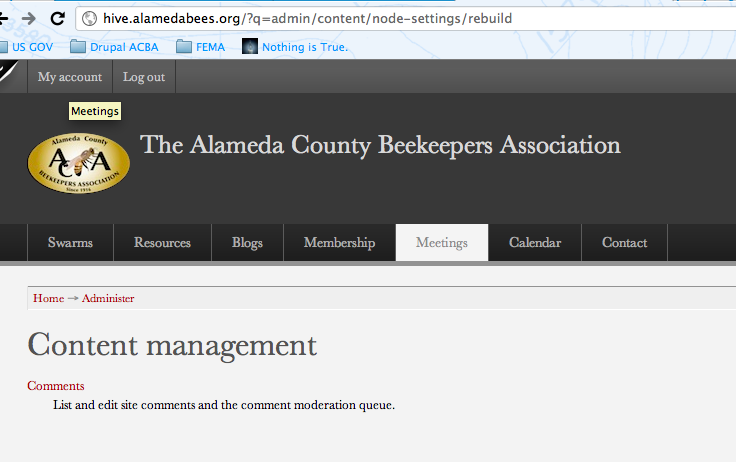
I have attached a screen shot (to the original post) of one of my administrative attempts. In this case it looks like the address was looking at my user, however there are plenty of address that are inaccessible, like add/node, which also fail.
Drush is the bees-knees!
I got Drush installed and cleared the cache. Site is working again!
I'm still quite concerned as I don't know what caused to the failure to begin with... (is it really DH? or something else..)
Thanks again for all the help!
Which PHP version?
Also, if you're running PHP 5.3, switch to 5.2.
You can do this in the Dreamhost control panel for the domain in question.
Why the downgrade from 5.3 to
Why the downgrade from 5.3 to 5.2?
PHP 5.3 has caused lots of
PHP 5.3 has caused lots of problems with Drupal and other PHP applications. Though there has been much effort to eliminate the bugs in Drupal, there could be some lingering. If you use a module that has a bug, and it occurs in a hook called by core, it could derail something in the permissions / menu access chain.
Update.php won't restore your database. It will make sure that any changes required by updates have been applied to the DB. You should make a backup of the DB before running it.
But if the other posters are correct and this is a DH throttling issue, then some attention to caching, css / js aggregation, and the like would be in order. These are changes that would be beneficial even on a so-called "Drupal optimized" hosting service, so there's little lost by looking into it (other than the lag time for seeing the possible resolution of your problem).
I googled Dreamhost throttling, and it doesn't sound like something that would kick in for a small site. Is your traffic huge?
Thanks for the quick
Thanks for the quick education.
I just checked, we're running PHP 5.2 FastCGI with an option to downgrade to PHP 5.2 CGI
Our site is tiny. I've got less than 30 users - and under 30 page views a day.
They don't throttle based on...
... traffic. They throttle based on:
In essence, they "penalize" based on the ratio of connections to queries. So if you have a particularly intensive view, you might hit something. That has been my experience, anyway.
Charlie Hayward
Foxhaven Designs
East Bay Professional Experience Network
The only viable response to pain is humor
I've edited views & pages all
I've edited views & pages all day long on my DH sites, and done lots of simultaneous page loads with multiple-query pages.
Maybe their site is being hit by some external sources like search engines, but if not I can't see how just editing a view combined with a userbase of 30 would cause excessive connection problems. Maybe I'm missing part of the picture, though.
Or possibly, wait timeout problems.
Dreamhost does have issues
We have hosted our East Bay PEN site on Dreamhost for about ten months. In addition I have helped set up about a dozen sites on DH. The simpler sites don't have too many problems, though I set up a custom php.ini first thing, by default, with a min of 128mb php memory stack.
With our large and quite complicated EB PEN site, however, at some point after installing OG (and, incidently, after DH went to "FastCGI") we began having serious issues with "Page not found" and "Internal server error"... One of our members traced this down to the MySQL connection being lost, often in the middle of saving a view, enabling a module or running Backup & Migrate. How many corrupt tables have we dealt with since then?! Sheesh.
I also have a screenshot from chrome showing that our "unthrottled" (according to DH) site was "Error 139 (net::ERR_TEMPORARILY_THROTTLED)" during one of the most frustrating sessions I've known (rebuilding permissions)... submit (error) submit (page not found) submit (error) [repeat for 4 hours!].
I have moved my personal & professional websites to Green Geeks and, yesterday, the EB PEN site. So far, things look really good :-)
To get back to John's problem... We had to rebuild permissions 2 or 3 times a week with DH. Our members would lose menus, forum topics would vanish, admin would lose content types... sound familiar? Sometimes my only option was to log in as superuser (which I hate :-P) and rebuild perms. Note: our site backsup daily, weekly & monthly. I could have just restored, but I really didn't trust restores that are interrupted 15 times.
Don't know if any of that helps, but I hope it at least gives you a direction to look.
Michelle: My experience with DH support is similar. They insisted every problem was with our site. It's not. Drupal does not break MySQL session connections every 2nd or third page load. Personally, I think their "FastCGI" doesn't play nice with their (refuse to admit) throttling.
-Charlie
Charlie Hayward
Foxhaven Designs
East Bay Professional Experience Network
The only viable response to pain is humor
As it turns out I'm on PHP
As it turns out I'm on PHP 5.2 by default, and it looks like I can disable the DH FastCGI with my domain and drop it to just plain ole vanilla CGI. Did you ever try this before leaving DH?
I did, along with a great many other things
As I said, I didn't have a problem with the simpler sites. But once I reached a certain level of complexity (and OG was the straw, I think) I've had problems since.
I did not have problems with FastCGI on the simpler sites, which is why I think it was an interaction between the throttling software and FastCGI. Setting CGI back to vanilla didn't change things, unfortunately.
I.e. it opens a session for the CGI scripts (which are set up when you install a custom php.ini)... but Drupal already handles session control, so why do I have (thanks, Ron):
Note: There might be fifty of those pairs in a one second block that I can match up with an intensive db page (saving a view, rebuild permissions).
Charlie Hayward
Foxhaven Designs
East Bay Professional Experience Network
The only viable response to pain is humor
Interesting. The more I read
Interesting.
The more I read about it, the more it seems that there isn't enough traffic through the site to warrant CGI faiure. The only load on the site is from ME acting as User 1 and doing site edits, writing posts, uploading files, and building panels and views. I've experienced a multitude of hang ups during site use, but they are the typical kind that I experience on my other DH sites using gallery2 or wordpress and nothing ever of this caliber. Unless it's related to the development of my view and pages..
I really don't think it's the traffic
...and I really do think it's something with DH. When I mentioned the error log file and matching it to intensive page loads, I (admin, but not superuser) was the only one online, or just one of two or three. And usually the errors occurred during Views editing, module enabling, permission rebuilding or status reports... or clearing the cache, come to think of it.
We moved EB PEN to GreenGeeks on Tuesday and honestly haven't seen a single instance of the problems that plagued us for the last 6 months. I still have sites on DH and they're working fine; one with fairly heavy traffic (well... heavy for little non-profits :-P ).
You mentioned OG. And that you don't have a full list of modules enabled yet. Hmmm... I'm pretty sure we were first experimenting with OG at the time FastCGI was implemented on DH. Maybe something there. I disabled OG (and pretty much rebuilt the site) in Dec trying to track down our problems.
More grist for the mill...
Charlie Hayward
Foxhaven Designs
East Bay Professional Experience Network
The only viable response to pain is humor
Backups
How is your site setup for regular backups? I'd like to get something similar in position.
The best I've got is a FTP download and a phpMyAdmin export - both of which are quite time consuming and likely to be sporadicly scheduled.
Backup & Migrate module
You can run it via cron, and set various pre-defined backup types that you can run on different cron frequencies (such as, have one that backs up every day, and only keeps 7 copies, one that goes every week, and only keeps 5 copies, one that goes every month, and only keeps 12 copies...)
That way you don't have a single daily backup that accumulates forever, filling up your disk.
The module will also FTP or email the backups. Those don't strike me as secure options, though. For off-site copies I'd rather have an rsync running as a cron on another computer that pulls the backups off the main server periodically.
Me 2
That is exactly how I have our sites set up. Additionally, I make each class of backup drop into it's own directory (Daily, Weekly, Monthly - on the server) to make it easier to find the backup I want at the granularity I want. B&M emails me notification whether the backup succeeds or fails so I know what's happening.
A reminder, this is a db backup, not a code or content (attachments, images) backup. Once a week I mirror all the backups, code and content (separately) to my archive drive (not the server), so I have that as well (with less granularity). Yes, I backup the backups... and if that sounds paranoid to you... Bless you! I hope you never experience the pain that brought me to this state ;-)
Another note: I really like the Supercron module. It allows me to rearrange the order cron_hooks are called, to collect stats on how long (last & average) the module takes and allows me to invoke individual modules (like search or views_mail) when I'm trying to troubleshoot something. You can also enable multithreading for individual modules. If one of your modules is choking on something (like search :-P) and the cron hangs on that module, multithreading will run that task in parallel so the rest of the tasks can complete. I'm just bummed it's taking so long to come to D7 :-(
Kentr, I never thought of running rsync to grab my backups... been doing manually as one of my weekly chores :-P Cool! :-)
Charlie Hayward
Foxhaven Designs
East Bay Professional Experience Network
The only viable response to pain is humor
Site is backed up now.. for
Site is backed up now.. for sure. Still learning the ins and outs of cron, but Backup and Migrate helped me at least get a copy of the DB in my pocket. I'll have a look at supercron and am going to have to bone up on my cron coding.
I certainly have read a great deal about perpetual frustration with DH and Drupal. However, I rarely read about the solution, only that moving fixed everything - and that poses the question: What's the problem?
If it's the PHP limit, it seems that with DH, changes can be made. http://wiki.dreamhost.com/PHP.ini
As for me, now that I've got access to my logs I'm seeing the exclusive error as trouble stemming from jquery of the flavor:
"file_get_contents(sites/all/modules/jquery_ui/jq...."
Our PHP memory limit
has been 128mb since October. It helped avoid "fatal error..out of memory" problems but made no difference with the "Page not found" & "Internal server" errors. Here's the settings we've been using:
memory_limit = 128M
upload_max_filesize = 100M
post_max_size = 100M
upload_tmp_dir = 100M

max_execution_time = 300     ; Maximum execution time of each script, in seconds
max_input_time = 300  ; Maximum amount of time each script may spend parsing request data

; Maximum time (in secondes) for connect timeout. -1 means no limit
mysql.connect_timeout = 300
John, what's the rest of the jquery error? Is something trying to load a jquery include and failing? Which include? What's trying to load it?
More questions... :-)
Charlie Hayward
Foxhaven Designs
East Bay Professional Experience Network
The only viable response to pain is humor
The full text of the
The full text of the error:
file_get_contents(sites/all/modules/jquery_ui/jquery.ui/ui/minified/ui.sortable.min.js) [function.file-get-contents]: failed to open stream: No such file or directory in /home/acba_admin/hive.alamedabees.org/includes/common.inc on line 2467.
with modifications to each js file at the '.../ui/minified/ui.______.min.js'
ui.droppable.min.js
ui.draggable.min.js
ui.core.min.js
ui.sortable.min.js
ui.datepicker.min.js
Worse yet - my bees just swarmed and I've got to chase them down.. DOH!
My first thought on that
is the famous "Step one: Is it plugged in?" :-) Or, in this case, are the files present in the jquery_ui/jquery.ui/ui/minified/ directory. Second, is your file system path correct (shouldn't matter here, but...).
After that, I'd suspect Theme developer (if you have it installed), there seems to be a conflict between DT & Jquery UI ( http://drupal.org/node/440854 )
Other ideas?
(Go ahead, catch dem Bs first :-) I'm gone for the weekend)
Charlie Hayward
Foxhaven Designs
East Bay Professional Experience Network
The only viable response to pain is humor
Solution -> Move host
Lots of "buzzing" on this thread but seems pretty clear the solution is learn backup and migrate as an ongoing best practice then use that file and fly off to a new host. Sounds like two alternates are mentioned. My experience with low cost shared hosts is HostGator which I find has quite good support but they can PHP memory to 64 on the shared accounts. Good luck
Hmmm, I think I doth protest too much!
Despite the above comments about my problems with Dreamhost, I'm really quite happy with them for my simpler sites. And their free domain & site for small non-profits can't be beat.
Our EB PEN site was rather breach-born to begin with and is certainly not typical. To begin with, its original purpose was simply as an online repository for an ancient Access database of members. And I mean ancient. The Access db was migrated with Table Wizard and then we (I) flailed around like a mad man trying to get reasonable forms and reports out of it. Right now I'm working on my first custom module to.. well, make things easier.
Anyway, our gerry-rigged setup should certainly not be taken as typical. OTOH, if my experiences can help others solve mysterious problems, I'm happy :-)
But always, always, always backup! =)
Charlie Hayward
Foxhaven Designs
East Bay Professional Experience Network
The only viable response to pain is humor
Disabled all jQuery modules
Disabled all jQuery module features: panels in place editor, date picker, views slideshow.
Updated fusion theme,
Updated modules: filefield, google_analytics, imagefield, insert.
Took site out of maintenance mode with an eye on the log.
So far the log reports users having no difficulty. A couple of page errors from what I assume to be search engines pointing to removed content.. (good to know our SEO is viable)
Feeling good and my bees are all buttoned up in their new home too.
Charlie, Kent Thanks again for all your diagnostic help. I hope the litany of versus in this feed will help someone with similar symptoms.