
Posted by jessSchn on February 15, 2013 at 1:47pm
Hi Everyone,
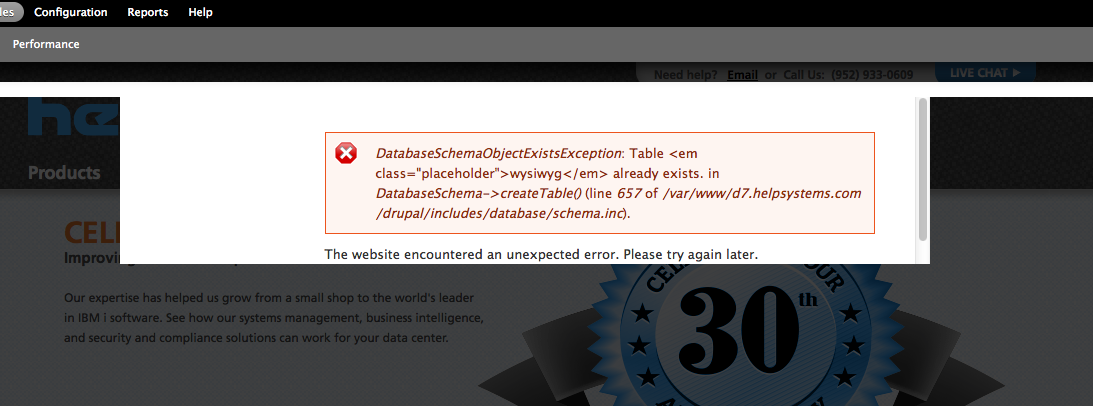
I'm finally working on Drupal 7 (Yay!). However, it seems that an issue has come up everytime I try to enable ANY module.
I did some googling on the error and the best information I found was: The problem is when you install a module remove it then turn it back on w/o removing it first
source: http://www.theofficialhandyman.com/node/78
However, I didn't find anything on how to fix this error. Do any of you have ideas? I've attached a screen shot of the error.
This Drupal 7 is a fresh install - it's not an upgrade from Drupal 6.
| Attachment | Size |
|---|---|
| Module_Enable_Error.png | 156.3 KB |

Comments
Hi jessSchn, This is not a
Hi jessSchn,
This is not a common error, in fact in some years of working with Drupal 7 I've never seen it. Once you get over this particular error, you should be able to turn modules on and off without a problem.
There are two steps to installing a module, and three steps to uninstalling it.
Install Process
You can disable and re-enable the module back and forth as many times as you want at this stage. If you decide not to use the module, you may choose to uninstall it.
Uninstall Process
It sounds as if you may skipped a step in the uninstall process. It is probably possible to recover from this error state but we would have to know exactly what you did to get there.
Hope this helps.
Another thing to try
One other thing to check on:
I know in drupal 6 (and probably drupal 7) modules can sometimes get "stuck" in the system table of the database.
If you have access to mysql via the command line on the server, you can try doing the following. This removed the module from the system entirely and allowed for a proper "enable" when I clicked the button in the UI.
First, get into your drupal tables, either by phpmyadmin, or the command line. I will be using command line examples.
Second, find the module in the system table of your DB, using the following command:
// If the module is disabledselect filename, name, status from system where status = 0;
// If the module is enabled
select filename, name, status from system where status = 1;
You should see something similar to what is below returned:
+----------------------------------------------------------------------------+-----------------+--------+| filename | name | status |
+----------------------------------------------------------------------------+-----------------+--------+
| sites/all/modules/contrib/nodewords/nodewords_basic/nodewords_basic.module | nodewords_basic | 1 |
| modules/system/system.module | system | 1 |
| modules/block/block.module | block | 1 |
| modules/color/color.module | color | 1 |
| modules/contact/contact.module | contact | 1 |
+----------------------------------------------------------------------------+-----------------+--------+
Next, you want to remove the record from the system DB for the module that you have installed (Don't worry, this won't crash your site, it simply ensures that Drupal has no memory of the module you wish to install).
Replace "nameofmodule" with your module name that you find.
The single quotes are important.
delete from system where name = 'nameofmodule';You should now be able to enable your module normally.
It's been my experience that simply using the install/uninstall feature in the frontend doesn't clear everything out of the system. This ensures that you have a clean slate to start with.
Hope it helps.