
Posted by yeusaigon on September 4, 2007 at 4:48am
Thế Hồng ơi, Drupal có Module dạng "Các tin đã đăng" hoặc "Các tin liên quan" không?
Ví dụ: Sau 1 bài viết bên dưới nó là danh sách "Các tin đã đăng" để cho website chuyên nghiệp hơn, có module nào đáp ứng được vậy không?
Mình ưu tiên cho module "Các tin đã đăng"
Module này có thích hợp không?
Similar Entries (http://drupal.org/project/similar)
A module that displays a block with the most similar nodes to the currently viewed one, based on the title and body fields.
Only supports MySQL-based sites.
Comments
tìm cái relatedviews based
tìm cái relatedviews based on taxonomy.
This module makes a filter available to any view:
Taxonomy: Term from current node
You can use this module in this type of situation: You can define a block which contains a view. The view uses the filter "Taxonomy: Term from current node", and therefore the view will contain nodes that share taxonomy terms with the current node being displayed. You could label that block "Related content".
http://drupal.org/project/relatedviews
http://www.truyentranh.com
Mình sử dụng cái
Mình sử dụng cái module relatedviews [tin liên quan ] rồi, nó không có hay, nếu không muốn nói là dở. Mình khộnng là dân code nên kô tự code được, khổ ghê.
Mình cần tìm module "Các tin đã đăng" ?? Thế Hồng, help!!!!!!!!!!
Website: http://thuvientre.uni.cc
Email: vietnam.tri [at] gmail.com
Trí, Việt Nam.
Website: http://thuvientre.uni.cc
Email: vietnam.tri [at] gmail.com
Trí, Việt Nam.
(Group đâu chỉ có
(Group đâu chỉ có TH)
Module Views rất mạnh, có thể đáp ứng được rất nhiều nhu cầu khác nhau. Cứ nói đến liệt kê các node, thì trước tiên cứ nghĩ tới Views. Không sử dụng được Views là một điều rất đáng tiếc, khi đã sử dụng Drupal. Như vậy đối với yêu cầu của YSG,
embeded viewsđể bỏ "các tin liên quan" vào nội dung node, na ná như trang nàyMình sẽ cố gắng sử
Mình sẽ cố gắng sử dụng lại View và chờ TH cho ý kiến!
Website: http://thuvientre.uni.cc
Email: vietnam.tri [at] gmail.com
Trí, Việt Nam.
Website: http://thuvientre.uni.cc
Email: vietnam.tri [at] gmail.com
Trí, Việt Nam.
View khó sử dụng cực
View khó sử dụng cực kỳ. Thôi ta đành bó tay!
Website: http://thuvientre.uni.cc
Email: vietnam.tri [at] gmail.com
Trí, Việt Nam.
Website: http://thuvientre.uni.cc
Email: vietnam.tri [at] gmail.com
Trí, Việt Nam.
View và Taxonomy
YeuSaigon,
"Các tin đã đăng" hoặc "Các tin liên quan"
Cái này không khó đâu, website http://sunflowermission.org dùng cái này mà. Bạn phải dùng taxonomy để kết hợp tất cả bài liên hệ với nhau lại rồi sau đó thì làm view cho những taxonomy đó (hình như những bài đăng trong web của bạn không có dùng taxonomy thì phải). Tại tôi không có cùng taxonomy của bạn nên không thể export 1 view của tôi cho bạn xem được. Xin lôi nha.
bạn xem cái này có đc không?
trang của em chia thành rất nhiều loại content (tin nội bộ, tin tổng hợp, tin hoạt dộng....)
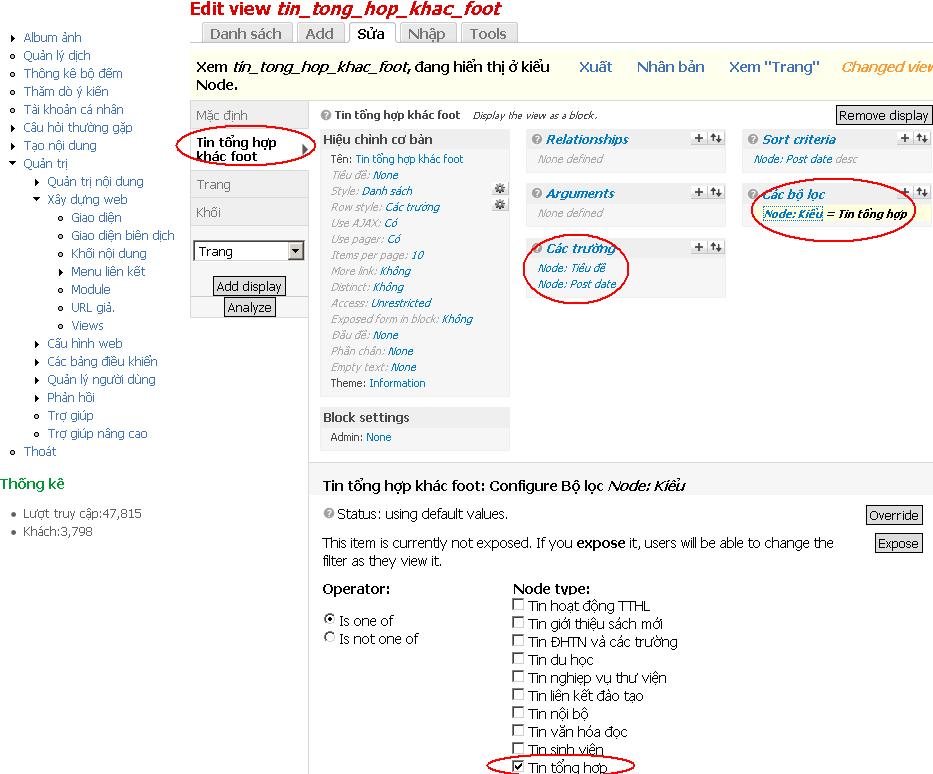
Em ví dụ là em đang làm cái tin liên quan cho mục "tin tổng hợp":
+em dùng view tạo một view mới là "tin_tong_hop_khac_foot", add một block (khối) tên là "tin tổng hợp khác foot" và lọc chỉ lấy cái content type là "tin tổng hợp khác" au đó save lại
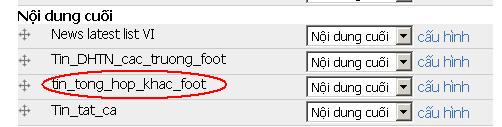
Sau đó bác vào block bác để cái khối "tin_tong_hop_khac_foot" ở đâu thì tùy (em để ở nội dung cuối)
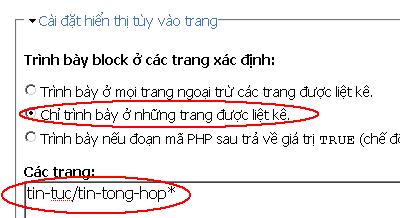
bác bấm vào config chỉnh phần cài đặt hiển thị như em (nhớ thay đường dẫn của bác vào nhé, và sau đó nội dung thuộc phần tin tức này bắt buộc phải nhập đường dẫn bằng tay và phải giống như đường dẫn bác để ở trên (của em tất cả các phần tin tức của "tin tổng hợp" là tin-tuc/tin-tong-hop/@#@$#%%#$
Gà con...
Ông anh chỉ luôn đi,
Ông anh chỉ luôn đi, còn mail chi cho mệt. (ông anh thích bị spam ghê)
--

Good place to hire Drupal experts
Bạn nên dùng cái attachment
Bạn nên dùng cái attachment trong views cũng có thể làm đc. Tìm google các bài viết liên quan tới attachment. ví dụ như
Đây là bài viết dành cho Drupal 6 nhưng tương tự với Drupal 7
Out of the box, VIEWS in Drupal 6 offers FOUR displays; PAGE, BLOCK, FEED and ATTACHMENT. Of the four the latter is the least used and least understood. So that's exactly what we'll tackle here!
First, I'll quickly review the three that you probably know.
PAGE
User enters a PATH and the output of the VIEW is viewable at that URL.
BLOCK
A BLOCK is created when the view is saved. Going to the Blocks Admin section shows that the newly created BLOCK is disabled and needs to be assigned to a region.
FEED
Custom XML FEEDS can be created to supply users and robots with FEEDS that are tagged with specific taxonomy OR event details for events that are upconing, etc.
And here's what we did with the ATTACHMENT display.
I already had a page display created earlier which simply showed the 10 most recent blog posts and only showed specific fields.
We then selected ATTACHMENT from the Drop Down Selector of Displays and then selected CREATE DISPLAY.
At this point we made some configuration changes, most notably changing from Fields to Nodes, and from 10 to 1 with an offset of one to avoid duplicate results.
After this we had to configure the attachment settings. We observed that the POSITION setting was set to BEFORE and that the ATTACH TO setting was set to NONE. We changes the NONE to PAGE so that the ATTACHMENT display would attach to the PAGE display and appear BEFORE it.
The preview bore witness to our success BUT we visited the actual page to see it in its glory.
Enjoy the video and PLEASE give us feedback on the topics we're delivering. We've enjoyed great feedback so far and would love to hear from YOU! :-)
Y: Free.Notes
F: tuansieu
T: tuansieu
E: free.notes@yahoo.com
W: freenotes.us - drupalvn.org
P: 0936 111 039
The most gracious commenter
The most gracious commenter “nordic material” provided working instructions for performing this task using Views 3 in D7. I just went through the directions and they work perfectly. Below is a recap. Thanks again Nordic Material!
Y: Free.Notes
F: tuansieu
T: tuansieu
E: free.notes@yahoo.com
W: freenotes.us - drupalvn.org
P: 0936 111 039
Bài viết liên quan với video cho drupal 7
http://www.youtube.com/watch?v=enDKg6xwdHw
:D