
I saw ultimike demonstrate using Table Wizard and Backup and Migrate to import a .csv earthquake data into drupal, and then map it to a content type. He then went on to use mapstraction to map the earth-quake data. It was really awesome.
I am trying to import some Microsoft Access tables from a database and do a similar thing, minus the mapping.
I exported the tables as a .csv file, then managed to set a primary key. Table wizard imports all of the rows.
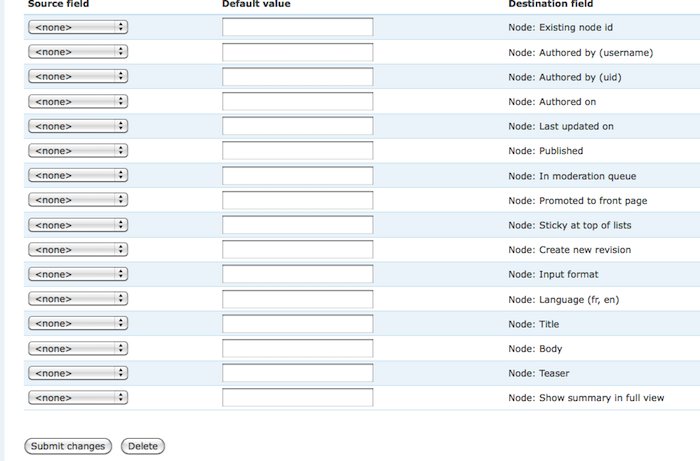
I then am using migrate to match them up with my fields. I used cck to create some custom fields that correspond to my initial entries in the database, but migrate doesn't show them and therefore I can't match them up with the fields. All I see are the stock drupal fields, none of my custom ones.
I really don't know that much about sql, so I may be missing something fundamental.
Does anyone have any tips or suggestions?
| Attachment | Size |
|---|---|
| migrate.jpg | 53.21 KB |
Comments
Need the Migrate Extras Module
You need to get the Migrate Extras module (http://drupal.org/project/migrate_extras) to use CCK fields. I just had the same issue and this was the answer. Check it out too for other field/module types it supports.
JCL
Awesome! That did it! Thanks
Awesome! That did it! Thanks for the help.