
Posted by sagarun on August 23, 2010 at 10:37am
I have a CCK content type, which uses Automatic node titles. I have created a view to list a field of this cck type. The view uses "unformated" style; In preview it list the contents of the field correct.
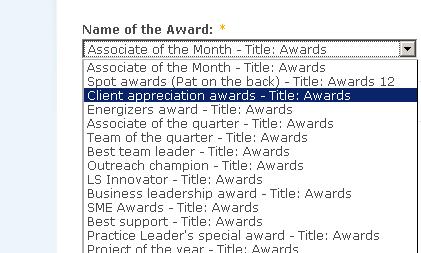
Then i used node reference in another cck content type and used this view to populate a select list. But unfortunately the populated select list includes "title" of each node along with the expected view data.
How to remove "title" being generated from a view? Please find the attached screen shot for more information.
| Attachment | Size |
|---|---|
| cckviews.jpg | 29.56 KB |
| cckviews1.jpg | 10.02 KB |
Comments
You have to clear the label
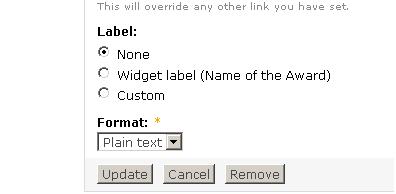
You have to clear the label for your Field Name(Name of the Award).
I have already done that.
Hi,
I have already did that. Please check the new attachment. It is not the lable of Field Name(Name of the Award). Its the title of the node that shows up in select box along with the values.
Hi sargun
i think in the settings of field in the lable section you have put title that's y it is appearing there
remove the title lable from the fields section then update. you view will work correctly
Give me the Screen Shot of
Give me the Screen Shot of the entire view.
node title field
in to fields:
choose node title: configuration window will open at bottom then remove the label and update it
i think it work
or check your content field & manage field for title
That works!
Thank you. It solved the problem. Added node field to the view and excluded it from the display.
Good !
Good !
Good One
Good One
Error Message with "Exclude from display"
Hey Everyone,
I'm really excited to have found this post because I'm encountering the same problem that started this thread.
I have a View that displays a list of counties, unformatted, that I can easily get node referenced through CCK as a select list. Unfortunately, this list not only includes each node from the View but it also appends the title of that node. For example, the county node of "Addison" from the View appears like this in the select list, "Addison - Title: Addison". I've tried to check the option for "Exclude from display" for the specific field under Views, as the above posts have suggested, however I get this error message:
"Display Counties uses fields but there are none defined for it or all are excluded."
I understand the error, since it's excluding everything from the display, so I must not be fully understanding what you all were referencing above. Any help would be GREATLY APPRECIATED!
Thanks in advance.
How to remove "title" being generated from a view
from the image cckviews1.jpg
3rd radio button
select custom and you can customized what ever you need, if you need to alter instaed of title or remove that too
I finally get it...
After reading and re-reading these posts, I finally got it! :)
For anyone else that has this same problem, here's how to fix it:
Silly me, makes sense! :)