
I'm learning Panels and come across a display problem that I don't know how to fix. Can anyone advise?
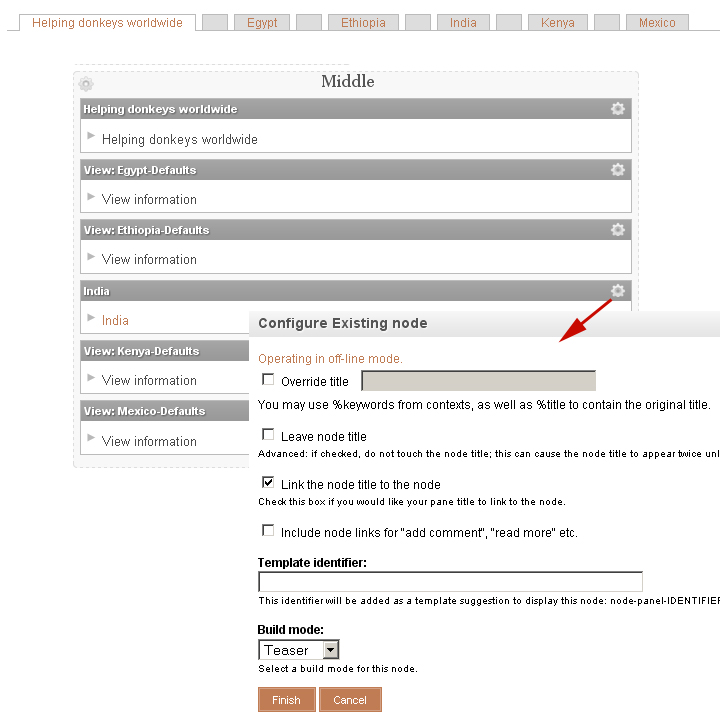
I've managed to set up a set of horizontal tabs, but rather than them open in place within the panel, I want to link the title displayed in the tab to the actual node so that the page is opened in full.
I clicked on a cog and selected "Link the node title to the node" and yes it works.
However, what I now get is a blank tab in between each of the 6 tabs I want.
Anyone have any ideas?
I am really novice at Panels at the moment, so would really like a bit of help in understanding why this is happening. If I remove the "Link the node title to the node", the blank tabs go away.
See screenshot of what is being displayed and what settings I've got.
Many thanks
Jenifer
| Attachment | Size |
|---|---|
| screenshot.jpg | 186.55 KB |
Comments
Probably wrong approach
The tabs that you are trying to use are (if I'm not misunderstanding you) what is called local tasks internally in Drupal.
These have a quite particular use, and you will have a lot of trouble if you want to use them as ordinary links.
I would instead suggest that you create a view or just a menu with the links that you want to use, and then style them to look like horizontal tabs. (There are several thems available which implement tab-like styles for the primary links, for example.)
Correct me if I'm completely misunderstanding what you're trying to do here.
Good luck and don't give up the fight!
//Johan Falk, NodeOne, Sweden
Horizontal tabs
Many thanks Johan for your advice on this... will give it a go!