
Hello all,
DISCLAIMER: I apologize in advance if this is an inappropriate venue to ask for help. I will redirect my inquiry if necessary.
I am a new settler in Western NY (Buffalo), a new member of this group, and a Drupal newbie in general. I have been looking around for some help on the following and have been unsuccessful. Would anyone have some suggestions for me? I would really appreciate any guidance!
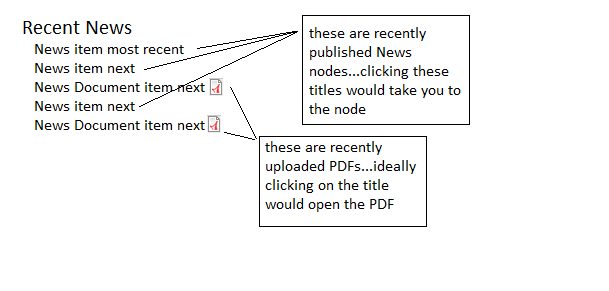
I need to create a view that lists the most recent News items. New items can be either created pages or uploaded PDF press releases. Ideally, I would have a view that lists the title of the news item, and that title would either link to the News item node, or directly to the uploaded PDF file.
I'm not really sure how to go about doing this. I've been experimenting with creating two content types...one is a News content type which is just your basic node with title and body. The other is a News Document content type which basically serves as holder for an uploaded PDF. My challenge has been getting a node title to link directly to an attached PDF, but only if the content type is News Document. If the content type is News, then the node title should link to the node.
I've attached a graphic to illustrate my dilemma.
Thanks for any help. I am really frustrated by this!
Cheers,
Tom
| Attachment | Size |
|---|---|
| recent-news-view.png | 13.09 KB |
Comments
this may help some
you should be using filefield http://drupal.org/project/filefield to upload and manage files. Not the default/ core upload module. Filefield is way more versatile.
With it in views - as a solution-
1) you should Output the filefield as a link (url as plain text) to the file and then exclude it from display. 2) Make sure that you also have the hide if empty option on the field field selected
3) You may only select tokens of fields that precede the current field - so move the filefield above the node title field.
4)Then rewrite the output of the node:title "output of the field" to
<a href="[url]">[title]</a>"where [url] is whatever the token for your filefield is.
Keep node:title linked to node ON/ checked
This should work.
A neat pdf module which you may find of interest - pdf to imagefield converts pdfs into images http://drupal.org/project/pdf_to_imagefield
Freedom Isn't Free
almost got it!
Hey Austin, thanks for the tips! I almost got this view to function correctly.
So the titles for News Document content types are correctly linked to the filefield file. The problem is that, for some reason, News content types are not linking to their nodes, even though I have the "Link this field to its node" box checked. These titles just link to the front page.
Just so I am clear: The token for my filefield is the one listed in "Replacement patterns," correct?
So, I've rewritten the the output of the node:title field to
<a href="[field_news_doc_fid]">[title]</a>Any idea why the title isn't linking to the node for the News content type?
You rock, thanks for the help on this. Very much appreciated, wish there was a way for a lowly noob to repay ya!
Sorry about that. You may
Sorry about that. You may need to use some php here then. Saying basically
if "[field_news_doc_fid]" is not empty/true then print "[field_news_doc_fid]" , but if it is empty/false then print "http://www.yoursite.com/node/[Nid]". You need to add the Node: Nid as a new field & then exclude it from display. I do not know any php or else i would give you the code.I actually need this code as well for this site where i either want to print a link field or if that is empty print a link to the node. So if anyone else could contribute the php or a different solution that would be great. Thanks
Freedom Isn't Free
preprocess it
Here are my fields in replicating this:
Node: Type Type
Node: Nid Nid
Content: Document Generic files
Node: Title Title
The first three are excluded from display. None of the fields have replacement text, links, or are linked to a node from within Views UI. Very, very stock except for the Excludes as noted.
So the last step could be handled in a custom module or in the template.php of your active theme. Here's something like what you'd do in the latter case for a view named "my_news" with a display of type Page. Your content type with the doc is called "news_doc" and you're using filefield (not core Upload) like was previously mentioned. The name of that field, if you're looking to replicate this exactly, is "field_news_doc" (which is represented below by its internal name, "node_data_field_news_doc_field_news_doc_fid").
<?php
function THEMENAME_preprocess_views_view_fields__my_news__page(&$variables) {

  if ($variables['row']->node_type == 'news_doc' && !empty($variables['row']->node_data_field_news_doc_field_news_doc_fid)) {
    $filearray = field_file_load($variables['row']->node_data_field_news_doc_field_news_doc_fid);
    $variables['fields']['title']->content = l($variables['row']->node_title, $filearray['filepath']);
  }
  else {
    $variables['fields']['title']->content = l($variables['row']->node_title, 'node/' . $variables['row']->nid);
  }

}
?>
The only really tricky part is grabbing the filepath from the field_file_load() array.
This kind of thing is pretty common over in the support queues at drupal.org -- you should probably reach out there at first, since the level of support you'll get in a regional g.d.o group is directly proportionate to the level of procrastination of its members. :)
Success!
TD, fending, so much thanks! Finally figured it out.
TD just so you know...
I only got this to work after I placed the tpl.php file for the specific view I wanted to affect in my theme's directory. So, in my case, I copied the "views-view-fields.tpl.php" file (which is in \sites\all\modules\views\theme) to my theme's directory and renamed it "views-view-fields--news--page.tpl.php". Then, I modified fending's php code for my purposes and placed it in my theme's "template.php."
Thanks again!
Doh! Forgot to mention that part!
Yeh, I actually named that file in my instance (and named the preprocessor after it) -- that's an important part!! Another thing to note is that when you add theme files like that, you sometimes need to go into Views UI and use the "Rescan template files" button under Theme Information. Wasted a lot of time on that one before.
Glad it's working!
Here is the Denver library link I mentioned at the meetup. . . .
http://drupal.org/node/903926
Hopefully this will help you with your task, Tommy.
-John