
Posted by adrian on May 20, 2009 at 4:28pm
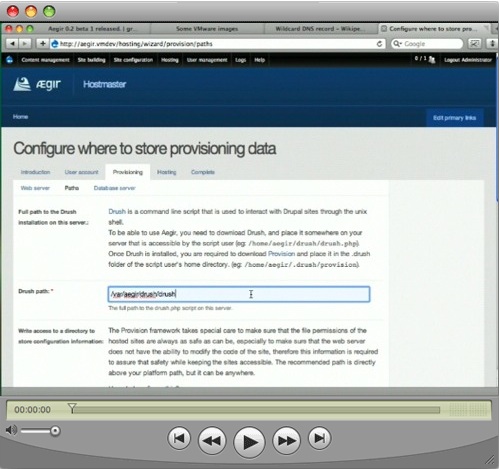
Just to give this some more visibility, I have made a very thorough screencast showing how to install the newest release.
| Attachment | Size |
|---|---|
| Picture 14.jpg | 74.75 KB |
Just to give this some more visibility, I have made a very thorough screencast showing how to install the newest release.
| Attachment | Size |
|---|---|
| Picture 14.jpg | 74.75 KB |

Comments
Link and transrcipt
Link: http://www.developmentseed.org/blog/2009/may/20/aegir-scratch-installing...
Copied the command transcript here for the link and typing challenged.
Installing required packages
(
# basic server maintenance
sudo apt-get update;
sudo apt-get upgrade;
# Specific to this environment
sudo apt-get install openssh-server;
sudo apt-get install sendmail;
# Required components
sudo apt-get install wget cvs;
sudo apt-get install mysql-server mysql-client;
sudo apt-get install apache2;
sudo apt-get install php5 php5-cli php5-mysql;
# Only needed if you are not using a real domain
sudo apt-get install bind9;
)
Configuring bind
sudo vim /etc/bind/named.conf.local &&
sudo vim /etc/bind/db.vmdev &&
sudo /etc/init.d/bind9 restart
sudo vim /etc/resolv.conf &&
sudo vim /etc/dhcp3/dhclient.conf &&
sudo dhclient
ping random.vmdev
Resulting files :
named.conf.local
db.vmdev
dhclient.conf
resolv.conf
Creating Aegir user
sudo adduser aegir --home /var/aegir &&
su - aegir
Downloading Aegir
(
export CVSROOT=:pserver:anonymous:anonymous@cvs.drupal.org:/cvs/drupal-contrib
cvs login
# Download Drush
cvs -z6 co -d drush -rDRUPAL-6--2-0-RC1 contributions/modules/drush
# Download provision
mkdir ~/.drush
cvs -z6 co -d .drush/provision -rDRUPAL-6--0-2-RC1 contributions/modules/provision
# Download hostmaster install profile
cvs -z6 co -d hostmaster -rDRUPAL-5--0-2-RC1 contributions/profiles/hostmaster
mkdir hostmaster/modules
mkdir hostmaster/themes
# Download hosting front end
cvs -z6 co -d hostmaster/modules/hosting -rDRUPAL-5--0-2-RC1 contributions/modules/hosting
# Download optional components eldir and admin_menu
cvs -z6 co -d hostmaster/themes/eldir -rDRUPAL-5--0-2-RC1 contributions/themes/eldir
~/drush/drush.php dl admin_menu-5.x-2.8 --destination=hostmaster/modules
)
Configuring Apache - Creating virtual host
(
mkdir -p ~/config/vhost.d
cp hostmaster/apache2.conf.txt ~/config/vhost.d/aegir.vmdev
vim ~/config/vhost.d/aegir.vmdev
)
Resulting files :
aegir.vmdev
Downloading Drupal
(
drush/drush.php dl drupal-5.18
mv drupal-5.18 drupal-5.x
mv hostmaster drupal-5.x/profiles/
)
Configuring Apache - Required modules and Include directive
logout
(
sudo a2enmod php5
sudo a2enmod rewrite
sudo vim /etc/apache2/httpd.conf
sudo /etc/init.d/apache2 restart
)
resulting files :
httpd.conf
Configuring MySQL - Creating hostmaster database and account
(
mysqladmin -uroot -ppass create hostmaster
echo "GRANT ALL ON hostmaster.* TO 'hostmaster'@'localhost' IDENTIFIED BY 'password'" |
mysql -uroot -ppass hostmaster
)
Configuring PHP - Setting the memory limit
(
sudo vim /etc/php5/cli/php.ini
sudo vim /etc/php5/apache2/php.ini
sudo /etc/init.d/apache2 restart
)
Change permissions of settings.php file
sudo chmod 777 /var/aegir/drupal-5.x/sites/default/settings.php
Add user to www-data group
sudo adduser aegir www-data
Configuring sudo - Give Aegir user permission to restart apache
sudo visudo
Added line :
aegir ALL=NOPASSWD: /usr/sbin/apache2ctl
Configuring MySQL - Add super user account
mysql -uroot -ppass mysql;
Ran command :
GRANT ALL PRIVILEGES ON . TO 'aegir'@'localhost' IDENTIFIED BY 'password' WITH GRANT OPTION;
Hosting setup
su - aegir
cd /var/aegir/drupal-5.x
/var/aegir/drush/drush.php hosting setup
Running hosting dispatch manually
~/drush/drush.php --root=/var/aegir/drupal-5.x hosting dispatch
Downloading extra platform
~/drush/drush.php dl drupal-6.12
Thanks to the wonderful Jonathan Coulton for the (cc licensed) intro music.