
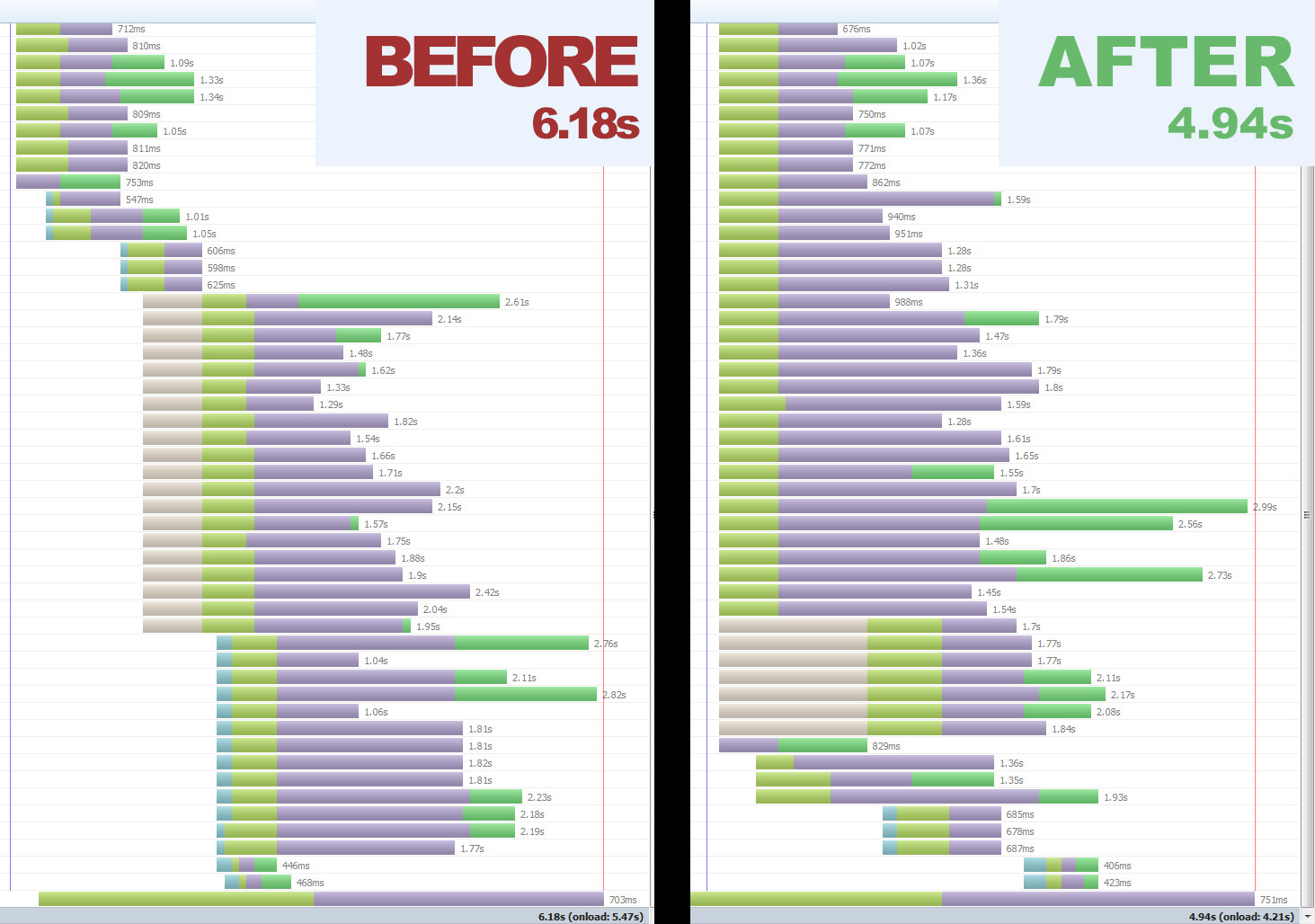
ATTACHED: comparison of download waterfall before and after applying these hacks to my page.
Hi Team,
I wanted to share with you some techniques I've discovered over the last couple of days that seem to have a noticeable impact on download times. These are especially applicable to pages with large CSS files on first load, as once things get cached it doesn't make much difference.
Each of these techniques can be used singularly, or together for maximum impact. Notice I used the word "hack" in the title - some of this is hardly semantic, and definitely not best practice!
However, if you have a slow loading page and are looking for some different ways to speed things up, please read on.
THE PROBLEM: My main issue was the download of IMG files being 'blocked' by CSS, so that images wouldn't even start downloading until all the CSS has downloaded. So I set out on a quest to alleviate this and here's what I found/tried in the order of discovery:
1. Trigger the "DOMContentLoaded" event as soon as possible. The theory being that image downloads won't begin until this event occurs. I'm not sure if this is true or not, but it seems to help.
var DOMContentLoaded_event = document.createEvent("Event")
DOMContentLoaded_event.initEvent("DOMContentLoaded", true, true)
window.document.dispatchEvent(DOMContentLoaded_event)
2. Create a "pre-load" list of required images in the HEAD of the page. Terrible, I know, but the idea is to get the browser thinking about these images ASAP. Give the images an inline style of "display:none" to hide them from display. I used image tags but you could also use a CSS class listing each image as a background URL. If you go down this route, make sure you add an empty DIV with that class as soon as you can, as the browser won't begin downloading the background images unless it hits an HTML element that requires them.
3. Load your CSS asynchronously. This is probably the most important technique, however it works best in conjunction with the other two. I have used the following script for this purpose:
https://github.com/filamentgroup/loadCSS
Works a treat.
So what kind of results can you expect? It depends (as always!). Personally, a page with reasonably heavy CSS (110kb+) and around 40 images, page load times went from an average of ~7s to an average ~5s. These figures are very rough, but give you an idea.
I opened up my browser to allow 60 concurrent connections, to simulate running a CDN (assuming I set up ~10 CDN subdomains). The effect of these techniques would be less on a site with no CDN because the limit on concurrent connections is going to block your image loading anyway, long enough for all the CSS and JS to load and parse.
That said, if you do have a CDN, or at least a site with a lot of CSS (large files, or numerous third party ones) then this could help a lot.
SUMMARY: Using the techniques above we can mitigate the blocking of image downloading by CSS files, thus shaving the total download time of all the CSS off the total download time of the page.
So if your download time for all your CSS is 0.3s, and page download time is 4.2s, you can probably expect a loading time of 3.9s after implementing these techniques. Handy!
~~~~~~~~~~~~~~~~~~~~~~~~~~~~~~~~~~~~~~~~~~
The next step forward for me is to find a way to dynamically generate a list of all images used on a page, so this can be injected into the head of the page before it's sent to the client's browser.
| Attachment | Size |
|---|---|
| comparo.jpg | 282.98 KB |
Comments
Great article
@brad.curnov, thank you for post, was very interesting to read! Let me share a couple thoughts about it.
#1
I think this is exactly the issue which should be solved with CDN.
#2
I am affraid that this will cause the issue with flushing of unstyled content when css files are not loaded yet, but browser has been already started rendering of
<body>content. This is good trick to start images loading faster, but also it could bring that annoying "unstyled jump" of a page.#3 Speaking about the solution without CDN that forces images to load faster. You are absolutely right, we can put images inside of a DOM head to preload them. You can generate a small css file (or just add styles inline) for all images which are going to be displayed on the page, and then include this file into
<head>. I'd recommend the following structure:body:after{display:none;
content: url(img01.png) url(img02.png) url(img03.png) url(img04.png);
}
That's a bit dirty trick, but plays a good game with delivery performance.
#4 Now lets talk about a hardware solution. If you're using apache for images delivery, consider using PageSpeed module for it. Really gives a nice performance boost for images delivery. Or just switch to nginx :)
#5 Make sure your images (and other static content as well) send Last-Modified, Expires, Etag and Max-Age headers with correct values. The HTTP caching is still performant.
#6 Consider switching content delivery protocol to SPDY. Once of the performance features is multiple requests per single connection, that solves your initial problem with blocking of images loading.
#7 Gzip delivered content. For example, use mod_deflate for apache or HttpGzipModule for nginx.
#8 Minimize amount of files inside of
<head>section. The less files will be mentioned there - the less requests browser will make to the server. So your<body>content will be displayed faster. There are a lot of tools that solves this issue. At least your css/js aggregation should be enabled.#9 Always a good idea to move js files which could be load with a small delay to the bottom of your
<body>. It gives the same performance boost as a trick above - the less files in<head>- the faster browser stars<body>rendering.Flashing unstyled content...
This is fixed pretty easily, I think.
On the body tag, add style="display: none;" and then in the main CSS file (the one being loaded asynchronously) simply put in a rule for the body tag, with "display: block !important;".
This hides everything until the main CSS file is downloaded. So the initial visual on the page is delayed for as long as it takes to download the main CSS file, but the payoff is you have gained a head start on EVERY image on the page.
The other option is to put a very small, basic set of styles either inline, or in a small CSS file and load those synchronously, so the flash of unstyled content, is, in fact, styled afer all :)
100% agree, great solution.
100% agree, great solution. Just mentioned here because other readers have to be aware of this problem and its quick solution.
http://www.bit-tech.net/news/
http://www.bit-tech.net/news/bits/2015/02/10/google-drops-spdy/1
Ex Uno Plures
http://elmsln.org/
http://btopro.com/
http://drupal.psu.edu/
Glad you liked it!
Thanks for your points. I've never heard of SPDY before, I will definitely look into that!.
In this particular case I'm running my site on Pantheon, so it's already on nginx, which is very nice. I'm really looking forward to see the performance once I implement all or most of the available optimizations, including setting the expire headers etc like you mention.
One thing:
Almost - in the case of CSS I believe the blocking on the images is not due to max-connections being reached (which would be solved by using a CDN) but by the browser deciding to wait until it has ALL the CSS before downloading and rendering the images.
In Firebug when I look at the NET tab before using any of the above techniques, I see that the images start downloading only once the last CSS file is received.
If I implement everything except the asynchronous CSS loading, the images are 'blocked' as soon as the HTML is loaded, but don't start to download until after the last CSS. As soon as I implement the async CSS loading though, the images begin to download as soon as the HTML is loaded, regardless of what CSS has been downloaded. Very nice!
Almost - in the case of CSS I
Well, then I guess your browser waits untill all your
<head>with css and js files will be processed.CSS async
Checkout this project
https://www.drupal.org/project/css_delivery
Nice one. Ta!
"There's a module for that!" ;)
Can anyone suggest....
...a way or ways to test this out more accurately?
I've been testing this on my Pantheon server which is in the US. I'm in Australia (west coast) - that's a whole lot of network in between!
What I'd like to do is eliminate or mitigate network time as a factor in page load time, but still "throttle" my link to the site so it doesn't load instantly.
I'm thinking if I run a server on my home network, and test in Chrome with the speed throttled in the dev tools, this would be a good starting point? That way I can get more consistent numbers on page load times, and then really see exactly how much of a difference each technique makes.
Only one way to find out I guess, but would appreciate any feedback on potential downfalls of this testing approach.
Cheers!
I think you can create a new
I think you can create a new virtual machine and mount a folder with files through the network to that virtual machine. Then configure a network delay on the virtual machine using netem or smth similar - and here you go.
http://www.webpagetest.org/
http://www.webpagetest.org/ is one of the better ways to test the frontend.
Webpagetest.org is awesome,
Webpagetest.org is awesome, and also use this with pagespeed/yslow browser extensions to help with this. And the Net tab in firebug/Network/Timeline chrome dev tools tabs. Helps compare latency hickups and how they effect your page load.
digitalocean.com lets you
digitalocean.com lets you select region to deploy in their cloud. super cheap and per hour billing. maybe try that?
Ex Uno Plures
http://elmsln.org/
http://btopro.com/
http://drupal.psu.edu/
Awesome.
Thanks Gents!
Will report back here once I've run some tests.
BC